From ALV to List Report (Aggregation)
Do you want to switch from a report with ALV to a RAP object with a list report? What should you actually consider if you also want to use aggregations? Let's look at the comparison in detail.

Table of contents
In this article, we'll look at how we can use aggregation within our outputs and what special considerations currently apply.
Introduction
The ALV is a solid foundation for initially outputting data to the user and allowing interactions via buttons, double-clicks, and other means. Another functionality is the aggregation, summation, and processing of data and numbers. This allows for the display of grand totals, or, for example, the calculation of subtotals to check whether certain document groups balance to zero. This is particularly important in the area of financial accounting, as it is a key feature for actually working with the analysis without exporting it to Excel.
SAP GUI
Therefore, let's first look at the basics in the SAP GUI and the classic ALV, and how we can use the settings there to work with numbers. We will primarily be working with personal data.
Define
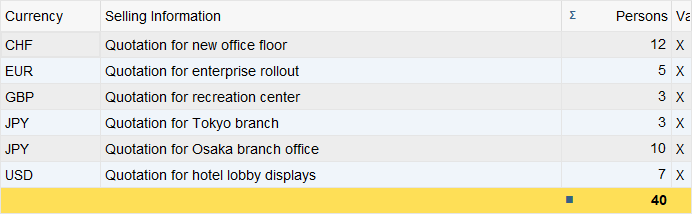
By right-clicking on a column, we can activate the summation. It is important that this is a number column, i.e., either currencies or quantities are displayed, for example. Or simply integers to display numbers. We cannot activate aggregation on columns that, for example, only contain text output.
Subtotals
Another special feature here is subtotals. This allows us to further aggregate the existing totals based on specific attributes, thus creating subtotals. In this case, these are the light yellow rows that are generated. With these, we can then decide whether to collapse them and hide the additional information, the sales information, or whether to expand the information to also see the various documents and information in between.

Fiori
Let's now look at the same feature in Fiori Elements, how we can create it, and what limitations currently exist.
Limitation
One limitation at the moment is that aggregation in the output tables does not work out of the box, but must first be activated in a current release. The classic Responsive Table, which is normally used, is converted into an Analytical Table to support aggregation functions. This ultimately means that the table component in the template is changed. To activate the feature, we need to enable the aggregation annotation in the Core Data Service and annotate the columns for which we want to allow aggregation accordingly. In this case, we want to activate aggregation for summing by person.
@OData.applySupportedForAggregation: #FULL
define root view entity ZBS_C_DemoListReport
  provider contract transactional_query
  as projection on ZBS_R_DemoListReport
  association [1..1] to ZBS_R_DemoListReport as _BaseEntity on $projection.KeyValue = _BaseEntity.KeyValue
{
      // ...
      @Aggregation.default: #SUM
      Persons,
This will quickly reveal a current limitation. For example, the current delivery of analytical tables cannot perform any modifying operations on the data. We would receive an error message stating that, for instance, the delete operation is not currently supported when attempting to load the data. In this case, we must first remove the various operations at the consumption level, as they are not supported in the current state. This limitation will change in future releases. At least on-premises, we will only receive analytical tables in the 2025 release, and modifiable analytical tables much later. At the earliest, therefore, in the 2027 release.
projection implementation in class ZBP_BS_DEMO_LISTC unique;
strict ( 2 );
extensible;
use draft;
use side effects;

define behavior for ZBS_C_DemoListReport alias ListReport
extensible
use etag
{
//  use create;
//  use update;
//  use delete;
//
//  use action Custom;

  use action Edit;
  use action Activate;
  use action Discard;
  use action Resume;
  use action Prepare;
}
Analytical Table
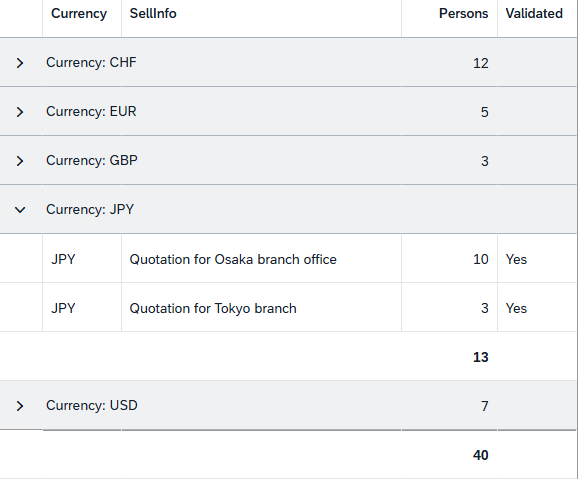
Once we have made the change, the table output will also change. The rows now appear slightly larger and are formatted differently than in the Responsive Table. Basically, a total for each person is displayed immediately after the initial data load. We still need to configure the various output columns, which we also had in the ALV.

Groups
To obtain subtotals, we need to define a grouping in this case. Here, only the naming changes significantly, as we find the feature again as a group. We then activate the grouping on the currency, and the table then also contains subtotals at the person level. We can also expand the various elements and see the individual positions, as was the case in ALV.
Complete Example
In this chapter, you will find all the resources for comparing the two applications. We have placed the RAP object in a new repository so that you can clone it. The program is simply a resource that is also located in this repository. You can use the table and generation class from the repository to generate the data for the report. If you are on the same system, you only need the table and class once.
Conclusion
Therefore, in this case, there is still no 100% definitive successor for the ALV. For the topic of summations, we need to change the table type, which currently also entails some limitations. However, if this feature is desired by the business department, you can already implement it, at least when it comes to display reports, which in the past were the majority of applications that worked with financial data.