
From ALV to List Report (Development)
Do you want to switch from a report using ALV to a RAP object using a list report? What should you actually consider during development and deployment? Let's look at the comparison in detail.

Table of contents
In this article, we'll look at some special considerations when developing Fiori Elements applications and what you should keep in mind when creating a List Report.
Introduction
When implementing a List Report in Fiori Elements, there are a few points to consider that are important and standard in Fiori, but don't initially seem to fit with the classic SAP GUI. Overall, Fiori should provide added value when the user works with it. This means that UIs shouldn't be overloaded. Only the information and fields that the user needs to complete their workflow should be available. We should keep this in mind to avoid falling into the trap of replicating GUI applications that end up being more cumbersome for the user, thus reinforcing the perception that Fiori applications are slow and cumbersome.
Structure
Let's take a look at the structure of the UI in its various elements and highlight the different aspects of operation and use.
Selection
To do this, we'll go to our Contacts app and look at a filter bar as it appears in an app we've often seen in the wild. In a classic SAP GUI application, we would display all the fields the user needs to work with the application on a selection screen. This automatically makes more information available than the user would actually enter for quick processing, which is sometimes the only way to do it in SAP GUI technology, or only in a very cumbersome way.
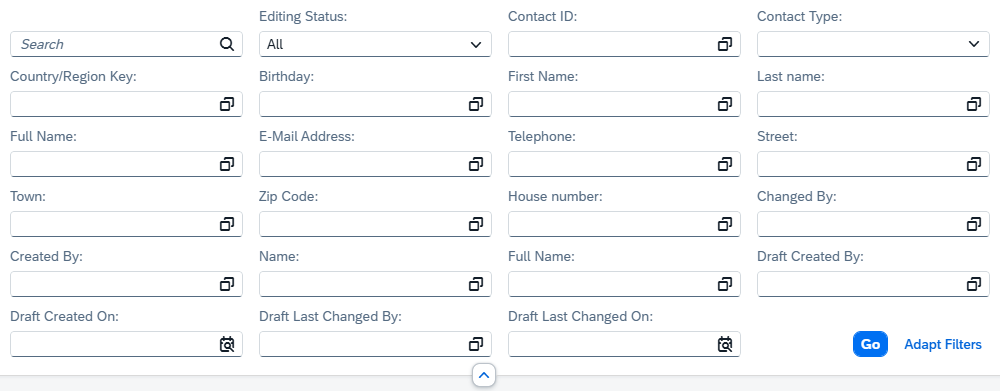
Finding the right input masks in this jumble of fields can then be quite challenging. Depending on the screen resolution, you should aim to stop adding new fields after the second or third row. In most cases, the end user will only need one, two, or three fields to filter by.
Table
The same applies to the output table. Responsive tables are the standard for a reason: we only want to display as much information as fits on the screen without cluttering the UI. In the example shown, we've used a grid table. The grid table provides a horizontal scrollbar. As you can see in the example, this allows for very long scrolling, making it quite difficult to find and compare the right information. This would also correspond to the ALV, where sometimes 90 or more columns are displayed side by side.

Therefore, it is still better to use the Responsive Table, as is the standard, and additionally display an Object Page where most of the information is available and also divided into groups to generate a better and more manageable view.
Action
You can actually apply the same to the actions that are available in an app. The more actions are displayed differently, the harder it becomes to identify the primary action intended for the end user, which is the main purpose of the application. Here you can already consider whether you want to provide a second application with specific actions, or, for example, group the different actions and make them available via a button, as in the example above where we have various Create actions.
Function
In this section, let's look at various functions that can help us solve the problems mentioned above. These functions are available in every application and generate added value for us.
Variants
As we learned in another article, variant management within Fiori Elements is particularly effective because we create a variant and thus Filters and simultaneously influence the output. This option also allows us to quickly switch from one specific variant to another with a single click, thereby restricting filters and output fields. This prevents us from displaying too much information in a single output variant and allows us to create specific views of our application. Furthermore, as a developer, you don't have to adjust the application every time the business department wants to display a new column; instead, the business department can display it themselves if it's already available in the field set. This saves you unnecessary development cycles and allows you to easily and quickly make adjustments via the variants later.
Object Page
Do you want to view the entire dataset, not just the different pieces of information on a single row? Then you can do this via the Object Page. The Object Page is an additional feature not available when using ALV, because we can display a completely visualized row, create different groups, and additionally show charts, thus displaying further details about a data set. Therefore, navigating to the Object Page offers added value for maintaining and presenting our application.

Tile
A transaction usually consists of the actual transaction for the call and a description. This only provides rudimentary information about the actual application to the user before they start it. The deployment configuration allows you to influence the tile that is created in the system, thus providing your users with additional information. In the example, we also have a wider tile if you want to highlight certain important applications. We have a counter on the application if you want to visualize information behind the tile first, and additionally descriptive text explaining what these numbers mean, for example.

Complete Example
In this case, we are not using the example shown so far, but are using an application in the context of Recycling-Heroes, a small project for YouTube. The reason is that more columns are available here, which we can use to demonstrate the current article. Accordingly, a different data model has also been used. Further information about the project can be found in the GitHub repository. The complete video for the Contact App can be found on YouTube.
Conclusion
When developing and using Fiori Elements applications with the List Report, you should consider a few points to enable the end user to achieve quick results and work effectively with your application. These include limited selection options and an output table that is easy to grasp at a glance. Various tools are available to you, such as variants or the Object Page, or even the tile, before you even begin working on your application.
