BTP - Pages and Spaces (ADT)
Can you also configure the Launchpad with Pages and Spaces using the ABAP Development Tools? In this article, we'll look at the current options.

Table of contents
In an older article, we looked at customizing the Fiori Launchpad using Fiori Apps and how you can use them to design your Launchpad. In this article, we'll discuss how you can deliver content during development.
Introduction
You can find out what you need Pages and Spaces for and how to set them up in this article. We want to make content available to our users directly when they log in to the Launchpad. Each user can set up their own view via the homepage.
In this article, we'll look at various templates in this area. If you create a new object using the ABAP Development Tools, you will find several objects in the Launchpad area.

Page
Let's create a page that we want to fill with applications later. We'll give the object a name and a description. In the lower part, you enter the text that will later be displayed in the interface.

Space
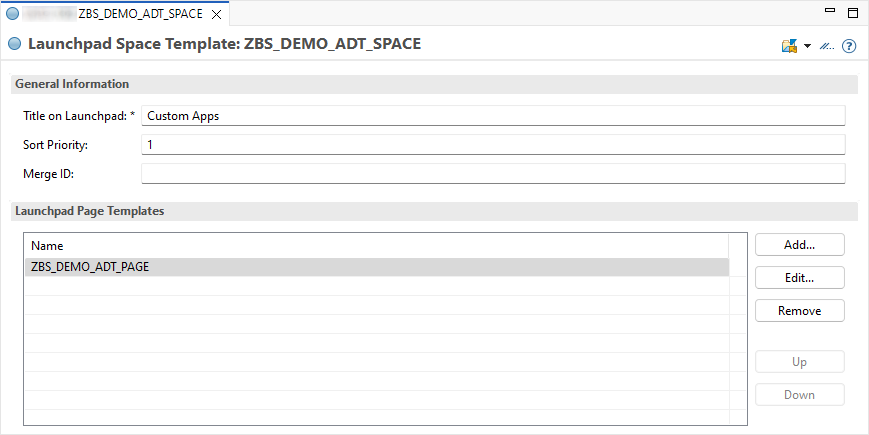
In the next step, we'll define a space. As with the page, we give the object a name and a description. A title is also required here, as it is needed for the display.

Once we have created the object, we should specify a sort order. This influences the display in the Launchpad; a high number is then shown far to the right. We can now assign our page to the space; if you have additional pages, you can insert them.
Content
Now we want to fill the page with content. If you want to add a new object, it will feel strange at first, as there is no "Add" button, as is usual in this type of view. You work in the list by right-clicking and using the context menu. At the end of the article, you will find a link on how to work with the view in ADT. The first step is to add a section. We can give the section a title, which will be displayed as a heading within the area. You can also adjust the section's ID if you want to give it a more descriptive name.

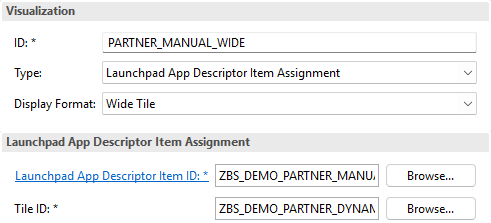
Below the section, you'll find the "Visualizations" section. Here, you can assign tiles to be assigned to this section. You can generally assign many tiles here. You can adjust the tile's ID, as well as its appearance in the Launchpad using different styles. You can find more information in the last article on this topic. To assign a tile, we select an App Descriptor Item—in this case, the item we last created. We can search for the defined tile using "Tile ID." Since our App Descriptor Item has four tiles, we need to choose one of them.
In total, we create two sections and assign three applications. The page should now look like this:

Scoping
If you check the configuration in Launchpad, you won't currently find the page and the space. Here you need to perform what is known as scoping. This is a similar action to "Publish Locally"; we need to inform the system that there are additional configuration options. Currently, there is no button for this in the UI; instead, we need to announce objects to the system via an ABAP API. You can use the following executable class for this.
CLASS zcl_bs_demo_scope_launchpad DEFINITION
  PUBLIC FINAL
  CREATE PUBLIC.

  PUBLIC SECTION.
    INTERFACES if_oo_adt_classrun.

  PRIVATE SECTION.
    TYPES object_name TYPE c LENGTH 40.
    TYPES objects     TYPE STANDARD TABLE OF object_name WITH EMPTY KEY.

    DATA scope_state TYPE c LENGTH 1 VALUE if_aps_bc_scope_change_api=>gc_scope_state-on.

    METHODS scope_content
      IMPORTING !pages TYPE objects
                spaces TYPE objects
                !out   TYPE REF TO if_oo_adt_classrun_out.
ENDCLASS.


CLASS zcl_bs_demo_scope_launchpad IMPLEMENTATION.
  METHOD if_oo_adt_classrun~main.
    scope_content( pages  = VALUE #( ( 'ZBS_DEMO_ADT_PAGE' ) )
                   spaces = VALUE #( ( 'ZBS_DEMO_ADT_SPACE' ) )
                   out    = out ).
  ENDMETHOD.


  METHOD scope_content.
    DATA scopes TYPE if_aps_bc_scope_change_api=>tt_object_scope_sorted.

    DATA(scope_api) = cl_aps_bc_scope_change_api=>create_instance( ).

    LOOP AT spaces INTO DATA(new_space).
      INSERT VALUE #( pgmid       = if_aps_bc_scope_change_api=>gc_tadir_pgmid-r3tr
                      scope_state = scope_state
                      object      = if_aps_bc_scope_change_api=>gc_tadir_object-uist
                      obj_name    = new_space ) INTO TABLE scopes.
    ENDLOOP.

    LOOP AT pages INTO DATA(new_page).
      INSERT VALUE #( pgmid       = if_aps_bc_scope_change_api=>gc_tadir_pgmid-r3tr
                      scope_state = scope_state
                      object      = if_aps_bc_scope_change_api=>gc_tadir_object-uipg
                      obj_name    = new_page ) INTO TABLE scopes.
    ENDLOOP.

    scope_api->scope( EXPORTING it_object_scope  = scopes
                                iv_simulate      = abap_false
                                iv_force         = abap_false
                      IMPORTING et_object_result = DATA(results)
                                et_message       = DATA(messages) ).

    out->write( results ).
    out->write( messages ).
  ENDMETHOD.
ENDCLASS.
The source code comes from the documentation, which you can find linked below. We've expanded the class again so that you can pass various objects, which will then be activated. You can also deactivate them again using the class attribute. Once you've completed the scoping, you'll find the objects in the "Predefined Content" area and can thus assign the space directly to the role without much customization:

Hint: According to the documentation, this action only needs to be performed on the development system. When imported into test and production, it is published automatically.
Result
After we have completed the configuration and scoping, we can assign the space to our role and find the space in our menu after reloading or logging in/out. The space defined above now looks like this in the system:

Translation
If you want to translate the various headings and sections, the standard for ABAP Cloud is available here. You can load the texts, translate them, and make them available again using the app. You can decide for yourself which tool you use to translate the XLIFF file.
Complete example
You can find all created objects in the corresponding GitHub repository if they are already supported by abapGit. You can find all changes in the following commit. If you are looking for the partner app, you can also find it in the repository.
Conclusion
Creating Pages and Spaces yourself as a developer? No problem using the various objects and options in the system. This means you can immediately deliver a standard for your applications.
Additional links:
SAP Help - Editing Launchpad Page Templates
SAP Help - Scoping