BTP - Dynamic Tile Service
How can you enrich your Dynamic Tile with additional information and still translate untranslatable components? Let's analyze it with an example and see how you can get more out of it.

Table of contents
In this article, we'll look at configuring Dynamic Tiles and how you can adjust other properties while they're running.
Introduction
A while ago, we looked at different tiles and how you can configure them in the system using the App Descriptor Item. In this article, we'll look at how you can use an additional solution to further dynamically design the tile and translate some additional text for the user.
Challenge
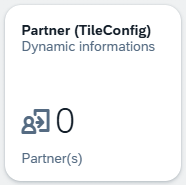
We've currently created an additional tile that uses the Launchpad App Descriptor Item and displays the number of partners in the system. We've also added a unit. Unfortunately, you won't find the unit among the system's translatable elements if you look in the "Maintain Translations" app. Therefore, the unit would initially look the same in every language.
Solution
Therefore, in this chapter we will look at a possible solution and try to make it as reusable as possible. We take advantage of the fact that the dynamic tile not only responds to the number we return via the service, but also to a possible JSON payload.
Configuration
Therefore, we use a service endpoint that returns JSON, which allows us to achieve a better and more dynamic configuration. You can find more information on the structure of the payload, including the possible values, in the SAP Help documentation below.
HTTP Service
To ensure that we have the most freely configurable endpoint possible, we use an HTTP Service in the system. This allows us to flexibly control which structure and information we want to return. The endpoint creates a URL in the system, of which we only need the first part, as marked in the screenshot.

Next, we adjust the tile configuration and change the "Service URL" to our endpoint. As you can see in the image, we've added the path after the endpoint. We want to use this to control the actual tile in the code and thus reuse the service.

Implementation
Basically, we now want to generate the JSON via the endpoint and return it to the caller so that we can dynamically adjust and overwrite the tile. However, since we want to make the service reusable, we need to implement a bit more logic. To do this, we first adopt the path from the header.
request->get_header_field( `~path` )
We can then break down the path to get to the last element. We'll then use this element to classify the tile. We'll use the XCO libraries for this, so we end up with the configuration in uppercase.
DATA(parts) = xco_cp=>string( path )->split( `/` )->value.
DATA(last_part) = parts[ lines( parts ) ].
DATA(endpoint) = to_upper( last_part ).
To be on the safe side, we should of course validate whether the part, for example, consists only of permitted characters. To do this, we check the endpoint for all Latin capital letters, numbers, and underscores that are permitted in ABAP objects.
DATA(regex) = `^[A-Z0-9_]+$`.
RETURN xco_cp=>regular_expression( iv_value  = regex
                                   io_engine = xco_cp_regular_expression=>engine->pcre( )
  )->matches( endpoint ).
To make things a little easier, we define an interface that will receive each configuration. In the interface, we define the possible configuration, our target JSON, and a helper constant for formatting some values in the service.
INTERFACE zif_bs_demo_tilec
  PUBLIC.

  TYPES:
    BEGIN OF configuration,
      title         TYPE string,
      subtitle      TYPE string,
      icon          TYPE string,
      info          TYPE string,
      info_state    TYPE string,
      number        TYPE p LENGTH 15 DECIMALS 4,
      number_digits TYPE i,
      number_factor TYPE string,
      number_state  TYPE string,
      number_unit   TYPE string,
      state_arrow   TYPE string,
    END OF configuration.

  CONSTANTS:
    BEGIN OF info_state,
      negative TYPE string VALUE `Negative`,
      neutral  TYPE string VALUE `Neutral`,
      positive TYPE string VALUE `Positive`,
      critical TYPE string VALUE `Critical`,
    END OF info_state.

  CONSTANTS:
    BEGIN OF number_state,
      none     TYPE string VALUE `None`,
      error    TYPE string VALUE `Error`,
      neutral  TYPE string VALUE `Neutral`,
      good     TYPE string VALUE `Good`,
      critical TYPE string VALUE `Critical`,
    END OF number_state.

  CONSTANTS:
    BEGIN OF arrow_state,
      none TYPE string VALUE `None`,
      up   TYPE string VALUE `Up`,
      down TYPE string VALUE `Down`,
    END OF arrow_state.

  METHODS get_configuration
    RETURNING VALUE(result) TYPE configuration.
ENDINTERFACE.
In the next step, we attempt to load the appropriate class for the endpoint. To do this, we use a generic implementation via the interface. We compose the class name and then attempt to create an object to call the GET_CONFIGURATION method. If this fails, we return an empty configuration, so the tile remains in the default state except for the number.
DATA config_handler TYPE REF TO zif_bs_demo_tilec.
DATA(class_name) = |ZCL_BS_DEMO_TILEC_{ endpoint }|.

TRY.
    CREATE OBJECT config_handler TYPE (class_name).
    RETURN config_handler->get_configuration( ).

  CATCH cx_root.
    RETURN.
ENDTRY.
In the implementation, we then need to determine the number; this is best done using the same Core Data Service as before. Since we are logged in via our user, we have the same permissions, and the query should return the same results. We can then set the additional attributes in the configuration, such as the title, subtitle, and a new icon. We can also set different colors on the tile, for example, for the number, the info, or add an arrow behind the number.
SELECT FROM ZBS_C_RAPPartner
  FIELDS COUNT( * ) AS number
  INTO @DATA(total_partner_number).

RETURN VALUE #( title         = 'Partner'
                subtitle      = 'Dynamically loaded ...'
                icon          = 'sap-icon://general-leave-request'
                info          = ''
                info_state    = zif_bs_demo_tilec=>info_state-neutral
                number        = total_partner_number
                number_digits = 0
                number_factor = ''
                number_state  = zif_bs_demo_tilec=>number_state-good
                number_unit   = 'Custom Unit'
                state_arrow   = zif_bs_demo_tilec=>arrow_state-up ).
Finally, we convert the structure to JSON, again using an XCO class and the camelCase conversion. This causes the HTTP service to return JSON. Don't forget to set the content type for the return so the caller knows what to receive from you.
RETURN xco_cp_json=>data->from_abap( configuration )->apply(
    VALUE #( ( xco_cp_json=>transformation->underscore_to_camel_case ) )
)->to_string( ).
If we update the tile and look at the result in the Launchpad, the elements have been replaced with our new values. This gives us full control over the display on the tile. However, you shouldn't confuse your user too much if the configuration changes the entire tile and the correct application can no longer be found. This method is about overwriting information; if you leave a field blank, the default tile configuration will be used.

You can now assign the texts to text symbols and translate them normally in ABAP to have all components of the tile in your language. In addition to normal text, you can now also bring the emoji apocalypse to your Launchpad, but for best practice reasons, you shouldn't do this.

Security
With this method, we provide a service that is generic and can be used by all authorized users. Therefore, you should consider a few things regarding security:
- HTTP Service - As a general rule, you should check all inputs before using them in processing. An attacker can send anything to your backend using the various methods and parameters.
- Data - For the numbers and totals, only use information where you have previously performed an authorization check at the user level and the user has also authenticated.
Why are we using an HTTP service? We had previously tried it with a custom entity that was in the same service. However, naming a field with "number" and creating the structure required by the endpoint didn't work. Therefore, we opted for a more flexible approach.
Complete Example
You can find the complete example in our GitHub repository, and you can also follow the changes via this commit.
Conclusion
With the method demonstrated today, you can retrieve even more information from your dynamic tile in the ABAP environment. In addition to translatability, we can also play with numbers, colors, and text. This should allow for maximum flexibility at runtime.