BTP - Dynamic Tile Service (Part 2)
In this article, we'd like to give you an update on the Tile Service and how you can integrate it even more easily. The Custom Entity plays a crucial role in this.

Table of contents
In this article, we'll discuss an additional variant of the Tile Service and how you can integrate it even more easily into your existing service.
Introduction
In the first part, we addressed the various problems and possibilities, and in this article, we'd like to look at another possibility. In the first part, we focused primarily on the HTTP service and its flexible use. Perhaps we should look at an even better solution to this issue.
Community
The community isn't quiet when it comes to solutions and creativity. Following our article on the Tile Service, Andre Fischer provided another solution for the problem with name conflicts in OData Services. Subsequently, Clément Ringot published a blog on Abapeur to test whether there are longer fields than the DDIC limit allows. The final post was then made by Jörg Brandeis, who posted the topic as a Core Data Service and explained how you can use it to build a Dynamic Tile, unfortunately without any translation options. So, lots of community spirit around what is essentially a similar topic.
HTTP Service
The solution as an HTTP service is valid and flexibly built. However, we should always pay attention to security here, and additionally we must grant the user appropriate permissions for the HTTP service. The topic of permissions and usage is not necessarily simple and is not always so flexibly controllable per application.
Solution
Therefore, we will look at a second solution based on a custom entity and go through the solution plus configuration step by step.
Preparation
As preparation, we actually only need the various information from the community articles and create our final solution.
Custom Entity
The heart of the service is a custom entity, which again must correspond to the structure as described in the SAP Help Documentation We first rename the field "number" to "numberOutput" and then convert the field to our desired name using the annotation "@OData.property.name" in the OData service.
@EndUserText.label: 'Custom Tile'
@ObjectModel.query.implementedBy: 'ABAP:ZCL_BS_DEMO_TILE_QUERY'
define custom entity ZBS_I_DMOCustomTile
{
  key key_field    : abap.char(20);
      title        : abap.string;
      subtitle     : abap.string;
      icon         : abap.string;
      @OData.property.name: 'number'
      numberOutput : abap.dec( 15, 4 );
      numberDigits : abap.int2;
      numberFactor : abap.string;
      numberState  : abap.string;
      numberUnit   : abap.string;
      stateArrow   : abap.string;
      info         : abap.string;
      infoState    : abap.string;
}
Tile
In the next step, we extend the service definition and include the custom entity. For easier access via the service, we give the entity a shorter name, in this case "Tile". This allows us to access the configuration later via the same service, since we have to authorize the service for our app anyway.
@EndUserText.label: 'Simple Partner Service'
define service ZBS_SIMPLE_PARTNER {
  expose ZBS_C_RAPPartner    as Partner;
  expose ZBS_I_RAPCityVH;
  expose ZBS_I_DMOCustomTile as Tile;
}
Let's add an additional tile to the App Descriptor Item. To do this, we extend it and create a new "Dynamic" tile.

As the Service URL, we then enter our OData service and our new entity. Since we named this tile, this goes after the path. We put a key access code in the parentheses. This means we want to read the entry with exactly this key (PARTNER).
/sap/opu/odata/sap/ZBS_UI_SIMPLE_PARTNER_O2/Tile('PARTNER')
Implementation
With that, the basics are defined, and we can now delve into the further details of the implementation. Since we have defined a key for the service, we can dynamically control what information we want to return to the caller. To do this, however, we also need to extract the key, which is passed as a filter to the query class. We read the filters, retrieve our key, and then double-check the value for safety before processing it further.
TRY.
    DATA(filters) = request->get_filter( )->get_as_ranges( ).
  CATCH cx_rap_query_filter_no_range.
    CLEAR filters.
ENDTRY.

TRY.
    DATA(range) = filters[ name = `KEY_FIELD` ]-range.
    DATA(value) = range[ 1 ]-low.

  CATCH cx_sy_itab_line_not_found.
    RETURN.
ENDTRY.

DATA(regex) = xco_cp=>regular_expression( iv_value  = `^[A-Z0-9_]+$`
                                          io_engine = xco_cp_regular_expression=>engine->pcre( ) ).

IF regex->matches( value ).
  RETURN value.
ENDIF.
In the next step, we can then populate the return structure again. To do this, we call the corresponding method for our key. Here, we can also use the same principle as before via the interface and the classes. Ultimately, how you want to use your class is up to you. Finally, we call the methods to return the results to the caller.
CASE identifier.
  WHEN 'PARTNER'.
    DATA(tile) = get_partner( ).
  WHEN OTHERS.
    CLEAR tile.
ENDCASE.

INSERT tile INTO TABLE tiles.

IF io_request->is_data_requested( ).
  io_response->set_data( tiles ).
ENDIF.

IF io_request->is_data_requested( ).
  io_response->set_total_number_of_records( 1 ).
ENDIF.
It's also important that we call the mandatory methods of the custom entity, otherwise the call will result in a dump. Therefore, we'll implement the call even though we'll forgo the results and not use them. You can find more details about why we do this in this Deep Dive.
io_request->get_sort_elements( ).
io_request->get_paging( )->get_offset( ).
io_request->get_paging( )->get_page_size( ).
Further steps
This gives us another solution to create a dynamic service and thus supply a tile with information. You can translate the texts again using text symbols in the class, thus maintaining international compatibility.
In principle, you can also model everything in a Core Data Service; however, mapping the translatability becomes somewhat more difficult, as you have to provide additional resources.
Complete Example
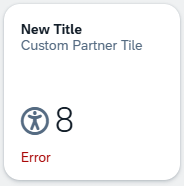
As usual, you can find the complete example in the GitHub repository for the RAP examples. In this Commit you will find the adjustments and new objects, allowing you to track all changes later. As a result, we again have a dynamic tile that dynamically retrieves the information from the service:
Conclusion
In today's article, we wanted to examine a second variant of the tile service and draw some further advantages from additional information. How you ultimately build the endpoint is entirely up to you and your creativity.