RAP - CDS Pattern
How does the CDS pattern actually work, and what does CDS-only have to do with it? In this article, we'll look at the architecture and use of the pattern.

Table of contents
In this article, we'll look at the CDS pattern, how to implement it, and how to meaningfully integrate it into your development.
Introduction
The ABAP RESTful Application Programming Model (RAP) is the new model in ABAP for creating Cloud Ready and Clean Core applications. With RAP, in addition to applications, interfaces for internal and external use can also be provided. With its latest features, RAP is very flexible in terms of structure and use, which is why we want to divide the applications into different patterns.
Structure
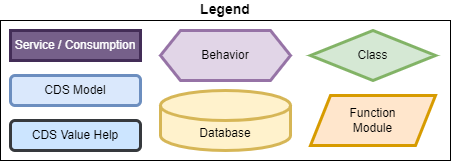
The "CDS Pattern" is so named because we use the CDS-only mechanisms of development. We forego traditional tools such as data elements, domains, and DDIC tables to create our data model. This eliminates the need for various mappings when using the data in our model. To begin, here is the legend for the model.
The following characteristics serve as a delimiter:
- The model's data source is Table Entities (successors to DDIC tables)
- The Interface Layer (CDS) is not required; behavior and connections can be modeled at the CDS level
- Use of CDS-only (Table Entity, Simple Types, Aspects)
- Mapping in the behavior definition is no longer necessary
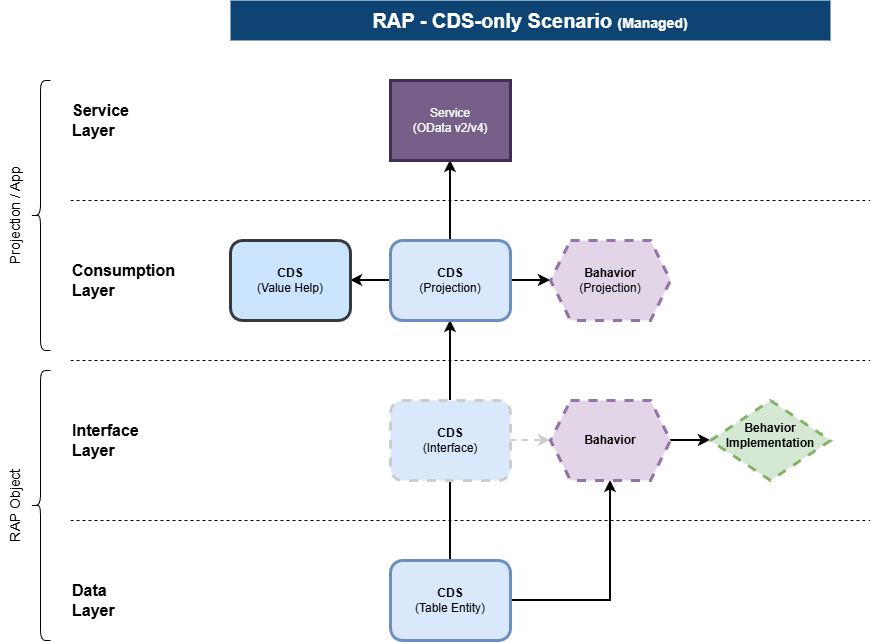
With the Table Entity we can define our data model and relationships at this level and don't need to do it at the interface level. Therefore, we can omit this layer and thus objects. However, the layer remains optional if you want to create a mapping of elements or have other special requirements.
Example
For this, we model our application on the Data Model of our Core Data Service series and use the Invoice and the Item to create a RAP object.
Data Model
Since we don't have a classic table, we create two Table Entities in the system. In this case, we work with built-in data types and, for the sake of simplicity, forego Simple Types. In the entity, we also have to use the new data types for date and time, as the old ones are no longer supported.
@ClientHandling.type: #CLIENT_DEPENDENT
@AbapCatalog.deliveryClass: #APPLICATION_DATA
@AccessControl.authorizationCheck: #NOT_REQUIRED
@EndUserText.label: 'CDS-P: Invoice'
define root table entity ZBS_T_CDSPatternInvoice
{
  key DocumentNumber     : abap.char(8);
      DocumentDate       : abap.datn;
      DocumentTime       : abap.timn;
      PartnerNumber      : abap.char(10);
      @Semantics.user.createdBy: true
      LocalCreatedBy     : abp_creation_user;
      @Semantics.systemDateTime.createdAt: true
      LocalCreatedAt     : abp_creation_tstmpl;
      @Semantics.user.localInstanceLastChangedBy: true
      LocalLastChangedBy : abp_locinst_lastchange_user;
      @Semantics.systemDateTime.localInstanceLastChangedAt: true
      LocalLastChangedAt : abp_locinst_lastchange_tstmpl;
      @Semantics.systemDateTime.lastChangedAt: true
      LastChangedAt      : abp_lastchange_tstmpl;

      _Position          : composition of exact one to many ZBS_T_CDSPatternPosition;
}
Client handling happens via annotation in the view. Additionally, we can also model the relationship directly in the view. Before we can activate the view, however, we should first create the position. Here we also define the corresponding fields, but we must also include the unit for the set, since associations are not possible at this point.
@ClientHandling.type: #CLIENT_DEPENDENT
@AbapCatalog.deliveryClass: #APPLICATION_DATA
@AccessControl.authorizationCheck: #NOT_REQUIRED
@EndUserText.label: 'CDS-P: Position'
define table entity ZBS_T_CDSPatternPosition
{
  key DocumentNumber   : abap.char(8);
  key PositionNumber   : abap.int2;
      MaterialNumber   : abap.char(5);
      @Semantics.quantity.unitOfMeasure : 'PositionUnit'
      PositionQuantity : abap.quan(10,0);
      PositionUnit     : abap.unit(3);
      @Semantics.amount.currencyCode : 'PositionCurrency'
      PositionPrice    : abap.curr(15,2);
      PositionCurrency : abap.cuky;

      _Document : association to parent ZBS_T_CDSPatternInvoice on _Document.DocumentNumber = $projection.DocumentNumber;
}
Behavior
In the behavior section, we additionally define Draft, link the fields and the various Draft actions, since we want to create an OData v4. Currently, we can only create DDIC tables for Draft, but this is expected to change in early 2026. Because we defined the behavior directly on the table entity, we save ourselves the mapping of the entity to the data source.
managed implementation in class zbp_bs_cdspattern_invoice unique;
strict ( 2 );
with draft;

define behavior for ZBS_T_CDSPatternInvoice alias Invoice
draft table zbs_cp_invoice_d
lock master total etag LastChangedAt
authorization master ( instance )
etag master LocalLastChangedAt
{
  create ( authorization : global );
  update;
  delete;

  field ( readonly ) DocumentNumber;

  draft action Edit;
  draft action Activate optimized;
  draft action Discard;
  draft action Resume;
  draft determine action Prepare;

  association _Position { create; with draft; }
}

define behavior for ZBS_T_CDSPatternPosition alias Position
draft table zbs_cp_pos_d
lock dependent by _Document
authorization dependent by _Document
{
  update;
  delete;

  field ( readonly ) DocumentNumber, PositionNumber;

  association _Document { with draft; }
}
Finalize
Currently, table entities are not supported in the RAP generators, so we have to build the entire RAP BO manually. We can then define the remaining steps, such as projection, service definition, and binding, as usual. For numbering, we are currently using late numbering and implementing some additional logic. You can find further details about the implementation in the GitHub repository in the next chapter.
Testing
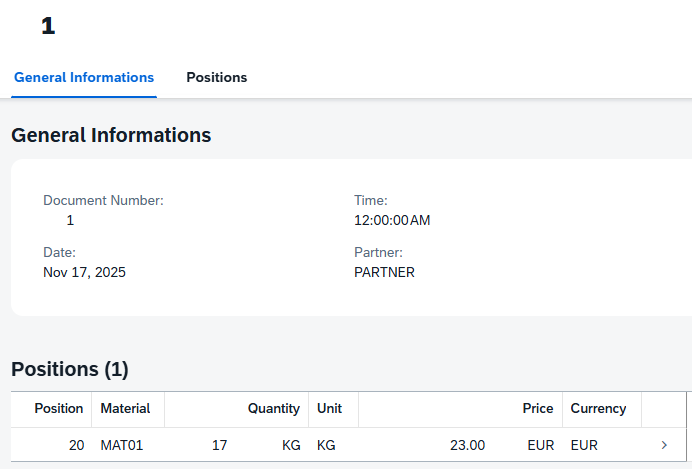
After we have created the UI via the Metadata Extension, we can test the application. To do this, we create a new header and populate it with the necessary information.

After saving, a new number was assigned and the data was stored in the database. Our application now works to some extent, although not perfectly.
Complete Example
You can find the complete example in our GitHub repository, and you can see all changes via the commit. Within the repository, the example is located in the package ZBS_DEMO_RAP_PATTERN_CDS. As described above, you will not find the consumption model and the call implementation there.
Summary
Basically, the pattern is very similar to the Classic Pattern in RAP development. However, by foregoing the classic artifacts, we can define the actual field names and model the relationships within the objects directly at the table entity level. This allows us to omit the interface layer in most cases and implement the behavior directly at the table level. This also gives us case sensitivity for types, objects, and fields, and, unlike with a table, more characters for naming.
However, the model is not yet 100% functional in its current state. Simple types with ENUMs are not yet supported at the UI and RAP levels, and while drafting is possible, it still uses a classic table. More of the new features will arrive in 2026 to support the CDS pattern.
Conclusion
The CDS pattern will increasingly replace and simplify the Classic pattern in the future. The number of objects will decrease, making RAP objects easier to understand. Since we can already implement permission checks at the table level, the model for read access will also become somewhat more secure.