RAP - Sort virtual Fields
If we have implemented virtual fields in an entity in the ABAP RESTful Application Programming Model, how can we actually use sorting? Let's take a look at the process.

Table of contents
In this article, we'll add simple virtual fields to our entity and implement sorting so that we can later apply restrictions to the fields.
Introduction
Have you defined virtual fields in your RAP object? This gives you additional options for displaying extra information in the UI that doesn't exist in the database. In this article, we first extend our Sales App by adding virtual fields, then look at how to handle them with the UI, and finally add the ability to sort by the fields.
Virtual Fields
To do this, we define two new pieces of information in the ZBS_C_SASale entity. We want to have the year and month information in the UI, which in this case we derive from the sales date. Normally, we would be able to do this via a statement in the Core Data Service. Therefore, we do this primarily for demonstration purposes and only conditionally recommend it as the standard.
Elements
Let's create the elements in the view. Using the keyword VIRTUAL, we define local elements in the Consumption View and give them specific types for the frontend. In this case, we simply use elements. Using the annotation, we define the class that will later derive the fields.
@ObjectModel.virtualElementCalculatedBy: 'ABAP:ZCL_BS_DEMO_RAP_SALES_VE'
virtual SalesYear : abap.char(4),

@ObjectModel.virtualElementCalculatedBy: 'ABAP:ZCL_BS_DEMO_RAP_SALES_VE'
virtual SalesMonth : abap.char(2),
Metadata Extension
We will now add the Metadata Extension and create the fields after the SaleDate. We want to display them in the List Report and on the Object Page and give the elements a label so that corresponding text is available in the UI.
@UI.lineItem: [ { position: 32  } ]
@UI.identification: [ { position: 32 , qualifier: 'GENERAL' } ]
@EndUserText.label: 'Sales Year'
SalesYear;

@UI.lineItem: [ { position: 33  } ]
@UI.identification: [ { position: 33 , qualifier: 'GENERAL' } ]
@EndUserText.label: 'Sales Month'
SalesMonth;
Exit
In the next step, we implement the SADL exit, i.e., the class we specified in the annotations. In the GET_CALCULATION_INFO method, we request the SalesDate field, as we need this for the derivation.
et_requested_orig_elements = VALUE #( ( `SALESDATE` ) ).
In the CALCULATE method, we derive the elements and populate each record with the information. In this case, we use SUBSTRING to extract the information into the target fields and pass the information to the caller. You can find the complete logic in the repository.
CASE element.
  WHEN `SALESYEAR`.
    original->SalesYear = substring( val = original->SalesDate
                                     off = 0
                                     len = 4 ).
  WHEN `SALESMONTH`.
    original->SalesMonth = substring( val = original->SalesDate
                                      off = 4
                                      len = 2 ).
ENDCASE.
Test data
To be able to test the new filters later, we'll add some new data sets at a higher level so that we have different years and months available in the list report. You can find the additional data in the class ZCL_BS_DEMO_RAP_SALES_FIELDS, which we'll execute again to populate the tables. Once we're finished with that, we can switch to the application and execute the selection.
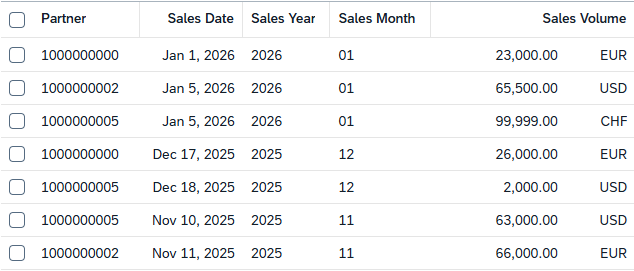
Month and year are displayed in a separate column and added as an element to the list.
Sorting
What about sorting the data records? We've linked the documentation for you at the bottom of the article; let's take a look at the examples.
Current Status
Currently, we can't find the fields in the sorted list. If you click on the column header, the sorting function is missing, as is also the case when we look at the table's default settings.

Implementation
To activate sorting and the function for the fields, we need an annotation and an additional implementation in the class. For this, we extend the metadata extension of the virtual elements with the annotation "ObjectModel.sort.transformedBy" and must again specify an ABAP exit. In this case, we can also use the same class as when determining the data.
@ObjectModel.virtualElementCalculatedBy: 'ABAP:ZCL_BS_DEMO_RAP_SALES_VE'
@ObjectModel.sort.transformedBy: 'ABAP:ZCL_BS_DEMO_RAP_SALES_VE'
virtual SalesYear : abap.char(4),

@ObjectModel.virtualElementCalculatedBy: 'ABAP:ZCL_BS_DEMO_RAP_SALES_VE'
@ObjectModel.sort.transformedBy: 'ABAP:ZCL_BS_DEMO_RAP_SALES_VE'
virtual SalesMonth : abap.char(2),
In our class, we now implement the interface IF_SADL_EXIT_SORT_TRANSFORM with the method MAP_ELEMENT. The purpose of the exit is to map the virtual field to a real element, which can then be sorted directly in the database. This only works effectively for certain elements. Generally, you should check whether the correct entity and elements have been passed if the exit is used multiple times.

In this case, both of our elements reference SalesDate, which is why we include it in the mapping and define it as the sorting element.
METHOD if_sadl_exit_sort_transform~map_element.
  IF iv_element = 'SALESYEAR'.
    INSERT VALUE #( name = 'SALESDATE' ) INTO TABLE et_sort_elements.
  ENDIF.

  IF iv_element = 'SALESMONTH'.
    INSERT VALUE #( name = 'SALESDATE' ) INTO TABLE et_sort_elements.
  ENDIF.
ENDMETHOD.
Display
Let's now test the behavior in the UI. The annotations have activated sorting on the fields. If we now click on the column header, the sorting and grouping options will load.

Let's sort the year in descending order. The different years are then neatly sorted and displayed; the criterion works correctly so far.

In our second example, let's sort by month in ascending order. In this example, the columns look randomly generated, and there seems to be no sorting. Here, we should understand the underlying logic. In this case, we sort by date, which was sorted correctly. The month is only extracted, resulting in an unclean element. In this case, we should actually deactivate sorting by month again.

Filtering
We actually wanted to write the article about filtering virtual elements. For this, we also need to add an annotation "ObjectModel.filter.transformedBy" to the virtual element and implement a method in the exit. However, the exit is currently not enabled for ABAP Cloud, and therefore we cannot demonstrate the scenario using our implementation in the ABAP environment. Basically, you can follow the implementation for sorting if you are implementing the method on-premises.
Complete Example
You can find all resources in our GitHub repository and the changes from this article in the following Commit. This should allow you to understand all the adjustments and reproduce or replicate the scenario in your own system.
Conclusion
Implementing additional logic on virtual elements is quite simple and quick. However, you should also consider whether the correct result will be achieved in such a case, and in the worst case, deactivate the logic for the element.
Source:
SAP Help - Filtering of Virtual Elements
SAP Help - Sorting of Virtual Elements