RAP - Generation with Template
The generators in RAP are powerful when it comes to quickly deploying RAP objects. You can create entities even faster using templates, especially if you're taking a training course.

Table of contents
In this article, we will first generate the templates and create a new RAP object from them, which will serve as the basis for the following article.
Introduction
We have already reported on the various RAP generators in different articles. Whether it's the classic Generator, the Fiori app, the Business Configuration, or the new generator from Scratch, they all ultimately generate a RAP object. Once you have sufficiently familiarized yourself with RAP and development, we would always recommend using generators, simply to save time and reduce repetitive tasks.
Data Model
Here, we create an application with a new data model to be able to carry out some use cases and implementations. We create a sales app that is closely linked to our CDS data model, which we have already used for other apps. At the top level, there is a sales figure per partner that we can maintain. Deviations are also entered there in the form of a currency or a percentage. Among these, we have an entity for material involved in the sale, the actual salespeople with their share, and information that is maintained in multiple languages.
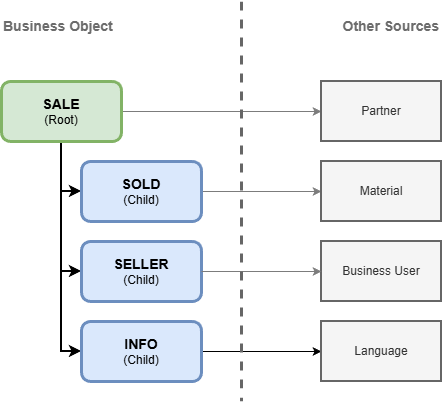
The relationships between partner and material originate from the CDS model, while the business user and language come from the system's standard settings. Here we retrieve specific data from the system.
Generation
In this chapter, we will focus on generating the artifacts.
Generator
In the last article, we built a Generator for DDIC artifacts to automatically create objects in the system. Since we need several entities, data elements, and domains for the data model, the generator will do the work for us. Basically, you can also pull pre-built parts of the data model from the GitHub repository (see below).
Configuration
For the configuration, we create an executable class in the new package ZBS_DEMO_RAP_SALES. You can find the complete configuration in GitHub in the class ZCL_SB_DEMO_RAP_SALES_FIELDS. We use the executable class with XCO Template, as this works best with the XCO classes for output. In total, we want to create four abstract entities to use later as templates:
- ZBS_S_SASale
- ZBS_S_SAInfo
- ZBS_S_SASold
- ZBS_S_SASeller
Creation
If we now execute the configuration, the various data elements and domains will be generated in the system. If you encounter an error due to the package or missing transport, you can add the information to the configuration.

RAP Generator
Now, in the next step, we will run the RAP Generator in the system and use the created templates to generate our RAP BOs.
Configuration
As already described in the relevant article above, we start the generator directly on the package. The on-premise generator is only available with version 2025; we are currently working primarily on the ABAP environment.

There, you select the generator "OData UI Service from Scratch," which we want to use for the templates. In the next step, the package is already pre-selected, so we can simply confirm the step and proceed to the object generation. Then we can jump directly to the "Business Object Entities" section to define our RAP BO. Here we use the abstract entities to populate the templates.

This may take a moment, as the structure is analyzed and all fields are created directly. Using templates saves us the manual creation of all fields, texts, and relationships. Once the four nodes have been defined, we can move on to the "Service Configuration" section. Why only now? The ROOT entity overrides the "ProjectName" field, which we only want to define at the end. Here we define a prefix for generation.

Generation
In the next step, we then receive the list of objects to be generated. After a brief check of the assigned names, we can then start the generator, which will then require some time for the objects.

Once the generation of the objects is complete, we receive information from the system and can navigate to the service. There we activate the OData service and can then view the Fiori Elements Preview.
Analysis
In our templates, we hadn't defined any keys. Currently, the RAP generator automatically generates UUID keys for all entities and defines the relationships between the objects based on these. When creating information fields, you should take this property into account. Let's look at the main table for Sales; we find the UUID as the key to our fields with the corresponding data elements, and the relationships between the data.
@EndUserText.label : 'Database Table for ZBS_SASALE'
@AbapCatalog.enhancement.category : #NOT_EXTENSIBLE
@AbapCatalog.tableCategory : #TRANSPARENT
@AbapCatalog.deliveryClass : #A
@AbapCatalog.dataMaintenance : #RESTRICTED
define table zbs_sasale {
  key client            : abap.clnt not null;
  key uuid              : sysuuid_x16 not null;
  partnernumber         : zbs_demo_sa_partner;
  salesdate             : zbs_demo_sa_date;
  @Semantics.amount.currencyCode : 'zbs_sasale.salescurrency'
  salesvolume           : zbs_demo_sa_amount;
  salescurrency         : zbs_demo_sa_currency;
  @Semantics.amount.currencyCode : 'zbs_sasale.differencecurrency'
  differenceamount      : zbs_demo_sa_amount;
  differencecurrency    : zbs_demo_sa_currency;
  @Semantics.quantity.unitOfMeasure : 'zbs_sasale.differenceunit'
  differencequantity    : zbs_demo_sa_quantity;
  differenceunit        : zbs_demo_sa_unit;
  salecomment           : zbs_demo_sa_comment;
  local_created_by      : abp_creation_user;
  local_created_at      : abp_creation_tstmpl;
  local_last_changed_by : abp_locinst_lastchange_user;
  local_last_changed_at : abp_locinst_lastchange_tstmpl;
  last_changed_at       : abp_lastchange_tstmpl;
}
Looking at Core Data Service on this basis, some not-so-nice things become apparent. Currently, the generator still uses the old cardinalities for the compositions; descriptive names should be used here by now. Likewise, the generator has ignored our PascalName-based field names, which makes the data model not quite so "pretty".
@AccessControl.authorizationCheck: #MANDATORY
@Metadata.allowExtensions: true
@ObjectModel.sapObjectNodeType.name: 'ZBS_GlobalSale'
@EndUserText.label: '###GENERATED Core Data Service Entity'
define root view entity ZBS_R_SASALE
  as select from zbs_sasale as SASale
  composition [1..*] of ZBS_R_SAINFO   as _SAInfo
  composition [1..*] of ZBS_R_SASOLD   as _SASold
  composition [1..*] of ZBS_R_SASELLER as _SASeller
{
  key uuid                  as UUID,
      partnernumber         as Partnernumber,
      salesdate             as Salesdate,
      @Semantics.amount.currencyCode: 'Salescurrency'
      salesvolume           as Salesvolume,
      salescurrency         as Salescurrency,
      @Semantics.amount.currencyCode: 'Differencecurrency'
      differenceamount      as Differenceamount,
      differencecurrency    as Differencecurrency,
      @Semantics.quantity.unitOfMeasure: 'Differenceunit'
      differencequantity    as Differencequantity,
      differenceunit        as Differenceunit,
      salecomment           as Salecomment,
      @Semantics.user.createdBy: true
      local_created_by      as LocalCreatedBy,
      @Semantics.systemDateTime.createdAt: true
      local_created_at      as LocalCreatedAt,
      @Semantics.user.localInstanceLastChangedBy: true
      local_last_changed_by as LocalLastChangedBy,
      @Semantics.systemDateTime.localInstanceLastChangedAt: true
      local_last_changed_at as LocalLastChangedAt,
      @Semantics.systemDateTime.lastChangedAt: true
      last_changed_at       as LastChangedAt,
      _SAInfo,
      _SASold,
      _SASeller
}
Language
Currently, there seems to be a problem with fields of type SPRAS. The field was removed from the entity during generation and was therefore ignored. Therefore, we must subsequently include the field in the various objects.
- Table - ZBS_SAINFO
- Core Data Service - ZBS_R_SAInfo, ZBS_C_SAInfo
- Behavior Definition - ZBS_R_SASale
- Regeneration of the Draft Table
Hint: After generating the artifacts, there should no longer be any errors in the service. We'll take care of the UI annotations next time.
Refactoring
If the ambiguities don't bother you (PascalCase in the field names), you can continue working with this version later. We'll now clean up the data model again and bring it up to date. You can find the current version at the end on GitHub and either load the clean model or perform the refactoring yourself. You should take a look at the entities (Core Data Service), Behavior Definition, and Metadata Extensions. Here's the excerpt after refactoring; the cardinality has been revised and PascalCase has been restored in the names.
define root view entity ZBS_R_SASALE
  as select from zbs_sasale as SASale
  composition of exact one to many ZBS_R_SAINFO   as _SAInfo
  composition of exact one to many ZBS_R_SASOLD   as _SASold
  composition of exact one to many ZBS_R_SASELLER as _SASeller
{
  key uuid                  as UUID,
      partnernumber         as PartnerNumber,
      salesdate             as SalesDate,
      @Semantics.amount.currencyCode: 'Salescurrency'
      salesvolume           as SalesVolume,
      salescurrency         as SalesCurrency,
}
Data
After the object has been created and generated, we will add some data. To do this, we define a class ZCL_BS_DEMO_RAP_SALES_DATA which you must execute in your system so that the entities are populated with data.
Cleanup
As a first step, we would clean up all tables so that we can run the data generation multiple times. In addition to the actual tables, you should also clean up the draft table, as it may contain old elements that you haven't saved.
DELETE FROM zbs_sasale.
DELETE FROM zbs_sasale_d.
DELETE FROM zbs_sainfo.
DELETE FROM zbs_sainfo_d.
DELETE FROM zbs_saseller.
DELETE FROM zbs_saseller_d.
DELETE FROM zbs_sasold.
DELETE FROM zbs_sasold_d.
COMMIT WORK.
Populating
For populating the database, we create several tables to transfer the dependent information into the database with a single call. Since we always access the root entity in this case and insert the lower-level data via association, we also define our tables in this way.
DATA sales   TYPE TABLE FOR CREATE zbs_r_sasale.
DATA infos   TYPE TABLE FOR CREATE zbs_r_sasale\_SAInfo.
DATA sellers TYPE TABLE FOR CREATE zbs_r_sasale\_SASeller.
DATA solds   TYPE TABLE FOR CREATE zbs_r_sasale\_SASold.
Creation
You can find the table population in the GitHub repository, and we won't describe the individual data records in detail again here. Finally, we call the creation of the instances and table entries via EML. At the ROOT level, we have defined the CID ourselves, as we need it for the sub-entities. There, we pass the reference via CID_REF to assign the data records to the root entry and set the entities themselves to AUTO FILL CID, which means the framework takes care of populating the CID in the data record. To keep the data definition simple, we use WITH for the fields. You can find more details about the EML variants in the article.
MODIFY ENTITIES OF zbs_r_sasale
       ENTITY SASale
       CREATE FIELDS ( PartnerNumber SalesDate SalesVolume SalesCurrency SaleComment DifferenceAmount DifferenceCurrency )
       WITH sales

       ENTITY SASale
       CREATE BY \_SAInfo AUTO FILL CID FIELDS ( Language TextInformation )
       WITH infos

       ENTITY SASale
       CREATE BY \_SASeller AUTO FILL CID FIELDS ( SellerId Quota Confirmed )
       WITH sellers

       ENTITY SASale
       CREATE BY \_SASold AUTO FILL CID FIELDS ( MaterialId )
       WITH solds

       FAILED DATA(failed)
       MAPPED DATA(mapped)
       REPORTED DATA(reported).
Test
Now that we have created test data, let's take a closer look at the application. After calling it and loading the first entries, we get many fields and filters in the list report.

If we navigate to the details, we still see many UUIDS and no real structure in the details yet. The image shows a section of the image; we've omitted the other tables in the lower section for now.

Complete Example
As always, you can find the complete code in the GitHub repository for our RAP examples. We've created a new package, ZCL_SB_DEMO_RAP_SALES_FIELDS, where the example and the template are located. In the Commit you will find all the generated artifacts from today's article.
Conclusion
Generating via a template saves you work when creating RAP objects on existing structures, tables, or entities. We use the object generator to create a template for the training and then, in the second step, generate the RAP object using the generator.