ADT - RAP Extension Assistent [MIA]
You want to extend a RAP object and don't know exactly where to start? Perhaps the Extension Assistant can help you and guide you through the process step by step.

Table of contents
In this article, we'll look at the Extension Assistant as an IDE action and what you can currently do with it in your RAP development.
Introduction
Last time, we looked at the RAP Analyzer, which supports you in your work and shows you what to expect from your RAP object. The RAP Analyzer is designed for quick navigation and an overview. Based on this IDE action, we then created a second action to help you quickly and easily extend the RAP stack.
Idea
We use the RAP Analyzer as a foundation to access all the information of the RAP object. We provide various scenarios for the current RAP object, giving us step-by-step instructions. These are not generic, but tailored to the current object. This is primarily intended to save time during the extension process. The original idea, however, was an automatic extension of all objects; unfortunately, the XCO libraries do not provide sufficient options for updating the objects.
IDE Action
Let's take a look at the implementation of the IDE Action and delve into some of its components.
Definition
Besides the actual implementation, i.e., the action, we also need a UI this time. We start again with the service and want to give the user the option to specify the appropriate assistant and further configurations.
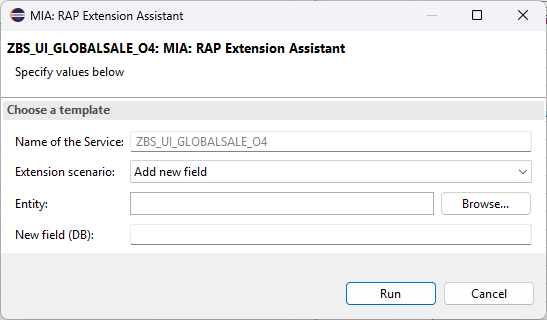
In the current use case, only the extension of fields in the data model is planned. You can select an entity in the data model using the search help and specify a field name. As the name suggests, this is about the database field.
Analysis
For the complete analysis of the RAP object, we use the RAP Analyzer, as it provides us with all the necessary information we need for the extension. For example, the pattern we need to define the form of the extension.
Steps
In the actual action, we can then request the extension and the steps. To do this, we pass the analyzed object to the factory and have the framework provide us with the appropriate object. We also need the pattern for this, since not all changes are possible in the same pattern.
RETURN SWITCH #( object-classification
                 WHEN zif_mia_rap_analyzer=>classifications-standard  THEN NEW zcl_mia_extension_classic( object )
                 WHEN zif_mia_rap_analyzer=>classifications-custom    THEN NEW zcl_mia_extension_custom( object )
                 WHEN zif_mia_rap_analyzer=>classifications-singleton THEN NEW zcl_mia_extension_singleton( object ) ).
Once we have the correct extension instance, we can call the actual steps. There will be a separate method for each use case.
DATA(extension) = zcl_mia_core_factory=>create_extension_steps( rap_object ).

CASE input-scenario.
  WHEN zcl_mia_rap_extension_input=>extension_scenario-field.
    DATA(converted_output) = extension->generate_steps_for_new_field( VALUE #( entity = input-entity
                                                                               name   = input-new_field ) ).
ENDCASE.
The current logic is pretty much hard-coded here, except that we check whether the corresponding layer is present. This determines the steps and their sequence.
CLEAR collected_steps.
DATA(enhanced_entity) = extract_layer_for_entity( new_field-entity ).

add_step_database( layer = enhanced_entity-interface
                   field = new_field-name ).
add_step_interface( layer = enhanced_entity-interface
                    field = new_field-name ).
add_step_consumption( layer = enhanced_entity-consumption
                      field = new_field-name ).
add_step_activate( ).
add_step_behavior( layer = enhanced_entity-interface
                   field = new_field-name ).
add_step_draft( enhanced_entity-interface ).
add_step_metadata( layer = enhanced_entity-consumption
                   field = new_field-name
                   root  = enhanced_entity-root ).
add_step_activate( ).

RETURN finalize_output_table( ).
We can then pass the result to the HTML output of the IDE action to prepare the output for the developer.
Extension
In this chapter, we extend our Sales App by adding a new field, using the Extension Assistant and the currently provided extension scenario.
Requirement
Currently, we need a field for the Log ID in the root entity of our object, as we want to store the handle of the application log later. To do this, we need to extend the data model.
Action
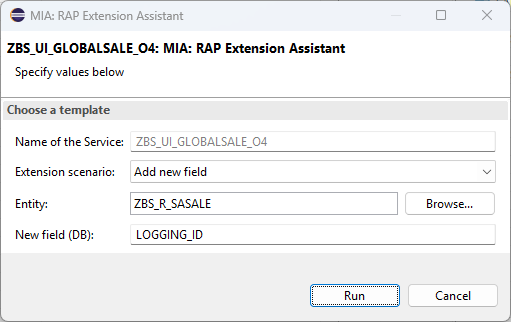
Let's first open the Service Binding ZBS_UI_GLOBALSALE_O4 and start the IDE Action using CTRL + ALT + R, then select "MIA: RAP Extension Assistant" to start the action. Using the value help, we can select the appropriate entity and enter the name of the new database field.
The assistant now generates a suggestion with the steps to be performed, a description, code snippets that we can directly adopt, and the links to the objects. This allows us to leave the popup open and work our way through the list. If the list is long and extensive, checkboxes are also available where you can confirm the steps you have taken.

In the Option column, you will find further information about the steps. "OPTIONAL" means that the step should be taken if it can be implemented. However, this is more likely because in this case we don't know if a draft table exists (due to the limited API readability). For "CHOOSE" You can choose one or more steps, for example, depending on where the field should appear.
Editing
Let's now edit the step and extend our data model in the application:
- Data Model - In the first step, we extend the data model, but we need a CHAR 22 field for the log handle. We can use all the other information. The field name has also already been implemented. Once we're finished with that, we can activate all three objects simultaneously.
- Behavior - Then we extend the behavior, in this case, the field mapping of the entity. Since we have a draft scenario, we also need to update the draft table using Quick Fix.
- UI - Finally, we extend the metadata extension with UI annotations. Here, we still need to assign the corresponding qualifier and determine the position. Optionally, we also assign a label so that the field has appropriate text. Finally, we activate the last objects and the extension is complete.
@UI.identification: [ { position: 105, qualifier: 'GENERAL' } ]
@EndUserText.label: 'Log ID'
LoggingId;
Result
If we now update our application, the new field has been adopted and can now be maintained. Without much effort and with the guided wizard, the extension was completed in just a few minutes. Fast, if we know the object, and even faster if we don't know the object at all.

Complete Example
You can find the change to the Sales App in the GitHub repository for the RAP examples. In this Commit you will find all the changes we have made. The IDE action can be found here on GitHub, among the other IDE actions from the MIA collection.
Conclusion
The Extension Assistant is a relatively simple way to extend RAP objects and is based on analyzing the information and structure. The extension is done manually and not automatically, as the appropriate ABAP APIs are not available. With the right MCP server and AI model, you could easily do this using artificial intelligence, but you would consume more resources.