ADT - RAP Analyzer [MIA]
Getting to grips with and understanding existing RAP objects can not always be easy, especially when dealing with complex objects. Questions such as which pattern is used and which objects are important usually need to be worked out.

Table of contents
In this article, we'll look at the IDE Action for the RAP Analyzer as a prototype and how you can use it to check existing objects.
Introduction
IDE Actions are a simple way to extend the ABAP Development Tools and provide additional functionality for the developer. In the ABAP Cloud environment, a significant challenge currently exists, as the appropriate APIs are not always available, preventing the implementation of all functions.
Idea
The idea behind the RAP Analyzer is to enable rapid analysis and navigation within a RAP object. We assume that while the application provides knowledge of the service, it doesn't reveal all its details. Navigating the entire stack can therefore be problematic, especially if you only want to adjust the fixed values of an object or the metadata extension at a specific level. Therefore, we analyze the RAP stack via the service, all the way to the database, and list the information as a result in a table.
- Analysis and Visualization of the RAP Stack
- Quick Navigation via ADT Links
Development
Let's take a look at some details regarding the development of the IDE Action and examine its various components.
IDE Action
The actual IDE Action is very simple; we only want to analyze service bindings and therefore don't need a UI in this case. Thus, we have the implementing class, restricted to a service binding.

Therefore, the actual action consists of only a few lines of code, as we outsource the majority to helper classes. We retrieve the current resource, read its type and name, and pass the objects to the analyzer. This analyzer then analyzes the RAP stack and returns a structured result to the caller. We pass this result to the HTML output, which creates a corresponding table, links, etc., for the output. We then pass this result to the HTML output of the IDE action.
DATA(resource) = context->get_focused_resource( ).
DATA(analyzer) = zcl_mia_core_factory=>create_rap_analyzer( object_name = resource->get_name( )
                                                            object_type = resource->get_type( ) ).

DATA(rap_object) = analyzer->get_rap_object( ).
DATA(html_content) = zcl_mia_core_factory=>create_html_output( )->generate_rap_object( rap_object ).

DATA(html_output) = cl_aia_result_factory=>create_html_popup_result( ).
html_output->set_content( html_content ).

result = html_output.
Analysis
The real "magic" happens during the analysis of the objects. We analyze the stack starting from the service binding, as this provides a direct path down to the RAP objects and tables. Most developers also access the service from the app level. Furthermore, there's a chance that multiple other objects and apps will be created on top of a single RAP object, which makes the actual analysis more difficult. We go through the various objects and relationships and, as a first step, create a list of the objects we need for the analysis.
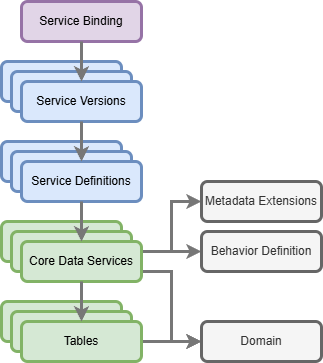
In the second step, we assemble the actual RAP object. Here, we want to represent the dependencies at each level (interface, projection). So we start with the root entity, then the children and grandchildren, to establish a hierarchy that we can later display. However, there are currently some limitations that we cannot fully address using the XCO APIs. For example, we cannot determine the behavior definition and metadata extension for the core data service; instead, we assume they have the same name. We can verify this using XCO, but with different names, we currently have no efficient way to read them. After the first pass, we receive a list of objects with their dependencies:
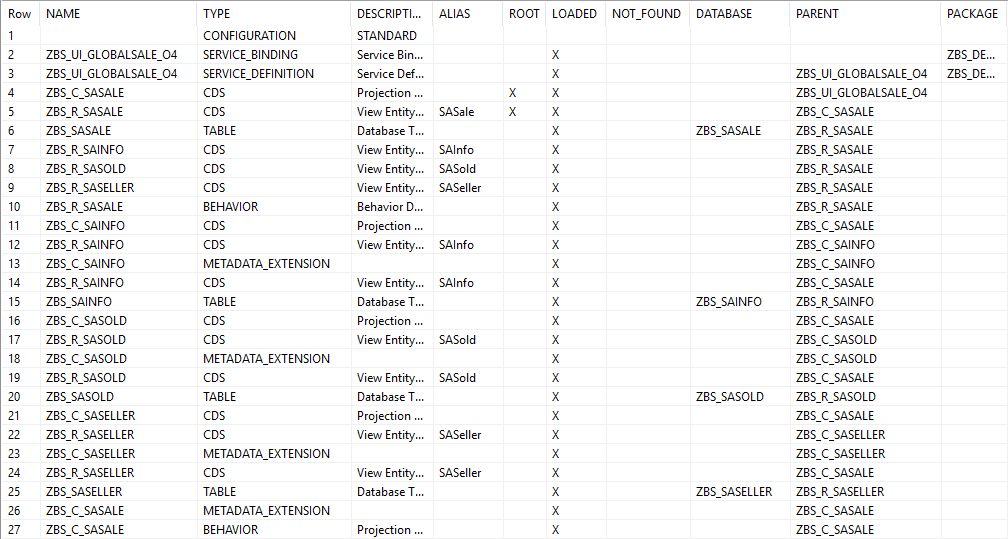
After restructuring the objects into layers and hierarchies, we obtain the final structure to prepare the output. We have the service, the root level, and the various sub-objects.
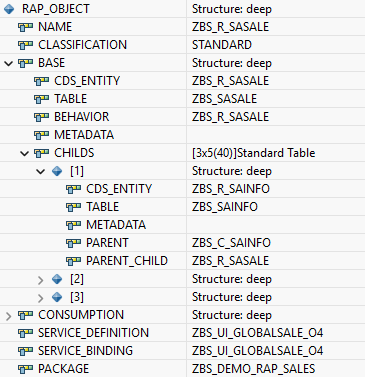
Output
For output, we prepare the objects and generate an HTML table. Each object receives an ADT link so that we can navigate between the objects more quickly. Since there is currently no SAP API for generating ADT links, we simply use our own class to create the links. As a result, we receive a string with HTML, which we can pass to the output.
Test
Let's test the action in the system and on various services and look at the result and the differences.
Standard
Let's look at the service ZBS_UI_COMPANY_O4, which you can find in the RAP Examples (REX) on GitHub. This service is relatively standard, was created with the "Generator from Scratch", and also has deep structures. All custom domains containing fixed values are displayed, as these are usually extended and quick access is desired.

Custom Entity
As a second example, we will use a Custom Entity for analysis. Here, for example, no Projection Layer or Metadata Extension is possible, therefore we also get fewer objects.

Pattern
In the upper section, you will also find the different RAP Patterns. Here, we try to identify which pattern it is using analysis. A pattern automatically identifies different properties of the object. A standard pattern has the largest number of objects, the metadata resides in separate objects, and we have a custom data model. A custom pattern has no projection, and the metadata always resides in the custom entity, as no custom objects are possible. Currently, not all patterns are supported or can be defined 100% correctly.
Performance
The analysis and display of the results takes a few seconds and is not immediately available. This is mainly due to the runtime of the XCO class, which, unfortunately, is not the most performant class for bulk analysis. In standard ABAP, a performance-optimized selection and analysis could certainly be created, but in ABAP Cloud we are bound to the public APIs.
In Action
If you would like further explanations about the RAP Analyzer or creating IDE Actions, you can find a Devtoberfest session from last year where we practically walk through the topic.
Complete Example
In this article, we have used various references from our projects. You can find more information about the projects on GitHub. If you want to test the IDE Actions on your own, you can also find the repository here:
- RAP Examples (REX) - Some examples of different developments and patterns for analyzing and testing the RAP Actions.
- My IDE Actions (MIA) - All IDE Actions developed in the framework.
Conclusion
The RAP Analyzer is primarily a prototype for now and already works quite well with the classic RAP stack. Specific patterns are partially recognized, but a full environmental analysis is not possible, for example, because the current XCO APIs do not allow complete access and we therefore cannot derive all the information.