RAP - Hybrid Pattern
Let's take a look at the hybrid pattern in the development of RAP objects. Who is this scenario intended for, how does it work, and what basic components are needed?

Table of contents
In this article, we'll look at the structure and use of the Hybrid Pattern. We'll build an application and examine the differences.
Introduction
The ABAP RESTful Application Programming Model is the new model in ABAP for creating Cloud Ready and Clean Core applications. With RAP, in addition to applications, interfaces for internal and external use can also be provided. With its latest features, RAP is very flexible in terms of structure and use, which is why we want to divide applications into different patterns.
Structure
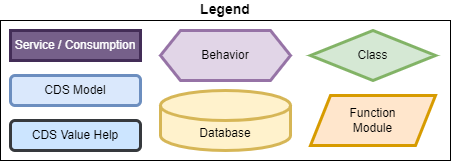
The "Hybrid Pattern" is primarily about the hybrid development of application scenarios across multiple systems. We have one or more remote sources that we connect to a local source in the system and then model together. This can currently happen in two ways: a custom entity or an external entity? In this article, we'll take a detailed look at the external entity. But first, let's define its boundaries. We use the following legend for the model.
The following characteristics serve as a delimiter:
- Data source from at least one remote system (often in a side-by-side scenario)
- Application based on local and remote data
- Currently, two technologies are used here (Custom Entity with Consumption Model or External Entity)

In our scenario, we have our main data, which we obtain via an External Entity. This accesses an on-premises system and reads a Core Data Service from it. We now incorporate this data into our application and model local data that we want to add to the data model. We then build certain behaviors on this and abstract the whole thing as a projection to create an application on the system. This is a classic extension scenario for a side-by-side application.
Example
In this chapter, let's look at a scenario based on an external entity, which we make available in the ABAP environment.
Data
Our remote data here comes mainly from the external entity. For this, we use the same external entity that we also used for our performance test. The entity contains corresponding random data that we want to display. We omit information such as very large text fields or other random data, which we will hide for now.
Modeling
During the modeling phase, we need to store our additional data locally in a table. Here, we also add the fields that are important for our RAP object so that we can later work with Draft. Since we repeatedly write this data away, it is worthwhile to store it locally and make it available to the model later.
@EndUserText.label : 'Additional Performance Data'
@AbapCatalog.enhancement.category : #NOT_EXTENSIBLE
@AbapCatalog.tableCategory : #TRANSPARENT
@AbapCatalog.deliveryClass : #A
@AbapCatalog.dataMaintenance : #RESTRICTED
define table zbs_hyb_perf_add {
  key client            : abap.clnt not null;
  key identifier        : abap.raw(16) not null;
  line_comment          : abap.char(160);
  responsible           : abap.char(12);
  local_created_by      : abp_creation_user;
  local_created_at      : abp_creation_tstmpl;
  local_last_changed_by : abp_locinst_lastchange_user;
  local_last_changed_at : abp_locinst_lastchange_tstmpl;
  last_changed_at       : abp_lastchange_tstmpl;
}
On the table, we model a Core Data Service. We will need this in the second step for the entire creation of our data model. Basically, we harmonize the field names here and specify further semantic information for the draft fields. Otherwise, there are no other special considerations.
@AccessControl.authorizationCheck: #NOT_REQUIRED
@EndUserText.label: 'Additional data'
define view entity ZBS_I_HYBPerformanceAdditional
  as select from zbs_hyb_perf_add
{
  key identifier            as Identifier,
      line_comment          as LineComment,
      responsible           as ResponsiblePerson,
      @Semantics.user.createdBy: true
      local_created_by      as LocalCreatedBy,
      @Semantics.systemDateTime.createdAt: true
      local_created_at      as LocalCreatedAt,
      @Semantics.user.localInstanceLastChangedBy: true
      local_last_changed_by as LocalLastChangedBy,
      @Semantics.systemDateTime.localInstanceLastChangedAt: true
      local_last_changed_at as LocalLastChangedAt,
      @Semantics.systemDateTime.lastChangedAt: true
      last_changed_at       as LastChangedAt
}
Then we can define our hybrid scenario. To do this, we create a root view. This root view selects from our external entity and has an association with our additional fields. We then directly integrate all of these additional fields into our entity.
@AccessControl.authorizationCheck: #NOT_REQUIRED
@EndUserText.label: 'Performance Data'
define root view entity ZBS_R_HYBPerformanceData
  as select from ZBS_X_DemoSQLPerformance
  association of one to one ZBS_I_HYBPerformanceAdditional as _Additional on _Additional.Identifier = $projection.Identifier
{
  key Identifier,
      ItemDescription,
      RandomDescription,
      Amount,
      Currency,
      NewDate,
      NewTime,
      _Additional.LineComment,
      _Additional.ResponsiblePerson,
      _Additional.LocalCreatedBy,
      _Additional.LocalCreatedAt,
      _Additional.LocalLastChangedBy,
      _Additional.LocalLastChangedAt,
      _Additional.LastChangedAt
}
That completes the modeling. We have combined the external data with the local data and provided additional information for the RAP runtime.
Projection
In the case of an external entity, the projection layer can be modeled in the standard way, without any restrictions, just like with a classic RAP object. You can find this layer in the example materials; we simply omitted it from the article because nothing particularly noteworthy happens there. This is not possible in the custom entity scenario, however, as custom entities do not currently support view stacking.
Behavior
Next, we define the actual behavior on our RAP object. We want to work with Draft, so we activate Draft. We set the various ETag fields; here we use the local fields that we can provide. In the data model, since our data is remote, there is essentially only the Update case. And we set Create and Delete to INTERNAL, which is important for the Draft runtime. We set the corresponding fields from the remote source to READONLY here, since we can't change this content anyway, at least not in our case. We also add a mapping to our table, which we can reuse later in our implementation. The UNMANAGED SAVE is particularly important here, since we're not working with a real table, at least not with the main data, but with the additional table that we have to save manually.
managed implementation in class zbp_bs_hybrid_performance unique;
strict ( 2 );
with draft;

define behavior for ZBS_R_HYBPerformanceData alias Performance
draft table zbs_hyp_draft
etag master LocalLastChangedAt
lock master total etag LastChangedAt
authorization master ( instance )
with unmanaged save
{
  internal create;
  update;
  internal delete;

  field ( readonly, numbering : managed ) Identifier;

  field ( readonly )
  ItemDescription,
  RandomDescription,
  Amount,
  Currency,
  NewDate,
  NewTime;

  draft action Edit;
  draft action Activate optimized;
  draft action Discard;
  draft action Resume;
  draft determine action Prepare;

  mapping for zbs_hyb_perf_add
    {
      Identifier         = identifier;
      LineComment        = line_comment;
      ResponsiblePerson  = responsible;
      LastChangedAt      = last_changed_at;
      LocalCreatedAt     = local_created_at;
      LocalCreatedBy     = local_created_by;
      LocalLastChangedAt = local_last_changed_at;
      LocalLastChangedBy = local_last_changed_by;
    }
}
After implementation, the first step is simply to create the SAVE_MODIFIED method. However, this is where things get a bit tricky, as we're always in the update case, but the data might not even exist in our database. Therefore, a fully managed implementation isn't possible, as the system would constantly try to update the record even if it doesn't exist, leading to a data dump. In this case, we first check if the record exists and read the data. Then we compare the data we have in the update with the data in the database. Here, we use our mapping and the control structure. Finally, we execute a MODIFY against the database to either create or update the data. Basically, we need to make sure that the key is always filled, because in the event of an update the key field is not changed and therefore, thanks to the CONTROL structure, is not adopted.
LOOP AT update-performance INTO DATA(update_performance).
  SELECT SINGLE FROM zbs_hyb_perf_add
    FIELDS *
    WHERE identifier = @update_performance-Identifier
    INTO @DATA(db_base).

  DATA(modify_performance) = CORRESPONDING zbs_hyb_perf_add( BASE ( db_base ) update_performance MAPPING FROM ENTITY USING CONTROL ).
  modify_performance-identifier = update_performance-Identifier.

  MODIFY zbs_hyb_perf_add FROM @modify_performance.
ENDLOOP.
UI
The rest is then relatively standard RAP. We create the projection layer and the corresponding behavior at that level. We define the service definition and the service binding, and publish the service. Finally, we generate the metadata extension to give the UI a look. Here we use our Metadata Wizard, a small open-source project that was implemented via an IDE action. Basically, you can also create the metadata extension manually.

Test
Once we're finished with that, we can also test whether our application now works properly. To do this, we load the preview function and, as a first step, display the application and load the initial data to see if the connection works at all.

In the second step, we edit a data record and add a short comment and an editor's initials so that we can save the information to the database and display it later along with the data record.

One special feature we have, especially with the External Entity, is that filtering is cleanly implemented in our application without requiring much effort from us to implement it manually. Let's run a test on the filter and filter by date; this would be the filter that's passed through to the backend (on-premises). We'll also enter a filter of locally defined values, so we can test both.
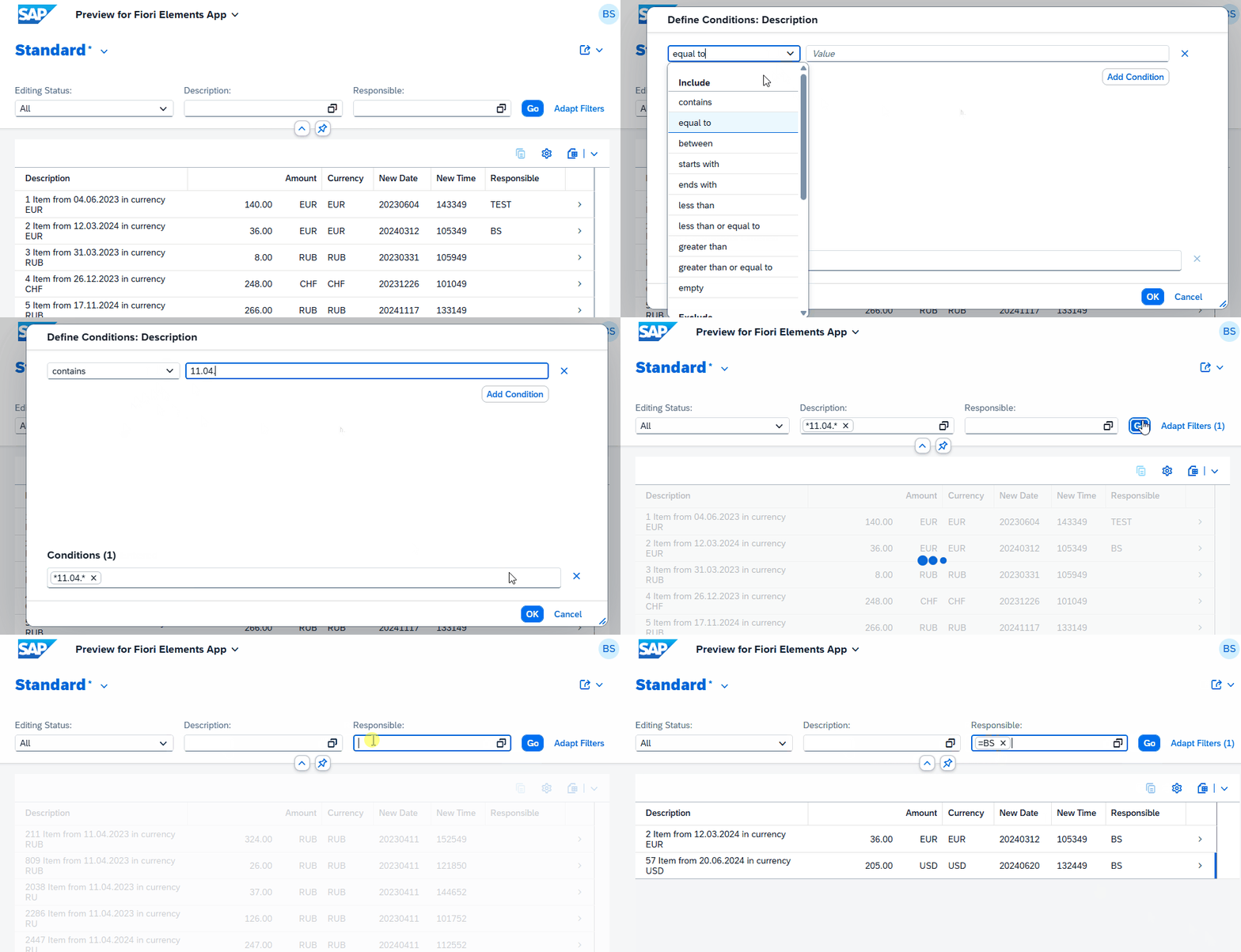
The interaction with the UI you see above was captured in real time. This is a huge advantage when working with external entities. Even if the data is hybrid, meaning it's modeled together, we can filter cleanly and quickly get a result. Implementing this with a custom entity and manually calling the OData service would take much longer and wouldn't be as performant. Furthermore, we would have to implement a lot of logic to control the filter that runs against the various data sources.
Complete Example
You can find the complete example of the built pattern in the package ZBS_DEMO_RAP_PATTERN_HYBRID in the GitHub repository. You can see all changes and objects that have been added to the repository via the following Commit.
Summary
This pattern is mainly used in side-by-side development and essentially just describes how we combine different data sources from different systems and bring them together in one data source or in a Fiori application. In this way, we can determine which extensions we implement, for example, whether we also call remote functionalities when the user performs an action in our application.
Alternatively, a custom entity can of course be used. There, the data could be retrieved via a consumption model. This has certain disadvantages, as we have a much higher implementation effort. There are also certain disadvantages in the application, as we have to model and display the data together. We would also have to consider the interaction with our application manually, i.e., which fields are displayed, which data the user filters in the frontend. Here, the External Entity offers many advantages and is an important aspect for us in the development of future applications that will be built side-by-side. This would allow the number of possible scenarios to increase even further.

Conclusion
Currently, side-by-side scenarios are built in a rather limited way. The problem is that a great deal of effort is required, especially when accessing and modeling the backend data, and there are not always synergies, especially if performance ultimately suffers. Hybrid development doesn't have to be complicated; with the help of external entities, it can be implemented much more frequently in the future without much extra effort, only requiring configuration. The actual modeling can then be done natively, regardless of the data source.