RAP - Sales App Learnings
The tutorial for the Sales App has come to an end, and this time a wide range of topics and areas were covered. In this article, we'll review what we learned and highlight some key points.

Table of contents
Our sales app is complete and fully developed. Let's review the entire process and look at the lessons learned from the whole series.
Introduction
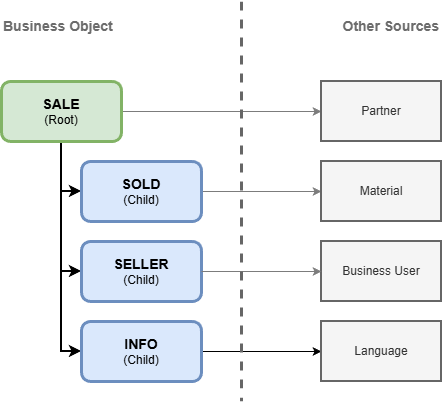
The sales app has now been completed and finally released. All the points we set for the app and the data model have been implemented. Thus, our RAP Example 7 (REX7) has produced a total of 35 articles from the various categories. The application is about recording sales on the different partners, distributing revenue and materials across various sub-entities. Here again is the representation of the different entities in the entire data model.
Learning
Let's look at the various learnings from the application areas.
RAP
As is typical for a RAP example, we have most of the learnings in this area. For example, we learned how to generate different RAP applications from templates. But we also covered specific topics such as multi-input fields, sorting virtual fields, augmentation, the positioning of various buttons, grouping actions, icons, criticality, importance, and draft queries, to name just a few. Furthermore, we examined various concepts that are important for representing complexity, for example, the implementation of change logs to track changes in our application. We implemented this both natively and manually. Another important aspect we explored was app-to-app navigation, a topic that is particularly important for user comfort and deserves more attention.
Fiori
We have created a completely new series on Fiori for ABAP developers. It was important to us that ABAP developers also understand how some Fiori tools work, how an app is structured, and where to find various components within the app. We covered different aspects, such as the page map, guided development, and navigation. Ultimately, not every app is purely native Fiori Elements; some require extensions. We explored how to extend the app, for example, by adding a rich text editor. Of course, to make the application available, it's crucial to perform a deployment and ensure the developer knows what to do. Other important topics included the implementation of standard services such as the application log, change logs, and open-source projects for uploading Excel files.
Additional
Additional topics we looked at, which can be helpful to an ABAP developer, include the Metadata Wizard for generating UI annotations, and relatively quickly at that. Additionally, we looked at other topics in the ABAP Cloud area, such as creating custom units when we need something outside the standard, or how to create and use change documents.
Tutorial
We carried out the development on the ABAP environment, as the latest features from RAP development are available there. This means that if you want to run the example in a sandbox like the Docker container or rebuild it on-premises, some functions may not be feasible or the corresponding tools may be missing. In principle, most things should be possible, and you can work through the tutorial step by step to absorb the various learnings from the different areas. By the end, you should know how to implement complex RAP applications and how Fiori Elements can support you in building simple applications and keeping them extensible.
We generally recommend that you check out the RAP Learning page. There you will find further tutorials, especially if you are a beginner, want to learn new things, or if you want to know more about the various features of RAP development. You can find the link at the bottom of this article.
Result
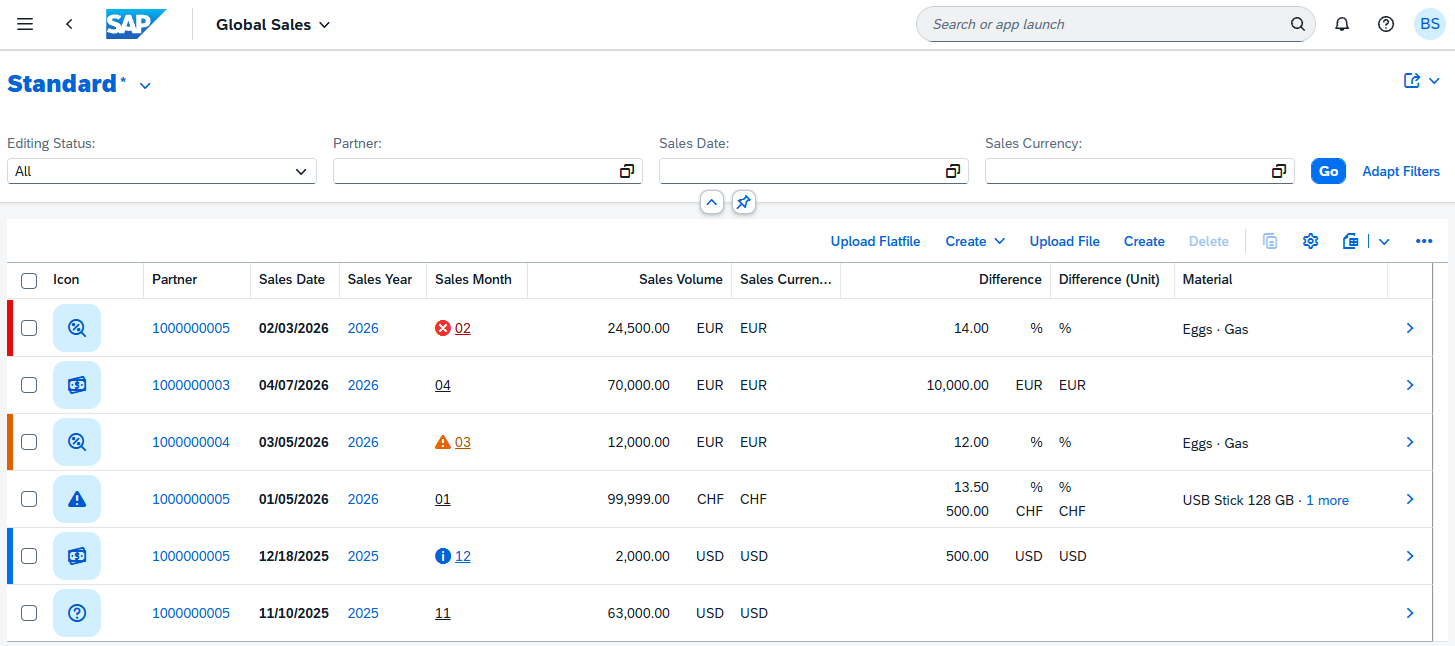
The result is a fully deployed application on the system. When we start the application, the List Report opens immediately. Here we find various things we have implemented in the past, such as the Semantic Key, which performs the highlighting, or the different colors that are represented by the Criticality. Further down, under Material, you will also find the Multi-Input Field, where we have entered various values that are displayed in a row. We have also implemented a grouping of the Create Action (dropdown), where selection is possible via a menu.
Navigating to the Object Page then loads it in Flexible Column Layout. That means, on the left side is the List Report, where we can navigate between the items, and on the right side we see the Object Page, which is loaded for the respective selected entry. There we find various formats for the header, the different sections we created, and the reusable components, such as the application log in the table.

Complete Example
You can find the complete example in GitHub in the repository for all RAP examples that we have published on this blog. The Sales App on the ABAP side is located in the ZBS_DEMO_RAP_SALES package. You can find the app as a Fiori project in its own GitHub repo.
Conclusion
Trying out RAP development on a complex and detailed example can be challenging, as most examples are kept very short to be completed in a small session. We hope this series will help you discover more details and learn things you didn't know before. We wish you lots of fun working through the tutorial.
Further information:
RAP Learning Path