ABAP in Practice - Object Generator
In this example, we will look at how to create a reusable generator using the XCO library to save ourselves some work for our tutorials and to automatically generate DDIC objects.

Table of contents
In this article, we'll put it into practice and create a generator for creating new objects in the DDIC area. This should save us manual work in future tutorials.
Introduction
Sometimes you want to try something new, but you're already annoyed by the process of creating the table and generating proper data elements? Then a generator can help you.
Task
The task sounds very simple at first: we need a generator that creates data elements and domains for us and works with minimal configuration. This will save us some work the next time we want to create models and databases. If it is built to be reusable, we can also use it to generate mass data for each participant in training sessions.
Hint: We will discuss the solution in the next section. If you would like to complete the task independently first, you should pause here.
Solution
Let's go through the different parts of the development step by step.
Basic Structure
In the first step, we provide a clean basic structure for the objects. We want to provide a small framework using ABAP OO while adhering to the principles of testability and reusability. Therefore, in addition to the class, we also generate a Factory and an Injector, which we use to start almost any development process. To ensure the system works smoothly, we use our IDE Actions to generate the classes.

After formatting the objects, we can then move on to the actual implementation.
Structures
To create the objects, we should first create a configuration in the form of structures and tables. In most cases, we want to pass a structure, table, or object to the method to keep the interface small, clean, and easily extensible. In this case, we create a structure and start with the internal objects. Let's begin with the configuration for domains and data elements.
TYPES: BEGIN OF domain,
         name           TYPE sxco_ad_object_name,
         description    TYPE if_xco_cp_gen_doma_s_form=>tv_short_description,
         base_type      TYPE string,
         length         TYPE i,
         decimals       TYPE i,
         case_sensitive TYPE abap_boolean,
       END OF domain.
TYPES domains TYPE STANDARD TABLE OF domain WITH EMPTY KEY.

TYPES: BEGIN OF data_element,
         name        TYPE sxco_ad_object_name,
         description TYPE if_xco_cp_gen_dtel_s_form=>tv_short_description,
         label       TYPE string,
         domain      TYPE sxco_ad_object_name,
       END OF data_element.
TYPES data_elements TYPE STANDARD TABLE OF data_element WITH EMPTY KEY.
Later, we want to be able to create abstract entities with the data elements, so we also define configurations for the entity's field list and the entity itself.
TYPES: BEGIN OF field,
         name         TYPE sxco_cds_field_name,
         data_element TYPE sxco_ad_object_name,
         currency     TYPE string,
         unit         TYPE string,
       END OF field.
TYPES fields TYPE STANDARD TABLE OF field WITH EMPTY KEY.

TYPES: BEGIN OF abstract_entity,
         name        TYPE sxco_cds_object_name,
         description TYPE if_xco_cp_gen_dtel_s_form=>tv_short_description,
         fields      TYPE fields,
       END OF abstract_entity.
TYPES abstract_entities TYPE STANDARD TABLE OF abstract_entity WITH EMPTY KEY.
With this, we have defined all subordinate types and can now define the actual configuration structure. For this, we also want the package for creation, the transport, and a checkfix. We need the first two values depending on the system. We enter the configuration into the generator via the other fields.
TYPES: BEGIN OF ddic_configuration,
         package           TYPE sxco_package,
         transport         TYPE sxco_transport,
         prefix            TYPE string,
         domains           TYPE domains,
         data_elements     TYPE data_elements,
         abstract_entities TYPE abstract_entities,
       END OF ddic_configuration.
Hint: With the initial setup, we have already established our basic structure for the system. Therefore, every data element in our system essentially has a domain that defines its type and technical details.
Configuration
Since we want to relieve the caller of many configuration tasks, we can easily derive some information. The XCO framework provides us with several methods for this. For example, we can deduce from the calling object which package we are working in and whether there is an open transport request for it. To do this, we could retrieve the Callstack and determine the calling object. In this case, we keep it relatively simple and pass the SY-REPID field via the factory. However, we receive the class name as "ZMY_CLASS====CP". We write a simple function to extract this name.
calling_object = substring( val = calling_object
                            len = find( val = calling_object
                                        sub = '=' ) ).
We can now read in the class, or at least we assume that we are being called from a class, and retrieve the package and its name via the interface IF_XCO_AR_OBJECT. Basically, we can also access an open transport via the interface IF_XCO_CTS_CHANGEABLE if the object is assigned to one.
xco_cp_abap=>class( CONV #( calling_object ) )->if_xco_ar_object~get_package( )->name.
If the prefix is filled, then we want to add it to all objects, since they are usually in the same namespace. This saves time and effort during input, and we could also generate different objects for different participants.
LOOP AT ddic_configuration-domains REFERENCE INTO DATA(domain).
  domain->name = ddic_configuration-prefix && domain->name.
ENDLOOP.

LOOP AT ddic_configuration-data_elements REFERENCE INTO DATA(data_element).
  data_element->name   = ddic_configuration-prefix && data_element->name.
  data_element->domain = ddic_configuration-prefix && data_element->domain.
ENDLOOP.
Operation
In order to generate objects, we need an OPERATION from the XCO framework. Since we want to create new objects, we use the CREATE_PUT_OPERATION method. We then pass this from method to method to create the different types.
DATA(put_operation) = xco_cp_generation=>environment->dev_system( me->ddic_configuration-transport )->create_put_operation( ).
We already described the generation of artifacts with XCO in a previous article. You can find more information about the possibilities and the framework in the article.
Domains
What actually constitutes a domain and which types do we need? We also need a structure of constants to allow the user to specify supported types. These are the types we typically use most frequently in development.
CONSTANTS:
  BEGIN OF domain_types,
    character     TYPE string VALUE `CHAR`,
    date          TYPE string VALUE `DATN`,
    time          TYPE string VALUE `TIMN`,
    integer       TYPE string VALUE `INT4`,
    integer_long  TYPE string VALUE `INT8`,
    timestamp     TYPE string VALUE `UTCLONG`,
    currency_code TYPE string VALUE `CUKY`,
    currency      TYPE string VALUE `CURR`,
    quantity      TYPE string VALUE `QUAN`,
    unit          TYPE string VALUE `UNIT`,
    decimals      TYPE string VALUE `DEC`,
    raw           TYPE string VALUE `RAW`,
    string        TYPE string VALUE `STRING`,
    short_string  TYPE string VALUE `SSTRING`,
  END OF domain_types.
The actual type of structure results from our requirements and the mandatory fields of the standard. In this case, we always need a description, the package for the attachment, a name, and the type. Using the operation, we add a new domain, set the target package, and obtain the specification. We can then use the specification to set properties such as description, type, and case sensitivity.
LOOP AT ddic_configuration-domains INTO DATA(domain).
  DATA(specification) = operation->for-doma->add_object( domain-name
    )->set_package( ddic_configuration-package
    )->create_form_specification( ).

  specification->set_short_description( domain-description ).

  CASE domain-base_type.
    WHEN zif_gen_objects=>domain_types-character.
      format = xco_cp_abap_dictionary=>built_in_type->char( CONV #( domain-length ) ).
    WHEN zif_gen_objects=>domain_types-date.
      format = xco_cp_abap_dictionary=>built_in_type->datn.
    WHEN zif_gen_objects=>domain_types-integer.
      format = xco_cp_abap_dictionary=>built_in_type->int4.
    WHEN OTHERS.
      CONTINUE.
  ENDCASE.

  specification->set_format( format ).
  specification->output_characteristics->set_case_sensitive( domain-case_sensitive ).
ENDLOOP.
Data Elements
The data elements then look quite similar to the domains. Here we have mandatory fields such as the texts that we should fill in. This keeps the logic here quite manageable.
LOOP AT ddic_configuration-data_elements INTO DATA(data_element).
  DATA(specification) = operation->for-dtel->add_object( data_element-name
    )->set_package( ddic_configuration-package
    )->create_form_specification( ).

  specification->set_short_description( data_element-description ).
  specification->set_data_type( xco_cp_abap_dictionary=>domain( data_element-domain ) ).

  DATA(label) = COND #( WHEN data_element-label IS INITIAL
                        THEN data_element-name
                        ELSE data_element-label ).

  specification->field_label-short->set_text( CONV #( label ) ).
  specification->field_label-medium->set_text( CONV #( label ) ).
  specification->field_label-long->set_text( CONV #( label ) ).
  specification->field_label-heading->set_text( CONV #( label ) ).
ENDLOOP.
Abstract Entities
Let's move on to the first CDS entity, which can be somewhat more complex. The beginning is the same: we define a specification and set the description. However, we then have different types that we can create. Therefore, we need our type from the specification to further define it.
DATA(abstract_entity) = specification->add_abstract_entity( ).
Then we transfer our fields into the entity. Since we want to define a data element for each field, we can use simple logic here. The more complex type determination thus remains in the domain. First, we add the field using ADD_FIELD and then set the type as a data element using SET_TYPE. The difficult part is finding the right example code for how the field is added and also the type. In the first step, we tried using an expression, but this puts a comma after each record, which leads to errors with an abstract entity.
DATA(cds_field) = abstract_entity->add_field( xco_cp_ddl=>field( field-name )
  )->set_type( xco_cp_abap_dictionary=>data_element( field-data_element ) ).
What's still missing? The entity will throw an error if we use an AMOUNT or QUANTITY field and don't link the units together. Therefore, we have to add annotations to the fields afterward. The annotations are specified without the @ symbol, and the value is concatenated using the builder. This research also took some time, as the usage wasn't immediately obvious, and the ABAP documentation didn't contain any information on how to use the method and the values.
IF field-currency IS NOT INITIAL.
  cds_field->add_annotation( 'Semantics.amount.currencyCode' )->value->build( )->add_string( field-currency ).
ENDIF.

IF field-unit IS NOT INITIAL.
  cds_field->add_annotation( 'Semantics.quantity.unitOfMeasure' )->value->build( )->add_string( field-unit ).
ENDIF.
Generation
Don't forget to generate the objects at the end. Here, they are generated and activated in one step and created in the system. However, you can also create them in an inactive state first if you still have some work to do or want to deal with the errors.
RETURN put_operation->execute( ).
Possibilities
To achieve further optimizations in the code, we can optimize a few things to make further input easier for the user:
- Defaults - Automatic defaults for labels, descriptions, and basic types to minimize input.
- Basic Types - Use of basic types and data elements from the standard (SPRAS, ABAP_BOOLEAN)
- Error Handling - The object cannot be created; a log is returned. Does the object already exist, or are required fields missing?
- JSON - Currently, the generator uses a structure for generation; however, it is also quite easy to read and use JSON from the system or a Git repository as configuration.
Test
Now that we have defined the logic, we should test it and create a few objects. We use a unit test for this, but that's not best practice in this case, as a test shouldn't modify objects in the system or would require the appropriate classification. Let's populate our structure for configuration.
DATA(abstract_entities) = VALUE zif_gen_objects=>abstract_entities(
    ( name        = 'ZGEN_S_TestGeneratedStructure'
      description = 'Automatic generated'
      fields      = VALUE #( ( name = 'KeyField' data_element = 'KEY_FIELD' )
                             ( name = 'SalesVolume' data_element = 'AMOUNT' currency = 'SalesCurrency' )
                             ( name = 'SalesCurrency' data_element = 'CURRENCY' ) ) ) ).

DATA(data_elements) = VALUE zif_gen_objects=>data_elements(
    ( name = 'KEY_FIELD' domain = 'KEY_FIELD' description = 'Key' )
    ( name = 'AMOUNT' domain = 'AMOUNT' description = 'Amount' )
    ( name = 'CURRENCY' domain = 'CURRENCY' description = 'Currency' ) ).

DATA(domains) = VALUE zif_gen_objects=>domains(
    ( name = 'KEY_FIELD' base_type = zif_gen_objects=>domain_types-character length = 7 )
    ( name = 'AMOUNT' base_type = zif_gen_objects=>domain_types-currency )
    ( name = 'CURRENCY' base_type = zif_gen_objects=>domain_types-currency_code ) ).

DATA(config) = VALUE zif_gen_objects=>ddic_configuration( prefix            = 'ZGEN_DEMO_'
                                                          domains           = domains
                                                          data_elements     = data_elements
                                                          abstract_entities = abstract_entities ).
Then we create an instance via the factory, pass in the data, and let the system create the objects.
DATA(generator) = zcl_gen_objects_factory=>create_generator( sy-repid ).
DATA(result) = generator->generate_ddic( config ).
After the logic has hopefully run without major errors, we should find our objects in the current package after a refresh.
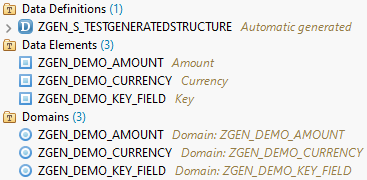
In the Core Data Service, the fields have been defined as desired, the relationship to the currency has been entered, and all objects have been activated. Therefore, the test is successful for us.
define abstract entity ZGEN_S_TestGeneratedStructure
{
  KeyField      : zgen_demo_key_field;
  @Semantics.amount.currencyCode: 'SalesCurrency'
  SalesVolume   : zgen_demo_amount;
  SalesCurrency : zgen_demo_currency;
}
Complete Example
You can find the current version of the generator in this GitHub repository. This repository is also the basis for the next article, where we will create the first objects via configuration to get started quickly.
Conclusion
Working with the XCO library is not always easy, and if we are not yet very familiar with the API, finding examples and the right method can take a while. In the end, we obtain an ABAP Cloud-compatible generator that will save us some work in the future.