ABAP - XCO Class Runner
What about the execution of ABAP classes in the XCO area? Let's take a closer look at the Class Runner.

Table of contents
The XCO classes are helper classes that provide various everyday functions bundled under a public API. You can find more information and an overview of the XCO libraries on the overview page.
Introduction
The Class Runner has now become a standard for executing classes and outputting data to the console in the ABAP Development Tools. There are various versions and interpretations of the Class Runner in the standard. Today we will look at the implementation for the XCO classes and which functions are supported by the standard.
Attachment
First, let's create a test class that we can use for our tests. Use the context menu; on our package ZBS_DEMO_XCO or on the system we can create a new class.

Once we have created the class, an error message awaits us in the first step, as we still have to redefine the MAIN method.

By clicking on the light bulb in the front part or CTRL + 1 on the source code we can use the "Quick Fix" and receive further suggestions for solving the problem.

Using "Add implementation for main" the method is redefined and the method body is created in our class. The class should currently look like this. You can find the redefinition in the PROTECTED area.
CLASS zcl_bs_demo_xco_classrun DEFINITION
  PUBLIC
  INHERITING FROM cl_xco_cp_adt_simple_classrun FINAL
  CREATE PUBLIC.

  PUBLIC SECTION.

  PROTECTED SECTION.
    METHODS
      main REDEFINITION.

  PRIVATE SECTION.
ENDCLASS.


CLASS zcl_bs_demo_xco_classrun IMPLEMENTATION.
  METHOD main.
  ENDMETHOD.
ENDCLASS.
Output
Using the MAIN method we get our OUT object of type IF_XCO_ADT_CLASSRUN_OUT, which we can use to output to the console. Let's take a closer look at the interface.

We have three methods and one attribute available:
- WRITE - Generic output of content to the console, no preparation of types takes place.
- WRITE_NEWS - Output of objects with the interface IF_XCO_NEWS.
- WRITE_TEXT - Output of objects with the interface IF_XCO_PRINTABLE.
- PLAIN - Access to the standard OUT object of the class runner to generate the standard output (with formatting).
Implementation
In this section we look at the different methods in detail and how they behave when outputting.
WRITE
The simplest method is WRITE, which accepts all data. To do this, we define a date, a string, a table of strings and a structured table. We then pass these to the method and look at the output.
DATA(simple_date) = CONV d( '20250228' ).
DATA(my_string) = `ABAP can handle long texts as string!`.
DATA(my_strings) = VALUE string_table( ( `ABAP can` ) ( `handle` ) ( `long texts` ) ( `as string!` ) ).
DATA(persons) = get_persons( ).

out->write( simple_date ).
out->write( my_string ).
out->write( my_strings ).
out->write( persons[ 1 ] ).
out->write( persons ).
The data is output in one line. The date is not formatted and the tables/structures are output as a JSON object.

WRITE_NEWS
The method is used to generate outputs via objects with an integrated interface IF_XCO_NEWS. The interface returns a list of individual messages, for which the GET_TEXT method is then called. The method is therefore primarily used to output
MESSAGE w001(zbs_demo_xco) WITH 'Method' 'Message' INTO DATA(dummy_message).
DATA(xco_message) = xco_cp=>sy->message( ).

out->write_news( xco_message ).
The message is then output as simple text and without specifying the type or further information about the message.

WRITE_TEXT
The WRITE_TEXT method outputs data for XCO objects. If the class has the interface IF_XCO_PRINTABLE, the output can be prepared and output accordingly. To do this, we create some XCO objects, such as strings or data.
DATA(xco_string) = xco_cp=>string( `ABAP can handle long texts as string!` ).
DATA(xco_strings) = xco_cp=>strings( VALUE #( ( `ABAP can` ) ( `handle` ) ( `long texts` ) ( `as string!` ) ) ).
DATA(xco_date) = xco_cp=>sy->date( ).
DATA(xco_moment) = xco_cp=>sy->moment( ).

out->write( xco_string ).
out->write( xco_strings ).
out->write( xco_date ).
out->write( xco_moment ).
When you look at the output, you will notice that the date types do not provide standard output, but are only listed as object references. To do this, we need to create objects with output, such as STRING objects with the AS method.
out->write( xco_date->as( xco_cp_time=>format->abap ) ).
out->write( xco_moment->as( xco_cp_time=>format->abap ) ).
The entire output of the section would then look like this:

PLAIN
Using the PLAIN attribute of the OUT object we have access to the standard object of the classic class runner. Using WRITE we can output content to the console.
out->plain->write( get_persons( ) ).
With GET we can return the current output for the console as a string. If you call the method, the current output buffer is reset and nothing is output to the console.
DATA(console_output_raw) = out->plain->get( ).
If, for example, you want to output the data for a table in a formatted form, you can simply do this using the standard object.

Stability
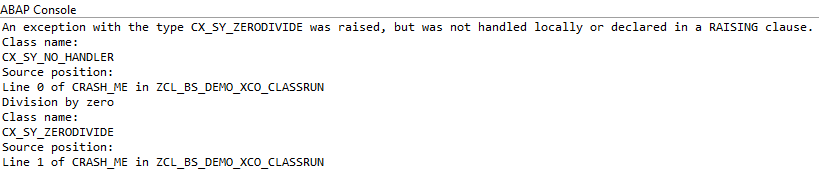
Finally, let's look at the stability of the class runner. If we normally trigger an exception and do not handle it, the process aborts with a dump. To do this, we implement the following logic in a separate method:
DATA(result_in_error) = 12 / 0.
When we execute the logic, it does not abort, but instead an error is output in the log. If you dive deeper into the standard, you will find a TRY/CATCH for CX_ROOT that catches and outputs all catchable exceptions.
Full example
The full example of the implementation can be found here. In addition, you can find further examples from the XCO area in the GitHub repository. You can find the changes made to the article via the commit.
CLASS zcl_bs_demo_xco_classrun DEFINITION
  PUBLIC
  INHERITING FROM cl_xco_cp_adt_simple_classrun FINAL
  CREATE PUBLIC.

  PUBLIC SECTION.

  PROTECTED SECTION.
    METHODS
      main REDEFINITION.

  PRIVATE SECTION.
    TYPES: BEGIN OF person,
             user_id    TYPE c LENGTH 12,
             name       TYPE string,
             birthday   TYPE d,
             size_in_cm TYPE i,
           END OF person.
    TYPES persons TYPE STANDARD TABLE OF person WITH EMPTY KEY.

    METHODS output_with_write
      IMPORTING !out TYPE REF TO if_xco_adt_classrun_out.

    METHODS output_with_write_text
      IMPORTING !out TYPE REF TO if_xco_adt_classrun_out.

    METHODS output_with_write_news
      IMPORTING !out TYPE REF TO if_xco_adt_classrun_out.

    METHODS use_plain_object
      IMPORTING !out TYPE REF TO if_xco_adt_classrun_out.

    METHODS get_persons
      RETURNING VALUE(result) TYPE persons.

    METHODS crash_me.

ENDCLASS.


CLASS zcl_bs_demo_xco_classrun IMPLEMENTATION.
  METHOD main.
    output_with_write( out ).
    output_with_write_text( out ).
    output_with_write_news( out ).
    use_plain_object( out ).
    crash_me( ).
  ENDMETHOD.


  METHOD get_persons.
    RETURN VALUE persons( ( user_id = 'P01' name = `Phillipp Kohl` birthday = '19850522' size_in_cm = 174 )
                          ( user_id = 'P02' name = `Ruth Z. Robinson` birthday = '19850107' size_in_cm = 168 )
                          ( user_id = 'P03' name = `James S. Richardson` birthday = '19921102' size_in_cm = 186 ) ).
  ENDMETHOD.


  METHOD output_with_write.
    DATA(simple_date) = CONV d( '20250228' ).
    DATA(my_string) = `ABAP can handle long texts as string!`.
    DATA(my_strings) = VALUE string_table( ( `ABAP can` ) ( `handle` ) ( `long texts` ) ( `as string!` ) ).
    DATA(persons) = get_persons( ).

    out->write( simple_date ).
    out->write( my_string ).
    out->write( my_strings ).
    out->write( persons[ 1 ] ).
    out->write( persons ).
  ENDMETHOD.


  METHOD output_with_write_text.
    DATA(xco_string) = xco_cp=>string( `ABAP can handle long texts as string!` ).
    DATA(xco_strings) = xco_cp=>strings( VALUE #( ( `ABAP can` ) ( `handle` ) ( `long texts` ) ( `as string!` ) ) ).
    DATA(xco_date) = xco_cp=>sy->date( ).
    DATA(xco_moment) = xco_cp=>sy->moment( ).

    out->write( xco_string ).
    out->write( xco_strings ).
    out->write( xco_date ).
    out->write( xco_moment ).
    out->write( xco_date->as( xco_cp_time=>format->abap ) ).
    out->write( xco_moment->as( xco_cp_time=>format->abap ) ).
  ENDMETHOD.


  METHOD output_with_write_news.
    MESSAGE w001(zbs_demo_xco) WITH 'Method' 'Message' INTO DATA(dummy_message).
    DATA(xco_message) = xco_cp=>sy->message( ).

    out->write_news( xco_message ).
  ENDMETHOD.


  METHOD use_plain_object.
    out->plain->write( get_persons( ) ).

*    DATA(console_output_raw) = out->plain->get( ).
  ENDMETHOD.


  METHOD crash_me.
    DATA(result_in_error) = 12 / 0.
  ENDMETHOD.
ENDCLASS.
Conclusion
The Class Runner from the XCO area offers the advantage of stability and that the main method cannot be called from other developments, which could potentially lead to errors. In addition, you can output many XCO objects via the output, which would otherwise be a little more difficult to prepare. Nevertheless, the output can still be expanded when it comes to standard types such as date or moment.
Sources:
SAP Help - XCO ADT