ABAP Cloud - SM30 Migration
In this tutorial, we'll look at migrating a maintenance view to ABAP Cloud and how to migrate existing objects step by step. We'll examine various aspects of the new maintenance application.

Table of contents
In this article, we migrate an existing maintenance view with data to ABAP Cloud and transfer it to the Business Configuration.
Introduction
If you are already on your way to ABAP Cloud, you are probably currently facing challenges in how to combine existing table maintenance and customizing. Users currently have two different approaches and UIs available. Maintaining data in both the SAP GUI and SAP Fiori simultaneously can be challenging. Therefore, you should consider whether you should also migrate existing table maintenance.
Current Status
Currently, we have a customer-specific table in the ZBS_SM30 package which, in addition to the company code as a key, also has a configuration field. The table is currently defined for application data and can be maintained.
@EndUserText.label : 'Configuration'
@AbapCatalog.enhancement.category : #NOT_EXTENSIBLE
@AbapCatalog.tableCategory : #TRANSPARENT
@AbapCatalog.deliveryClass : #A
@AbapCatalog.dataMaintenance : #ALLOWED
define table zbs_sm30_config {
  key client : mandt not null;
  key bukrs  : bukrs not null;
  setting    : zbs_setting;
}
We have generated a corresponding table maintenance view, which has an authorization group and its own function group. All the generated artifacts are located in the function group so that we can maintain the table.

The table already contains some data that we have maintained for testing purposes. This is the standard procedure for maintaining table content in the SAP GUI.

Migration
Our goal in this case is to migrate the current maintenance view to ABAP Cloud without deleting the data. We want to switch from the SAP GUI to the Business Configuration. We're doing the switch on an S/4HANA 2023 On-Premises system with FPS3.
Preparation
To start the migration, we need a new or existing Software Component in the system. In this scenario, we'll create a new SWC. You can find more details about the creation process in this article. We'll then create a structure for the migration. We create a separate app for each table because the business configuration, or rather the entire RAP stack, generates many objects, and this allows us to separate the objects from each other.

Table
In the next step, we change the language version of the table to ABAP Cloud and move the table to the software component. To do this, we open the table and go to the "Properties" view in Eclipse. There you will find the language version in the "General" tab and can edit it.
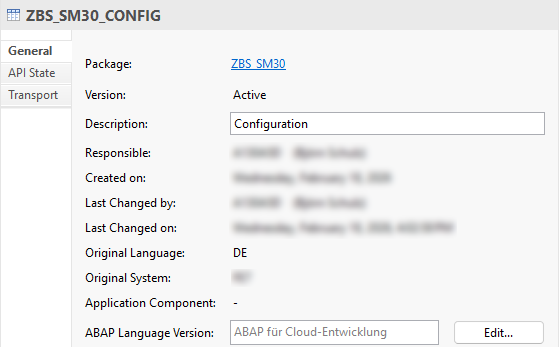
After activating the table, we can then move it to the software component. To do this, right-click on the table and select the option "Change Package Assignment..." from the dropdown menu. We define our new package as the target.

The table migration works, however, you should now see an error message in the table when you click "Check". The data element ZBS_SETTING should also be moved, but the table will remain active until then. To restore consistency, we also move this data element into the new package for the table. Don't forget to change the object's language version. After moving the object, the error should disappear after a further check.
Generation
In the next step, we want to start the Generator on the table, which creates the business configuration in the system. However, we still need to set the delivery class to C for Customizing, otherwise we will get an error message when starting the generator. On the table, you can then right-click to start the wizard via "Generate ABAP Repository Objects..." and select the generator for "Maintenance Object" there. select.

In the next image, we configure the various objects and display the preview. Once you are satisfied with the object names, start the generation process in the system. Generation takes a few minutes, and at the end, we can jump to the new Business Configuration Maintenance Object.

Service
After generation, the OData service must also be activated in the system. In the release we are using, this now also works via the ADT UI using the "Publish" button. If you have an older release, you may need to do this via transaction /IWFND/V4_ADMIN.
Authorization
To see the service in the Business Configuration, you need authorization for the service. The Business Configuration is generally present in the table SMBC_CONFIG, however, the entry in the app is filtered out via the authorization object S_START in the Core Data Service. Therefore, you need the corresponding authorization; otherwise, the app will remain empty and no maintenance dialogs will be displayed. This allows you to control in detail who sees which maintenance dialog.

Since permissions are restricted in many systems, or because S_TABU_DIS was primarily assigned for maintenance permissions in the past, we may currently lack editing permissions. You can easily recognize this if the "Edit" button in the application is deactivated.

Ultimately, the user will later need permissions based on S_TABU_NAM to be able to work with the table and the data. Depending on the internal process, it can take some time for these permissions to be granted. Therefore, we can currently adjust the check in the implementation. To do this, we go to the GET_GLOBAL_AUTHORIZATIONS method and add the following line after setting the IS_AUTHORIZED variable. This ensures that the permissions are always in place and editing is enabled.
is_authorized = if_abap_behv=>auth-allowed.
Hint: If you don't see any data in the Core Data Service, you should also check the Access Control and deactivate the check there. This is generally a quick fix, and proper authorizations should always be assigned.
Value Help
Currently, the value help is not working, even though a classic value help is defined in the BUKRS data element. However, this is only supported for the SAP GUI. Therefore, we need to define our own search help in the Consumption View using annotations. Here, you can always search for "I_*VH" and you will find most of the standard search helps in the system that are also enabled.
    @Consumption.valueHelpDefinition: [{ entity: { name: 'I_CompanyCodeVH', element: 'CompanyCode' } }]
key bukrs   as Bukrs,
Transport
Depending on the generator and release, you may need to remove the transport mechanism afterward if you don't need it. You can find an example of how to do this in a current release in this YouTube video. Generally, you should check and clean up the following objects:
- Behavior definition - Here, actions and validations for transport are defined. Everything named "Transport" can be removed without major problems.
- Behavior implementation - After the definition, you will find some error messages in the implementation. Here you can remove all methods with errors and all information related to transport.
- Metadata Extension - In the metadata of the root entity, the facet and the button for transport can also be removed.
Hint: When adjusting the behavior, also consider the projection.
Cleanup
Now that we have moved the table, we can clean up the last elements of table maintenance. To do this, we open transaction SE11 or SE54 and can delete the generated objects.

After clicking "Delete", we confirm all objects and remove the various components from the system so that the table can only be maintained via the Fiori app.

Result
The migration is complete, and maintenance can now be performed via the Business Configuration. You can make further maintenance settings via the BC Maintenance Object.

Conclusion
Migrating existing maintenance views is quite simple and quick. The change in authorizations, in particular, will take a little more time, but allows for better control of the objects and tables to be maintained.