BTP - Business Configuration (without Transport)
How do you actually use the Business Configuration without the transport recording? In this article we clarify whether it is possible.

Table of contents
In the last article we looked at the use of the Business Configuration and noticed that a transport is always necessary to change the entries in the table. In this little tip we'll look at how we can deactivate the transport control, similar to the SM30.
Introduction
When it comes to customizing, it is important that it is distributed consistently across the system landscape, as it controls central processes in the system. It is therefore also important that changes are recorded in transports and transported across the system landscape. However, in in-house development there are always requirements to be able to maintain settings directly in production, which would not be possible at the moment.
Changes
Let's take a look at the changes to be made, what do we have to change to the business object so that we can work without transport. You should note that the type of table must always be set to C for Customizing if it is used in a business configuration.
Behavior implementation
The easiest way is to comment out the necessary calls. If you look at the behavior implementation (Local Type), you will find several helper classes for implementing each function.

The class with CTS is the connection to the transport administration. We have to comment out the following method contents:
- Singleton - GET_INSTANCE_FEATURE
- Entity - GET_GLOBAL_FEATURES
- Entity - ValidateTransportRequest (Validation from RAP)
CDS Metadata
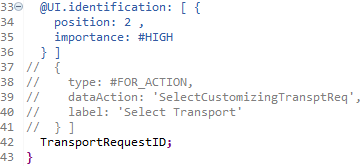
We still have to comment out the action in the metadata of the singleton, otherwise it will still be displayed in the UI.
Complete
Of course, you can also clean the object completely. To do this, the behavior definition had to be completely cleaned up and all traces of the transport connection had to be deleted in the implementation. If you are still unsure whether you will still need the settings later, you can comment them out first.
Result
The result of our adjustments now looks like this, the “Select Transport” button is no longer there, the entries in the table can be edited and saved.

You can find all the changes we made in the commit of the GitHub repository, where you can see the various changes again.
Conclusion
Not many adjustments to the object are necessary to disable transport recording. Theoretically, you can also use this to record transports in the development system, but allow adjustments to the master data in the subsequent systems. Similar hybrid scenarios have already existed in the SM30 environment in the past.