ABAP Quick - Logging Performance
What about the performance of the BAL log in the ABAP Cloud world? Let's look at three solutions and measure their performance in different scenarios.

Table of contents
In this article, we measure the performance of the current ABAP Cloud Logging classes and examine which class is worthwhile for which scenarios. The article was inspired by a comment on the XCO Logging article.
Introduction
A few articles back, we looked at the XCO Logging class and compared it with the existing classes. But what about the performance when using these classes, and what impact does this have on our application operations? To do this, we will look at various scenarios and compare them at the end of the article.
Scenario
In our test scenario, we want to look at the ABAP Cloud classes CL_BALI_LOG and XCO_CP_BAL. Additionally, we will also measure the behavior of the Open Source project ABAP Message Logger, which focuses more on message processing. This project is also fundamentally based on the CL_BALI_LOG class, but it further integrates the logic. We will look at the following test cases:
- Without storage (little) - Transfer of 500 messages to the object
- Without storage (lots) - Transfer of 5000 messages to the object
- Storage (little) - Transfer of 500 messages to the object and storage of the application log
- Storage (lots) - Transfer of 5000 messages to the object and storage of the application log
- Second connection (little) - We use the second database connection for storage and work with 500 messages
- Second connection (lots) - We use the second database connection for storage and work with 5000 messages
Setup
For the test setup, we create several methods to generate and manage the various objects for us. First, we divide the different logs into scenarios that we execute sequentially:
- CL_BALI_LOG
- XCO_CP_BAL
- ABAP Message Logger (AML)
Start
Using the various helper methods, we process the data, create logs, and save the messages. We later start all tests using the START_SCENARIO method. In this process, we define the type of scenario, the number of messages we want to manage, whether the log should be backed up, and whether a second database connection is used for this purpose.
METHODS start_scenario
  IMPORTING scenario           TYPE i
            number_of_messages TYPE i
            !save              TYPE abap_boolean
            db_connection      TYPE abap_boolean.
Create Log
We then create the log using the various predefined methods of the frameworks. With BALI, we create the header and pass it to the log object. With the XCO class, we only need to call the Create method, and with AML, we use the factory with the settings. For all three scenarios, we use a UUID as the external ID.
METHOD create_log.
  DATA(external_id) = CONV cl_bali_header_setter=>ty_external_id( xco_cp=>uuid( )->as( xco_cp_uuid=>format->c32 )->value ).

  CASE scenario.
    WHEN 1.
      bali_log = cl_bali_log=>create( ).
      bali_log->set_header( cl_bali_header_setter=>create( object      = 'Z_AML_LOG'
                                                           subobject   = 'TEST'
                                                           external_id = external_id ) ).
    WHEN 2.
      xco_log = xco_cp_bal=>for->database(
                      )->log->create( iv_object      = 'Z_AML_LOG'
                                      iv_subobject   = 'TEST'
                                      iv_external_id = external_id ).
    WHEN 3.
      aml_log = zcl_aml_log_factory=>create( VALUE #( object                = 'Z_AML_LOG'
                                                      subobject             = 'TEST'
                                                      external_id           = external_id
                                                      use_2nd_db_connection = db_connection ) ).
  ENDCASE.
ENDMETHOD.
Passing the message
As a message, we generate a message via the system variables and pass the message into the classes. We chose this form because all classes support it well.
METHOD add_message.
  CASE scenario.
    WHEN 1.
      bali_log->add_item( cl_bali_message_setter=>create_from_sy( ) ).
    WHEN 2.
      xco_log->add_message( xco_cp=>sy->message( )->value ).
    WHEN 3.
      aml_log->add_message_system( ).
  ENDCASE.
ENDMETHOD.
Save Log
Save the logs is implemented differently here. With BALI, we need an additional object to save the log, XCO saves the messages immediately, and with AML, we only need to call SAVE, as the remaining logic is abstracted internally.
METHOD save_log.
  CASE scenario.
    WHEN 1.
      cl_bali_log_db=>get_instance( )->save_log( log                   = bali_log
                                                 use_2nd_db_connection = db_connection ).
    WHEN 2.
      " Nothing to do
    WHEN 3.
      aml_log->save( ).
  ENDCASE.
ENDMETHOD.
Test Run
In the first step, let's execute each logic once. To do this, we can set the constant TIMES_TO_EXECUTE to one and start the class. This gives us an initial indication of the runtimes of the different components.

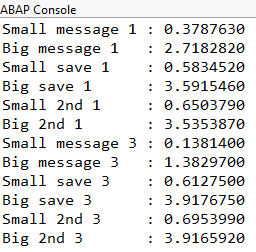
After the first run with one execution of each, it becomes clear that the architecture of the XCO class is not designed for mass testing. The runtime scales with the number of messages and negatively impacts the overall runtime. Therefore, in the second run, we increase the number of executions to 25, but exclude the XCO class. This time we get the result faster and can already see some initial differences.
Comparison
Based on the results, we can now make the following statements about the different classes and frameworks:
- XCO_CP_BAL - Is the slowest class and offers hardly any settings for recording and storing messages. The more messages need to be stored, the slower the class becomes.
- Logging - For pure logging without storing the messages, AML is faster than CL_BALI_LOG, because the BAL function modules are not used, but the data is managed internally. If you don't want to persist the messages at all, or only in emergencies, a separate logging solution is recommended.
- Storage - CL_BALI_LOG is slightly faster when saving, as the internal management and processing of AML consumes some performance.
- Direct or second connection - The second database connection does not improve performance. It still waits for the save. However, no commit is triggered in the current session, and the messages are written even during a rollback.
XCO_CP_BAL is very slow in testing, but the class continuously writes the messages to the log. During a dump, all messages up to that point are available in the log. With the other solutions, no log is written. However, the "emergency logging" function has been now also implemented as an option in AML, the charming advantage of an Open Source project.
Complete Example
Here you will find the complete example from the article. To execute the class, however, you need a helper class for runtime measurement and the Open Source component. Here is the example shown:
CLASS zcl_bs_demo_performance_log DEFINITION
  PUBLIC FINAL
  CREATE PUBLIC.

  PUBLIC SECTION.
    INTERFACES if_oo_adt_classrun.

  PRIVATE SECTION.
    CONSTANTS times_to_execute TYPE i VALUE 1.
    CONSTANTS messages_small   TYPE i VALUE 500.
    CONSTANTS messages_big     TYPE i VALUE 5000.

    DATA bali_log TYPE REF TO if_bali_log.
    DATA xco_log  TYPE REF TO if_xco_cp_bal_log.
    DATA aml_log  TYPE REF TO zif_aml_log.

    METHODS create_log
      IMPORTING scenario      TYPE i
                db_connection TYPE abap_boolean.

    METHODS add_message
      IMPORTING scenario TYPE i.

    METHODS save_log
      IMPORTING scenario      TYPE i
                db_connection TYPE abap_boolean.

    METHODS start_scenario
      IMPORTING scenario           TYPE i
                number_of_messages TYPE i
                !save              TYPE abap_boolean
                db_connection      TYPE abap_boolean.

ENDCLASS.


CLASS zcl_bs_demo_performance_log IMPLEMENTATION.
  METHOD if_oo_adt_classrun~main.
    DO 3 TIMES.
      DATA(scenario) = sy-index.

*      IF scenario = 2.
*        CONTINUE.
*      ENDIF.

      DATA(lo_run) = NEW zcl_bs_demo_runtime( ).
      DO times_to_execute TIMES.
        start_scenario( scenario           = scenario
                        number_of_messages = messages_small
                        save               = abap_false
                        db_connection      = abap_false ).
      ENDDO.
      out->write( |Small message { scenario } : { lo_run->get_diff( ) }| ).

      lo_run = NEW zcl_bs_demo_runtime( ).
      DO times_to_execute TIMES.
        start_scenario( scenario           = scenario
                        number_of_messages = messages_big
                        save               = abap_false
                        db_connection      = abap_false ).
      ENDDO.
      out->write( |Big message { scenario }   : { lo_run->get_diff( ) }| ).

      lo_run = NEW zcl_bs_demo_runtime( ).
      DO times_to_execute TIMES.
        start_scenario( scenario           = scenario
                        number_of_messages = messages_small
                        save               = abap_true
                        db_connection      = abap_false ).
      ENDDO.
      out->write( |Small save { scenario }    : { lo_run->get_diff( ) }| ).

      lo_run = NEW zcl_bs_demo_runtime( ).
      DO times_to_execute TIMES.
        start_scenario( scenario           = scenario
                        number_of_messages = messages_big
                        save               = abap_true
                        db_connection      = abap_false ).
      ENDDO.
      out->write( |Big save { scenario }      : { lo_run->get_diff( ) }| ).

      lo_run = NEW zcl_bs_demo_runtime( ).
      DO times_to_execute TIMES.
        start_scenario( scenario           = scenario
                        number_of_messages = messages_small
                        save               = abap_true
                        db_connection      = abap_true ).
      ENDDO.
      out->write( |Small 2nd { scenario }     : { lo_run->get_diff( ) }| ).

      lo_run = NEW zcl_bs_demo_runtime( ).
      DO times_to_execute TIMES.
        start_scenario( scenario           = scenario
                        number_of_messages = messages_big
                        save               = abap_true
                        db_connection      = abap_true ).
      ENDDO.
      out->write( |Big 2nd { scenario }       : { lo_run->get_diff( ) }| ).
    ENDDO.
  ENDMETHOD.


  METHOD start_scenario.
    create_log( scenario      = scenario
                db_connection = db_connection ).

    DO number_of_messages TIMES.
      MESSAGE s001(zbs_demo_xco) WITH 'Test' sy-index INTO DATA(message) ##NEEDED.
      add_message( scenario ).
    ENDDO.

    IF save = abap_true.
      save_log( scenario      = scenario
                db_connection = db_connection ).
    ENDIF.
  ENDMETHOD.


  METHOD create_log.
    DATA(external_id) = CONV cl_bali_header_setter=>ty_external_id( xco_cp=>uuid( )->as( xco_cp_uuid=>format->c32 )->value ).

    CASE scenario.
      WHEN 1.
        IF bali_log IS NOT INITIAL.
          bali_log->release_memory( ).
        ENDIF.

        bali_log = cl_bali_log=>create( ).
        bali_log->set_header( cl_bali_header_setter=>create( object      = 'Z_AML_LOG'
                                                             subobject   = 'TEST'
                                                             external_id = external_id ) ).
      WHEN 2.
        xco_log = xco_cp_bal=>for->database(
                        )->log->create( iv_object      = 'Z_AML_LOG'
                                        iv_subobject   = 'TEST'
                                        iv_external_id = external_id ).
      WHEN 3.
        aml_log = zcl_aml_log_factory=>create( VALUE #( object                = 'Z_AML_LOG'
                                                        subobject             = 'TEST'
                                                        external_id           = external_id
                                                        use_2nd_db_connection = db_connection ) ).
    ENDCASE.
  ENDMETHOD.


  METHOD add_message.
    CASE scenario.
      WHEN 1.
        bali_log->add_item( cl_bali_message_setter=>create_from_sy( ) ).
      WHEN 2.
        xco_log->add_message( xco_cp=>sy->message( )->value ).
      WHEN 3.
        aml_log->add_message_system( ).
    ENDCASE.
  ENDMETHOD.


  METHOD save_log.
    CASE scenario.
      WHEN 1.
        cl_bali_log_db=>get_instance( )->save_log( log                   = bali_log
                                                   use_2nd_db_connection = db_connection ).
      WHEN 2.
        " Nothing to do
      WHEN 3.
        aml_log->save( ).
    ENDCASE.
  ENDMETHOD.
ENDCLASS.
Conclusion
The runtime of the XCO class was very noticeable and unexpected. Therefore, the class was excluded during the course of the test, although it still offers certain advantages. You should always consider your logging goals when implementing the code.