DDIC of the Future (Today)
What does the future hold for the DDIC, and can we already use the new features today? In this article, we'll look at the current state of the dictionary in ABAP.

Table of contents
In this article, we'll examine the state of the dictionary in everyday use, especially in the modern era, and consider various aspects of how it's still sometimes modeled.
Introduction
The dictionary, or DDIC for short, plays a special role in the ABAP universe. Hardly any other programming language has an integrated library of reusable types, structures, and tables that can be directly integrated into programs at any time. In other languages, you usually have to install numerous libraries, initialize DDLs, download packages, or take other detours to obtain something comparable. Therefore, the dictionary is all about reusability and its use within our applications.
However, the dictionary is evolving: While in the past it was primarily designed for GUI development and had to meet corresponding criteria, this has since changed. Today, we need objects that primarily interact with the Fiori frontend and have similar properties, but without the overhead that, for example, a data element in combination with a domain generates.
Therefore, it's time for modernization. In this three-part series, we'll look at what has happened so far and what the future holds.
Overview
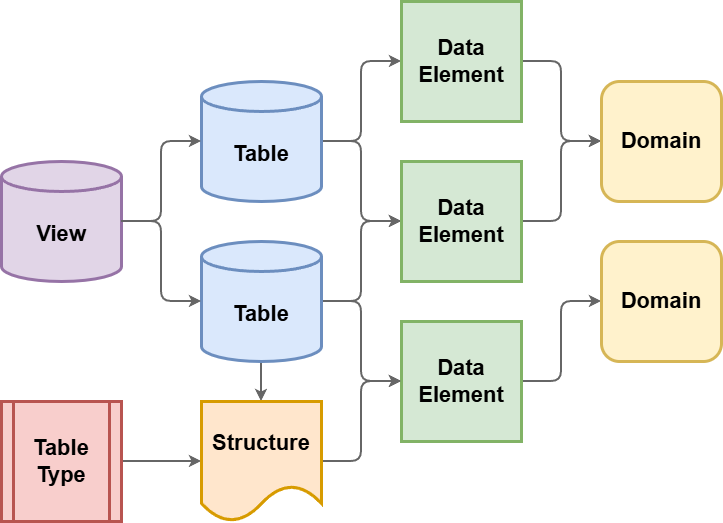
Here you'll find a rough overview of the current structure and the objects we need when working with the dictionary. On the left, you'll find the lowest level; on the right, you're already relatively high up in the stack. Basically, we always start modeling at the domain level. We can create domains that have the corresponding technical data types. For this, we usually create a data element in which the texts are defined, and which in turn uses a domain or can reuse different domains.
Above this are the database tables. Tables have columns, and these columns in turn usually use data elements, since they also inherit the attributes from the data elements. If we want to combine different tables and perhaps perform a join, we can do this via a view, which we also create in the dictionary.
Below this are two helper types. One is the structure, which in turn does not contain any data, but represents a set of fields. This structure can also be used, for example, to integrate it into different tables, so that the same structure can be used across multiple tables. A table type can also be derived from a structure. This means we directly define a type that, for example, also has a key, a sort order, and certain key fields. We can then reuse this type, which happens primarily in the interface area of function modules.
Elements
Let's take a closer look at the different levels and artifacts and examine their specific properties.
Domains
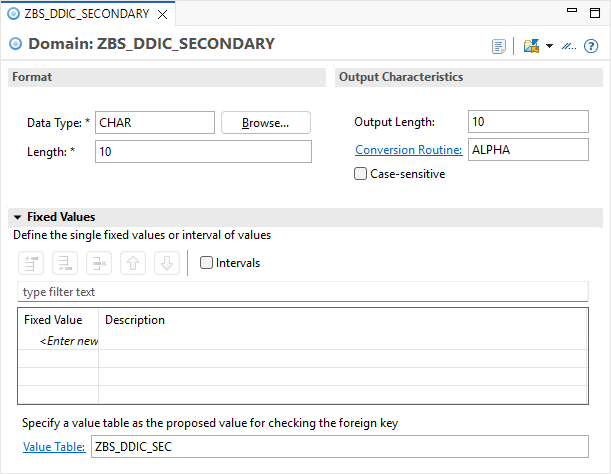
In a domain, we first define the basic data type that the domain should have. We can choose between various basic data types such as Character (CHAR), Numeric Character (NUMC), Integer (INT4), Date (DATS), and others. Many data types then require a length specification. Once we have finished this, we can also assign fixed values to the data type. These behave similarly to constants, but they are not checked and validated in the code; at most, they are offered for selection from a domain in the UI. Basically, this has the charming advantage that we define a value and a corresponding text, and you don't have to work later in the GUI to display them.

A second component of domains are the output criteria, i.e., how we ultimately display the value on the screen or in a list. For example, we can define the output length. We can also specify a conversion routine (conversion exit) that, for example, automatically adds leading zeros (ALPHA). Furthermore, we can specify whether text should allow uppercase and lowercase letters, as otherwise it will be converted to uppercase by default. Below you will find the value table. This primarily serves to automatically implement a foreign key check when the corresponding element is later used in a table.
Data Element
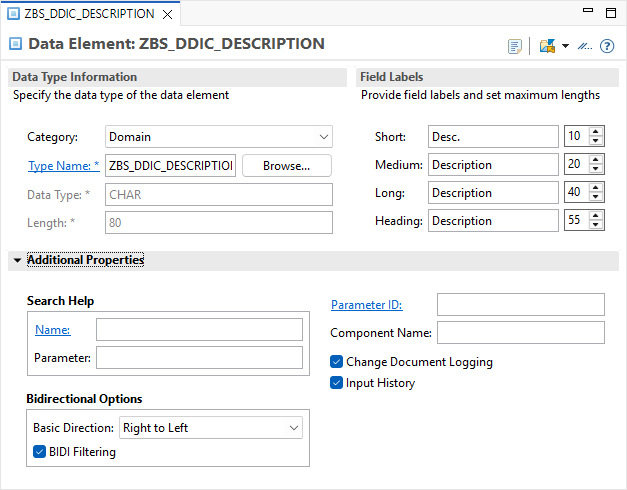
The data element is the fundamental component before table development begins. It contains a domain that defines the data type of the data element. However, you can also directly specify predefined data types in a data element or, for example, reference interfaces and classes. This section primarily defines which field names exist for the column headings and other descriptive texts. Under the additional criteria, you will find further elements:
- Search help - You can integrate this here so that it will later automatically have a defined value help and search function in the SAP GUI.
- Parameter ID - If fields are to be assigned to specific memory parameters in order to pre-populate values by default.
- Change documents - If the table is logged and you want to log changes to this specific field in the system, then activate the corresponding flag in the element here.
Table
The table is the most important component in the system, as it stores the data and is available to us. This is persisted so that we can access the same data again next time. In a classic table, the header also defines the delivery class and whether the table data can be maintained using classic maintenance tools. For the fields, we define which ones are key fields. We can also define foreign key relationships to our check tables. This gives us a consistent check on the database later to see if the corresponding element even exists when we want to add a new entry (FOREIGN KEY). Using a counter as an example, we can also see that we don't necessarily need a data element, but can also use a so-called built-in type, in this case an integer field of type INT4.

Types
Next, we define an auxiliary type, a so-called structure. The structure looks quite similar to a table. However, we don't need any technical settings for the database here. It also doesn't require a client field to delimit the data; instead, we can directly specify all the fields we need. Unlike a table, a structure does not hold persistent data in the database, which is why we cannot read from it using SELECT.

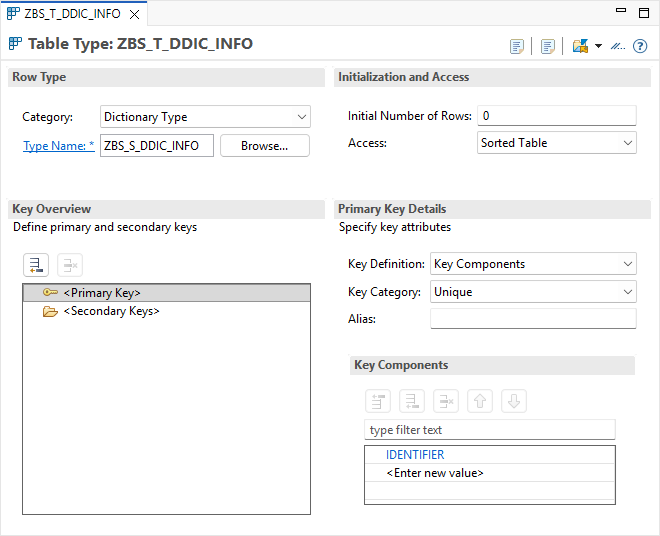
In addition, we define a table type. The table type can, for example, incorporate our structure, meaning the table row then looks exactly like the structure itself. We can define a table type directly and specify that it has, for example, a primary key, is a sorted table, and works with different key components. As you can see below, we have defined the identifier as a key element; this delimits the subsequent values in the internal table.
Usage
In this chapter, we will look at two usage scenarios and examine a specific use case.
Selection
What about data security? Let's look at an excerpt of the code that we almost always have to implement in classic ABAP development when accessing data. We read the data from the table and, in the next step, must first check whether the currently logged-in user has the necessary permissions. In this case, we have created a custom permission object and check against the activity "03" (Display) using AUTHORITY-CHECK. Additionally, we check whether the user has permission for the corresponding action. This manual step is essential in a classic DDIC environment to ensure that no unauthorized data access occurs at the application level.
SELECT FROM zbs_ddic_table
  FIELDS *
  INTO TABLE @DATA(found_ddics).

LOOP AT found_ddics INTO DATA(found_ddic).
  DATA(table_index) = sy-tabix.

  AUTHORITY-CHECK OBJECT 'ZBS_DDIC'
                  ID 'ACTVT' FIELD '03'
                  ID 'ZBSDDICACT' FIELD found_ddic-action.

  IF sy-subrc <> 0.
    DELETE found_ddics INDEX table_index.
  ENDIF.
ENDLOOP.
This creates a very high risk that we will simply forget this authorization code as soon as we implement data access to the table, since it is not automatically included. This poses a significant security risk when using classic DDIC tables: We run the risk of reading data in the code for which the user is not actually authorized.
Constants
In this second example, we want to use our action and compare in the code whether a field in a local structure contains a certain action code. To do this, we first define a local constant structure that contains all the actions that are also defined in the domain. Here, the first major risk is that we forget to update values in the code if we have modified or extended them in the domain. Furthermore, we often don't know afterwards whether this is the only central location or just one of many places in the system where these constants were defined redundantly.
CONSTANTS:
  BEGIN OF actions,
    no_action   TYPE zbs_ddic_action VALUE '',
    enhancement TYPE zbs_ddic_action VALUE 'E',
    rollout     TYPE zbs_ddic_action VALUE 'R',
  END OF actions.
We then define a variable, in this case of the type of the structure we defined earlier. Subsequently, we can check in an IF statement whether, for example, the action ENHANCEMENT is contained in an action field. This feels relatively natural when writing: We can directly access the constant structure and select the field ENHANCEMENT, which corresponds to our value in the domain. However, the compiler does not perform an automatic check here. This means that within classes and interfaces, any other arbitrary value can be passed, as long as the technical data type matches. A true, standardized protection, as we would like for robust architectures, is completely lacking in the classic DDIC approach at this point.
DATA local_structure TYPE zbs_s_ddic_info.

IF local_structure-action = actions-enhancement.
  " TODO
ENDIF.
Full example
You can find all created elements and relationships in a new GitHub repository. In the subpackage ZBS_DEMO_DDIC_OLD you will find all classic DDIC elements. In the top-level package, we have defined overarching elements that we use.
Conclusion
The dictionary is and remains an important part of ABAP development, and the classic objects have been in use for decades. However, the focus here is primarily on GUI development, as many functionalities such as search helps, foreign key relationships, and conversion routines are still completely designed for the SAP GUI era.