DDIC of the Future (Comparison)
What does the future hold for the DDIC, and can we already use the new features today? In this article, we compare the world of today with that of tomorrow and show you where to find all the features.

Table of contents
In this article, we compare the features of today's world and tomorrow's world and show you where to find all the important points.
Introduction
In the last two articles, we primarily wrote about what the world today looks like and how we create data models using tables. In the second article, we then looked at what the world of tomorrow will look like when we work exclusively with "CDS-only" and use corresponding new artifacts. With this, you should now be familiar with both worlds and know the various details. Therefore, in this article, we want to take another look at where you can find the various features in both systems and how you can use them more effectively without getting completely lost.
Comparison
In this chapter, we will examine the different features and where you can find them in the new model. We will also address minor differences.
Client
In the old system, the client field was defined as a separate field in the table. This was redundant work that had to be done in every table and was often forgotten, especially by beginners. In the new system, this is handled via an annotation, which is automatically set to CLIENT_DEPENDENT. This means the client field is created automatically and therefore cannot be forgotten. Therefore, in the future, client-independent tables must be explicitly and separately marked as such.

Relationship
Relationships can finally be modeled directly at the table entity level. In the past, it was possible to define a foreign key, but this was not actually a relationship through which we could access data. The advantages of Core Data Services and the defined associations are that we can predefine them directly at the table level and see at a glance how the data model of the different tables relates to each other.

Data Type
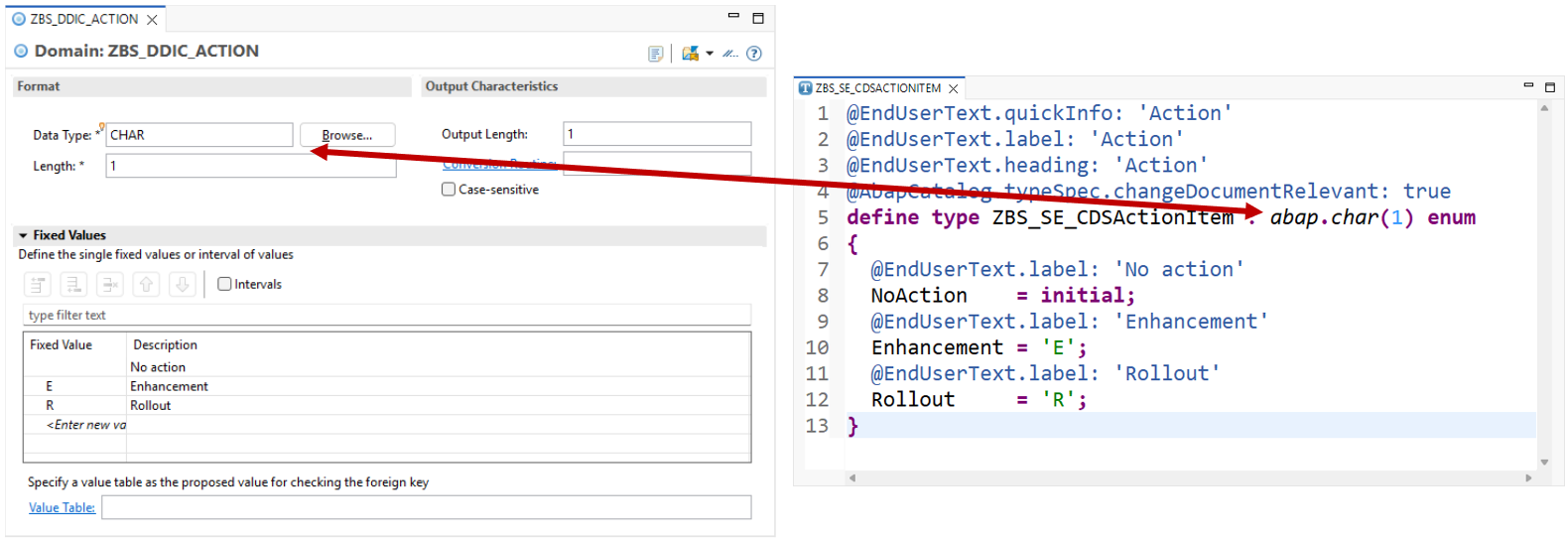
The data type is specified directly after the Simple Type definition in the case of Simple Types. A form is provided for this purpose in the domain. There, the data type can be selected from a list and the length can be set via the field. The setting here is typically done in an editor, as are virtually all CDS artifacts.
Fixed Values
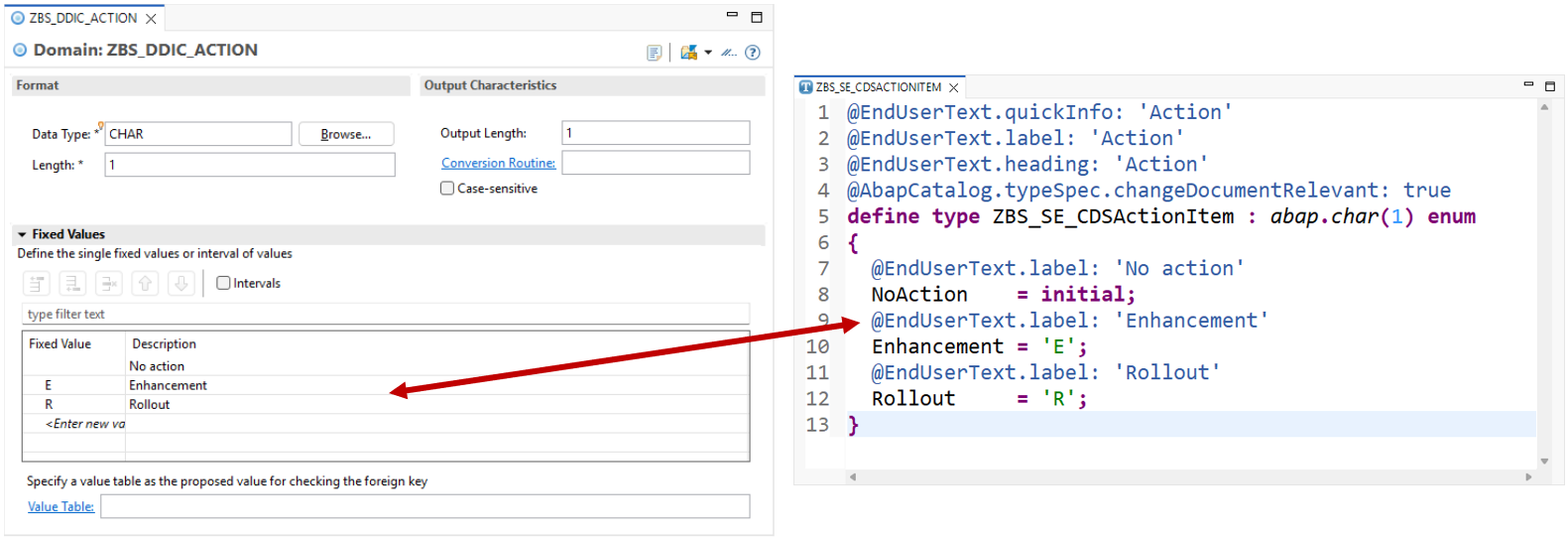
Looking at fixed values or constants, we can define them in a list within the domain. Here, the value is placed opposite the text we want to output. In Simple Type, this is an enum. We can also define values there, but we must always include a constant with an initial value. Basically, we can also define the text via the End User Label here, which we will later receive in the output.
Output
The output is also defined at the domain level. Various output criteria are available here, such as the output length and a conversion routine that allows for extended formatting. In Simple Type, this is defined as an annotation. Here, the ABAP Catalog provides corresponding type specifications that we can define.

Change Documents
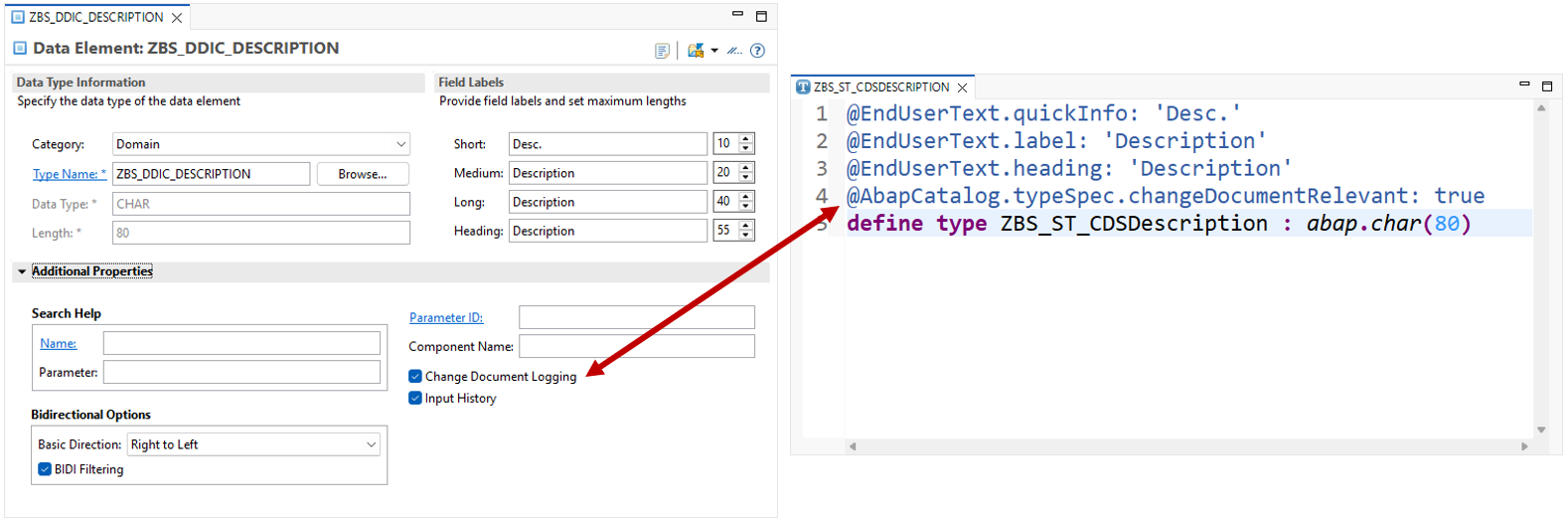
If we want to activate change documents for a field, we must do this in the data element. There, under the additional settings, is a checkbox that we can activate. At the simple type level, we also do this via an annotation and can activate the flag there. This means we don't need to distinguish between data element and domain if we want this attribute.
Texts
The output texts for the UI are also maintained via an annotation, if we look at the Simple Type. There is a mapping to the texts from the data element, although there is currently no element for the long text. This isn't necessarily needed in a Fiori application; three texts are usually perfectly sufficient. Even though the values appear hardcoded, the translation can be done later using the translation app.

Case Sensitive
Case sensitivity is an important aspect when it comes to processing text and long texts. In the traditional world, this often led to errors and problems if the flag enabling case sensitivity for the element was not set at the domain level. In the new world, this is somewhat different: Here, every created element that provides text-like content has case sensitivity enabled. Basically, upper-case conversion would have to be activated here; however, the annotation is unfortunately not enabled for ABAP Cloud. Here, appropriate determinations in RAP would have to ensure that upper-case conversion takes place, or functions at the Core Data Services level would have to be used.

Authorization
Tables are not delivered with authorization checks by default, so we only see content for which we are authorized. Therefore, for a classic table, we always have to perform an authorization check after reading it and filter out the corresponding entries. This leads to problems if we forget the authorization check. Therefore, in Table Entities, we can directly define an Access Control and store the authorization check there. If we don't want authorization checks, we have to actively disable them when reading. Therefore, authorization checks are automatically active when reading by default.

Constants
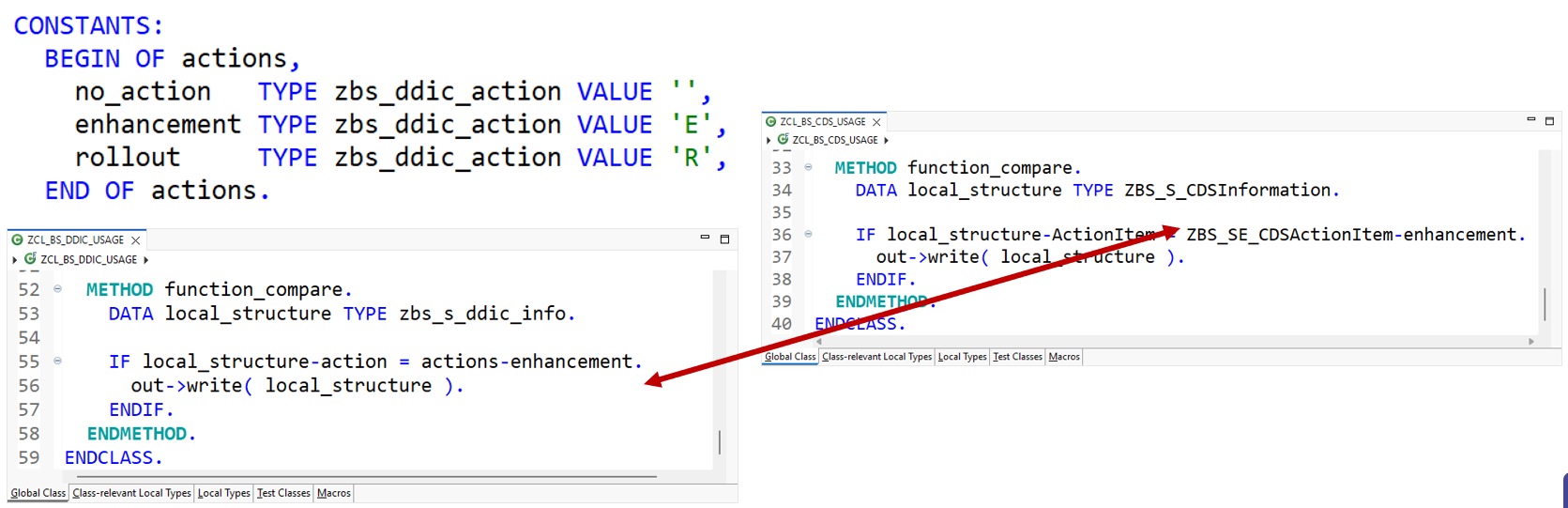
If we have stored fixed values in a domain, we usually want to use or validate them in our program. For this, we often had to create constant structures that then represent the values of the domain and which we can then access in our code. Once we have defined a Simple Type Enum, we can use it directly to access the constants defined within the enum. This saves us the effort of creating the constant structure, and secondly, the type used is always up-to-date.
Benefits
What do you actually get today if you switch to Core Data Services? Basically, the data model, i.e., the objects offered to you today, is already in very good condition as long as you are working on a current system.
- When you work with Table Entities, you can directly map data relationships and automatically gain security and type safety. Because in Table Entities only current fields like the date, time, and timestamp are possible, that is, only the most current types, which are also type-safe. You can use annotations that are simultaneously constraints on the database and therefore also produce errors if values other than the defined values are entered.
- You can build your entire data model directly as it will later be used in Core Data Services. This means that case sensitivity for field and entity names is already active. Today you can use much longer names for the entities, which makes everything more descriptive and renders these cryptic, short table names obsolete.
Open Issues
Let's look at the open issues that are currently not supported.
- For example, in RAP development, enumeration is not yet truly supported for the UI. Here, you have to convert to data types and then build corresponding value help in the UI. Naturally, we would like this to be available out of the box when defining an annotation at the database level.
- Currently, there are also no table types at the CDS level. This means that if you later want to use the structures and definitions in classic objects such as function modules or screen development, for example, it won't work.
- Similarly, the tables cannot yet be used everywhere you can enter a table. For example, consider certain customizing settings where you can define a kind of exit table: Here, the value help would probably not find your table entity.
Conclusion
In general, we can say that the data model will change in the future and be more based on Core Data Services. If you're already using a 2025 release, you can effectively use many objects to build data models and RAP applications. If you're using an older release, you can use Core Data Services, but table-entity-based modeling isn't yet possible. Therefore, this should initially be viewed as a future-oriented approach.