BTP - Table Entity and Includes
Table Entity for the Draft in the RAP object? We also check Includes and Aspects and rebuild our RAP object to the new entities.

Table of contents
In this article, we'll look at the Table Entity as a Draft, but first, we'll examine how to use Includes within tables.
Introduction
In a previous article, we looked at the CDS Pattern and how we can use it to build applications based on Table Entities. At that time, Table Entities had a few drawbacks; for example, we couldn't use them in the Draft section. With Release 2605, the Draft section was extended. This now makes it possible to use a Table Entity as a Draft table. Let's take a closer look at the different steps.
Aspect
The aspect plays an important role when it comes to includes in table entities. Previously, it wasn't possible to include fields in table entities via structures. This has also changed with the latest release. An aspect is typically a type of structure where we can outsource and reuse certain fields and calculations from a Core Data Service. Later, when including these, we need to perform a binding and bind the corresponding fields to the aspect in order to reuse calculations, for example. Therefore, the aspect's primary use was for outsourcing functions and less for reusing them as structures with corresponding fields. We'll create a new aspect for this purpose. This also has its own folder structure within the ADTs, so it is not located in the Core Data Services area.

In our example, we create a new aspect for the admin fields of a RAP object, which we need for the draft. In addition to the fields and types, we also define corresponding annotations that we want to reuse later. In this simple case, the aspect gets a descriptive name; otherwise, we don't need to consider any special features. We also don't have any functions that we want to outsource.
@EndUserText.label: 'RAP Admin Fields'
define aspect ZBS_DMORapAdminFields {
  @Semantics.user.createdBy: true
  LocalCreatedBy     : abp_creation_user;
  @Semantics.systemDateTime.createdAt: true
  LocalCreatedAt     : abp_creation_tstmpl;
  @Semantics.user.localInstanceLastChangedBy: true
  LocalLastChangedBy : abp_locinst_lastchange_user;
  @Semantics.systemDateTime.localInstanceLastChangedAt: true
  LocalLastChangedAt : abp_locinst_lastchange_tstmpl;
  @Semantics.systemDateTime.lastChangedAt: true
  LastChangedAt      : abp_lastchange_tstmpl;
}
Include
So what about includes? In classic tables, includes were primarily used to make structures reusable and to use the same fields in multiple tables, for example, by including them. A similar function now exists for table entities.
Table Entity
To do this, we create a new table entity, which is kept relatively simple. We have an invoice ID and an invoice status, and we want to add the admin fields to them.
@ClientHandling.type: #CLIENT_DEPENDENT
@AbapCatalog.deliveryClass: #APPLICATION_DATA
@AccessControl.authorizationCheck: #NOT_REQUIRED
@EndUserText.label: 'TE with Include'
define table entity ZBS_TableEntityWithInc
{
  key InvoiceId     : abap.raw( 16 );
      InvoiceStatus : ZBS_DemoCDSInvoiceStatus;
}
Extension
For the extension, we now take over the fields that come from the aspect. For this, we again use the keyword INCLUDE, followed by the aspect name. To then be able to access the different fields, we use the dot followed by an asterisk to address all fields. Here we would also have the option of taking individual fields one at a time. With the addition SIGNATURE ONLY, we only want to take over the signature of the aspect, but not the functionality, such as formulas, which would be possible in a normal aspect.
@ClientHandling.type: #CLIENT_DEPENDENT
@AbapCatalog.deliveryClass: #APPLICATION_DATA
@AccessControl.authorizationCheck: #NOT_REQUIRED
@EndUserText.label: 'TE with Include'
define table entity ZBS_TableEntityWithInc
{
  key InvoiceId     : abap.raw( 16 );
      InvoiceStatus : ZBS_DemoCDSInvoiceStatus;

      include ZBS_DMORapAdminFields.* signature only;
}
Looking at the Table Entity via the Element Info, we see that all fields from the include have been included and are available in the table. Thus, it works similarly to classic tables. We can see that an include exists, but not that the fields are subsequently available. Using the Element Info for the name, we get a complete picture of the Table Entity.

Usage
For usage, we want to insert data into the table. We want to populate not only the main fields, but also one of the included fields. After we have inserted the data, we read it directly from the table and output it to the console.
INSERT ZBS_TableEntityWithInc FROM @( VALUE #( InvoiceId      = xco_cp=>uuid( )->value
                                               InvoiceStatus  = 'T'
                                               LocalCreatedBy = cl_abap_context_info=>get_user_alias( ) ) ).

SELECT FROM ZBS_TableEntityWithInc
  FIELDS *
  INTO TABLE @DATA(table_data).

out->write( table_data ).
We have now performed this several times. And as we can see in the console output, several data records were read from the table entity. The values are pre-populated, and the custom field was also populated with the creation user. Basically, the include works just like with a table and extends it.

Draft
How does it actually work when used as a draft table? With the foundation of understanding aspects, we can now extend the functionality and convert the draft table to a table entity.
Auxiliary Fields
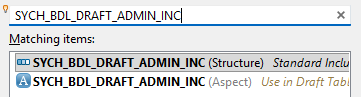
For this purpose, there is the include object SYCH_BDL_DRAFT_ADMIN_INC, which we can find using the search function in the ABAP Development Tools (CTRL + SHIFT + A). Searching for the include name currently yields two objects in a new system: the classic include, which is automatically integrated into the draft tables, and the new include, which has the same name but is available as an aspect. We need this element to then include it in our draft tables.
Delete
Currently, this is primarily a manual process. Therefore, in the first step, we delete the wire tables from the system. You should, of course, be careful that there are no more candidates, or rather, he can work with an application. If you do this, basically, we can select both objects in a Project Explorer and delete them from the system by right-clicking, even if a warning is issued that the objects are still in use, namely in the. Behavior definition: can we remove this from the system

Creation
We now have to create the draft table manually in the system. To do this, we create a new table entity and assign it a descriptive name that, for example, also contains the word "Draft". However, you should be careful here: Currently, there is no validation for the length of the entered name. For example, we used the name "ZBS_T_CDSPatternInvoiceDraft" to create our draft entity. However, the name of a table entity can only be 25 characters long. Unfortunately, we only find this out after creating the object and with an error message from the compiler. Therefore, we deleted the object, changed its name, and chose a shorter name.
define table entity ZBS_T_CDSPatternInvDraft
{
  key DocumentNumber : abap.char(8);
  key DraftUUID      : sdraft_uuid;
      DocumentDate   : abap.datn;
      DocumentTime   : abap.timn;
      PartnerNumber  : abap.char(10);
      @Semantics.user.createdBy: true
      LocalCreatedBy     : abp_creation_user;
      @Semantics.systemDateTime.createdAt: true
      LocalCreatedAt     : abp_creation_tstmpl;
      @Semantics.user.localInstanceLastChangedBy: true
      LocalLastChangedBy : abp_locinst_lastchange_user;
      @Semantics.systemDateTime.localInstanceLastChangedAt: true
      LocalLastChangedAt : abp_locinst_lastchange_tstmpl;
      @Semantics.systemDateTime.lastChangedAt: true
      LastChangedAt      : abp_lastchange_tstmpl;
      include SYCH_BDL_DRAFT_ADMIN_INC.* signature only;
}
Using the include, we then append our structure to the end of the table entity. If we then check the table entity with the element info, we see that all draft fields have also been appended to the end.
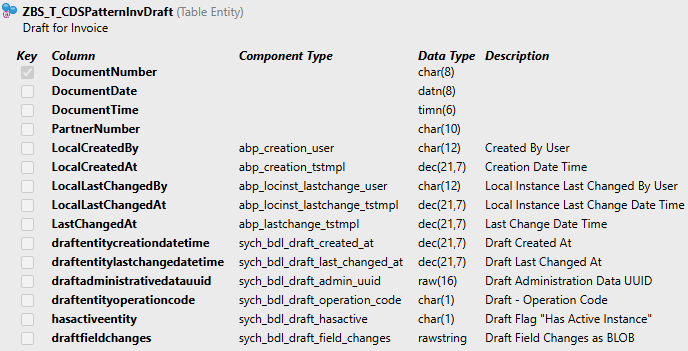
Our draft table is now prepared, and we create a second table for the second entity, or rather, the table that we deleted from the system. Finally, in the behavior definition, we replace the table with the new entities and activate the object.
Includes
Currently, aspects are supported when you work normally with table entities. However, there is no support yet within the RAP object. Here, for example, we had inserted our reusable include for the administrative fields, which basically works on a table entity basis. However, the SADL framework does not currently support includes within our table. Here we also receive an error message in the service binding and can no longer execute the service because it contains an error.

Complete Example
You can find the complete example spread across various repositories. You can find the example for this aspect in the Core Data Services with this Commit. The modifications to the RAP application are in the RAP Repository and in this Commit.
Conclusion
The first tentative attempts at includes for the new tables are here, but unfortunately cannot yet be used in the complete process. However, the handling already looks good and at least feels like classic includes. This makes it possible in the future to outsource administrative fields and other fields that you want to use in multiple entities and re-include them separately using includes. This saves you the trouble of copying and pasting fields and content.
Further information:
SAP Help - Include Aspect