RAP - Draft Query
In this article, we'll look at the Draft Query in RAP and how you can use it to control entries and their visibility. We'll also look at a practical example.

Table of contents
In this article, we will primarily focus on the Draft Scope and how you can use it to control the actual draft.
Introduction
Currently, in our Sales App, we have a table for the participating salespeople on the Object Page. In the table, we want to add new sellers and can use the action to release unconfirmed entries or start a workflow that triggers the actual release process.

Hint: With this Commit, we have changed the release action from sold materials to sellers, as it is only intended for that purpose.
Requirement
Now we have another requirement: that in the active state of the instance, only the confirmed entries are visible, and when we edit the data record, only new and unreleased records should be editable. Once released, the other data records can no longer be edited and should no longer be visible.
Check
To filter the data records for output, we currently have several options. Firstly, we can implement a strict filter in the WHERE clause of the Core Data Service. This would prevent anyone from accessing the restricted data records, as the condition would always apply. Alternatively, we can extend the authorization check and add a condition there. This would allow us to access the data later using PRIVILIGED ACCESS. Therefore, we choose the second option and extend the access control created with the RAP generator. To do this, we open ZBS_R_SASELLER and adjust the condition. The new implementation should now look like this:
@EndUserText.label: 'ZBS_R_SASELLER'
@MappingRole: true
define role ZBS_R_SASELLER {
  grant select on ZBS_R_SASELLER
  where Confirmed = 'X';
}
The Projection Layer inherits from this View, and therefore also the validation. Let's now call the same entity and display the sellers. Only one record will be loaded, one that has actually been approved.
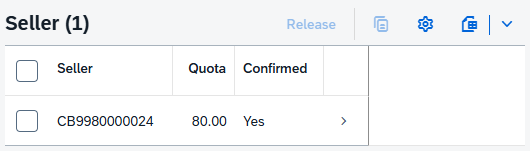
If we now go into Edit Mode, we will again see all records and can edit the approved records as well. The actual access control of our projection layer no longer applies, and we see the complete draft.

Draft Query
In this chapter, we will discuss a solution for our current situation.
Cause
What actually happened in the example above? When clicking on "Edit" in the UI, we go into editing mode, and the complete original record and all dependent entities are loaded into the draft tables defined in the RAP object.
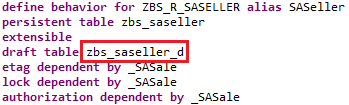
This allows us to work on the draft without affecting the original. However, currently, the data is only read from the draft table, and we have no further way to restrict the data. An access control cannot be defined on a table.
Query
As a solution, we define our own Core Data Service on the draft table ZBS_SASELLER_D, where we can also define appropriate authorization. You can create the view directly as a CDS artifact via the context menu in the Project Explorer. We'll do the mapping of the fields at the interface level within the actual view.
@AccessControl.authorizationCheck: #NOT_REQUIRED
@EndUserText.label: 'Draft for Seller'
define view entity ZBS_I_SASellerDraft
  as select from zbs_saseller_d
{
  key uuid                          as UUID,
      parentuuid                    as ParentUUID,
      sellerid                      as SellerId,
      quota                         as Quota,
      confirmed                     as Confirmed,
      draftentitycreationdatetime   as Draftentitycreationdatetime,
      draftentitylastchangedatetime as Draftentitylastchangedatetime,
      draftadministrativedatauuid   as Draftadministrativedatauuid,
      draftentityoperationcode      as Draftentityoperationcode,
      hasactiveentity               as Hasactiveentity,
      draftfieldchanges             as Draftfieldchanges
}
For the new query, we also create an access control via the context menu of the new Core Data Service and define a simple condition here again.
@EndUserText.label: 'Draft Scope'
@MappingRole: true
define role ZBS_I_SASELLERDRAFT {
  grant
    select
      on
        ZBS_I_SASELLERDRAFT
          where
            Confirmed is initial;
}
Behavior
In the behavior definition ZBS_R_SASALE, we now add the Core Data Service behind the Draft table using a QUERY. This means that when the Draft is loaded, the query is used for the determination, and therefore our Access Control is also used.
define behavior for ZBS_R_SASELLER alias SASeller
persistent table zbs_saseller
extensible
draft table zbs_saseller_d query ZBS_I_SASellerDraft
etag dependent by _SASale
lock dependent by _SASale
authorization dependent by _SASale
Test
Going back to our application and accessing the record in edit mode, only two records are displayed. The active record is now hidden via the access control, but is still included in the draft table.

Action
To complete the logic, we now implement the actual action that will perform the release.
Update
For the simple update, we don't even need to write much logic. Since we are directly using the keys to implement a license plate, the key alone is sufficient for the first step, and we can directly call the update. For this, we use a FOR loop and accept all the passed data records.
MODIFY ENTITIES OF zbs_r_sasale IN LOCAL MODE
       ENTITY SASeller
       UPDATE FIELDS ( Confirmed )
       WITH VALUE #( FOR key IN keys
                     ( %tky = key-%tky Confirmed = abap_true ) )
       MAPPED mapped.
UI
After executing the action, nothing happens in our application. The data record hasn't been updated or hidden. Currently, we're modifying the data record in the buffer and draft, but we're not triggering the interface to update. Therefore, we'll extend the action and return the data record itself, allowing the UI to update automatically with the new data.
action ReleaseItems result [1] $self;
In the actual implementation, we finally read the current data set one last time and map the result to the now available RESULT field. Whether you do the mapping using LOOP or FOR is ultimately up to you.
READ ENTITIES OF zbs_r_sasale IN LOCAL MODE
     ENTITY SASeller
     ALL FIELDS
     WITH VALUE #( FOR key IN keys
                   ( %tky = key-%tky ) )
     RESULT DATA(result_set).

LOOP AT result_set INTO DATA(result_record).
  INSERT VALUE #( %tky   = result_record-%tky
                  %param = CORRESPONDING #( result_record ) ) INTO TABLE result.
ENDLOOP.
If we now execute the action in the UI, the record will be updated after execution, but not hidden. The access control will therefore not be executed again. Here you could also adjust the input of the fields so that no further changes are made afterward.
Complete Example
You can find the complete example in GitHub in the corresponding package for the Sales App. The changes from this article can be found in this Commit and you can follow the changes, plus the additional information.
Conclusion
The draft query helps us control the visibility of the draft. Not every item should be visible in the draft, especially if it has already been hidden in display mode. Visibility can also be controlled differently via the two access methods.
Source:
SAP Help - Draft Query