BTP - Clean up Packages and SWC
You want to delete a package in the ABAP environment, but there are still objects that are blocking the process and might not even be visible in Eclipse anymore? Let's look at some cleanup steps.

Table of contents
In this article, we will look in detail at how to remove objects from the ABAP environment and a software component, even if it might not be possible.
Introduction
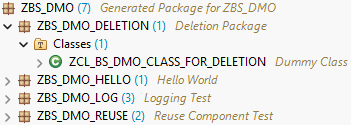
In our example, we start with a package within a software component. The package to be deleted currently contains an object that is visible to us. We want to remove this class. Cleaning up and reorganizing packages within software components is common practice. But what happens if the deletion goes wrong or results in information that doesn't help us?
Cleanup
If we try to delete the package directly, we will receive an error message stating that the package still contains objects and deletion is not possible. This is generally the default behavior. We must first empty the package before we can delete it.

To do this, we delete the contained class and release the transport. Only when the transport is released are the objects completely removed from the system. Normally, there is a delete flag that marks that an object has been deleted, and only when this object is transported is the registration removed. In this case, our package is initially empty. However, we still cannot delete the package, even though we have released the transport.

TADIR
In most cases, the reason is that there are still database-level objects blocking the package deletion. In a traditional system, we would access the database and look at the TADIR table, which would then provide information about which object is still associated with the package. However, we are in a cloud system here, and SAP provides a core data service, namely "I_CustABAPObjDirectoryEntry". We can use this to obtain further information about objects in a package.

For this purpose, we provide a small helper class that you can execute to get further information, such as which objects within a software component are already marked with a delete flag. Sometimes it can also happen that a colleague has removed a deleted object directly from the transport. In this case, the deletion is not transported; the object remains in the database with the delete flag and prevents us from deleting the package.
CLASS zcl_bs_demo_object_cleanup DEFINITION
  PUBLIC FINAL
  CREATE PUBLIC.

  PUBLIC SECTION.
    INTERFACES if_oo_adt_classrun.

    TYPES objects TYPE STANDARD TABLE OF I_CustABAPObjDirectoryEntry WITH EMPTY KEY.

    METHODS read_objects
      IMPORTING software_component    TYPE I_CustABAPObjDirectoryEntry-ABAPSoftwareComponent
      EXPORTING deleted_objects       TYPE objects
                objects_to_be_deleted TYPE objects.

  PRIVATE SECTION.
    METHODS output_line
      IMPORTING !object TYPE I_CustABAPObjDirectoryEntry
                !out    TYPE REF TO if_oo_adt_classrun_out.
ENDCLASS.


CLASS zcl_bs_demo_object_cleanup IMPLEMENTATION.
  METHOD if_oo_adt_classrun~main.
    read_objects( EXPORTING software_component    = 'ZBS_DMO'
                  IMPORTING deleted_objects       = DATA(deleted_objects)
                            objects_to_be_deleted = DATA(objects_to_be_deleted) ).

    out->write( `Deleted objects` ).
    LOOP AT deleted_objects INTO FINAL(deleted_object).
      output_line( object = deleted_object
                   out    = out ).
    ENDLOOP.

    out->write( |
Active objects| ).
    LOOP AT objects_to_be_deleted INTO FINAL(active_objects).
      output_line( object = active_objects
                   out    = out ).
    ENDLOOP.
  ENDMETHOD.


  METHOD read_objects.
    SELECT FROM I_CustABAPObjDirectoryEntry
      FIELDS *
      WHERE     ABAPSoftwareComponent  = @software_component
            AND ABAPObjectType        <> 'DEVC'
      ORDER BY ABAPPackage, ABAPObject
      INTO TABLE @DATA(package_objects).

    LOOP AT package_objects ASSIGNING FIELD-SYMBOL(<package_object>).
      IF <package_object>-ABAPObjectIsDeleted = abap_true.
        APPEND <package_object> TO deleted_objects.
      ELSE.
        APPEND <package_object> TO objects_to_be_deleted.
      ENDIF.
    ENDLOOP.
  ENDMETHOD.


  METHOD output_line.
    DATA(seperator) = ` - `.

    out->write( |{ object-ABAPPackage }{ seperator }{ object-ABAPObjectType }{ seperator }{ object-ABAPObject }| ).
  ENDMETHOD.
ENDCLASS.
As a result, we obtain two lists: one for the objects with the delete flag and the package in which they are located, and one for the various active objects that also belong to this software component and other packages. We will then need the object type and object name information in the next step for deletion.

Delete
As you can see above, there is an object in the package to be deleted that is no longer visible in the Project Explorer. This is because a deletion flag was set, but the entry wasn't transported. In this case, we go to the task and can specify the object using the Add button, which we then write to the transport request. This way, we can add the various objects, which only works manually.

Let's then release the transport request. To transport the deletion, there should now be no objects left in the database, but only one object, namely our package. If we then start the deletion of the package, we will only receive a warning message that references itself. We specify a transport request and can then finally remove the package from the system.

Hint: We had actually tried to develop an automated method using the XCO classes. However, the XCO classes currently do not support adding object keys, which means we cannot automatically add the deleted objects via the API.
Conclusion
Are you having problems deleting a package? First, you should check the object explorer, and then check the database to see if there are any objects marked for deletion. Removing objects by releasing individual transports is always a bit of a pain, as it requires so many steps to finally delete a package.