BTP - ATC Approval in Steampunk
How can you actually implement an ATC exemption in the SAP BTP ABAP environment? We'll guide you step by step through the process.

Table of contents
In this article, we'll look at the approval process in the ABAP environment and why it differs slightly from the standard Central ATC process.
Introduction
A while ago, we showed you how to set up the Central ATC in the BTP. You can take advantage of various benefits by using the central scenario, such as up-to-date checks, centralized system governance, and security checks (CVA) that don't require additional licenses. We also demonstrated that the Central ATC does not currently support a steampunk system.
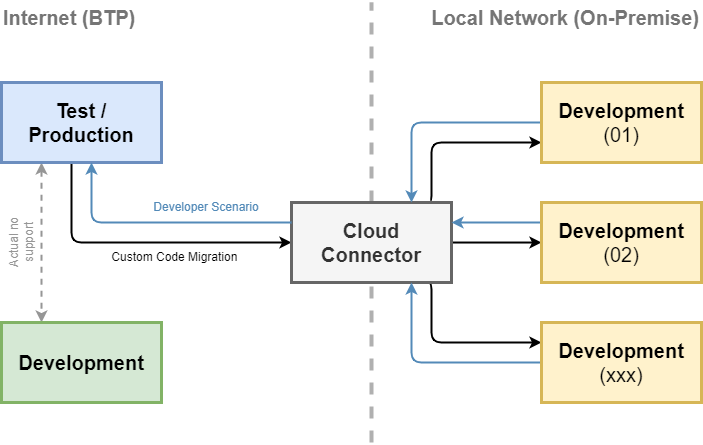
In principle, you can use the same variant as you use for on-premises exams and define it as the standard. However, exemptions by developers are handled differently and are not processed via the central Fiori application. This is also because the process was first defined in the system before the idea of a central ATC made its way into production.
Example
First, we need something that ATC can check and that generates a message. Basically, we have a few topics available that often cause problems, such as non-translatable text or forgotten sorting after selecting from a table. Here's a small example; we use a table from our CDS tutorials.
CLASS zcl_bs_demo_atc_approve DEFINITION
  PUBLIC FINAL
  CREATE PUBLIC.

  PUBLIC SECTION.
    INTERFACES if_oo_adt_classrun.
ENDCLASS.


CLASS zcl_bs_demo_atc_approve IMPLEMENTATION.
  METHOD if_oo_adt_classrun~main.
    SELECT FROM zbs_dmo_partner
      FIELDS *
      INTO TABLE @FINAL(partners).

    LOOP AT partners INTO DATA(partner) FROM 1 TO 3.
      partner-name = 'No clean Text'.
      out->write( partner ).
    ENDLOOP.
  ENDMETHOD.
ENDCLASS.
To run the check, you can use the keyboard shortcut CTRL + SHIFT + F2 in the object, or you can use the object's action/context menu.

If we now run our ATC check in the example, we should now receive a result. Here you should check which variant you are using to run the check. Basically, the "FUNCTIONAL_DB" check variant is used. also include the check if you want to use a standard variant.

Request
To request an exception, you simply need to right-click on a finding in the results. In addition to various other actions, such as quick fixes, you can also find the requests via the "Request Exemption" option.

This starts the classic wizard, which you also find in an on-premises system. In the first image, we define what we want to request the exemption for. Here we can also request the validity of the release, whether it should be temporary (short period) or we want to release the finding permanently.

In the next step, we select a reason and have some free text to further describe the problem or justification.

If we have selected a transport, the exemption request (CHKE) is displayed at the end. This is a transportable exception that is now in our transport.

Exemption
In principle, you can now send your colleague the link to the request. To do this, go to the object's Share function and have the link generated. On the other hand, your colleague can also simply check the system regularly to see if there are any new releases. You can do this via the menu under "Window -> Show View -> Others..." or by pressing CTRL + 3 after the "ATC Exemptions (ABAP)" view. search.

There you will find all systems listed and the corresponding requests. You can filter for a specific user per system or search for all entries in the system using "*". In the "Open" area, we should now find the system's open entries.

Double-clicking on the entry opens the exemption and takes you back to the corresponding dialog. Since we are working with the four-eyes principle here, you cannot approve your own requests. In this example, we have a request from a colleague. Only when we fill in the justification will the approval buttons be activated, and we can approve or reject the request.

The request will then also be recorded on a transport request. At this point, it is best to use the same transport as for the application. This completes the approval process, and we can transport normally.
Authorization
In order to approve requests in the system, you need the appropriate authorizations. You can get everything you need for the process from the Business Catalog SAP_A4C_BC_DEV_CHKE_APR_PC (Quality Management - ABAP Test Cockpit Exemption Approval).
Conclusion
Currently, the process in the ABAP environment is still completely different from that of the Central ATC, and we can currently only use the local version. However, SAP certainly plans to make the system centrally connectable in the future, allowing everything to be processed via one system and use a central system.