RAP - Feature Control (Part 2)
What about the feature controls in RAP, and what changes have been made since then? Here, we'll take another look at the features for our sales app and the updates that have been implemented.

Table of contents
We created the first part of the Feature Controls some time ago, and there have been some minor adjustments in the meantime, which we will discuss in this article.
Introduction
So far, we have implemented the permission object and the restriction type for our Sales App. Therefore, we want to take a closer look at how Feature Controls are actually set within our application to control, based on permissions, whether certain actions are possible or no longer available. In the last article, we looked at the visibility of data records via Core Data Services, and this time we want to focus on the programmatic part within the RAP object to respond to the different permissions.
Preparation
As preparation, we create an initial class to perform a permission check. We define a constant structure with the various activities that this permission check allows, and an additional method with which we can check whether we have permission. We pass the activity we want to check and a partner ID to the method. We'll leave the partner IDs optional for now, since in one case, for example, we only want to check whether the activity is generally available.
CONSTANTS:
  BEGIN OF activities,
    create  TYPE activ_auth VALUE '01',
    change  TYPE activ_auth VALUE '02',
    display TYPE activ_auth VALUE '03',
    delete  TYPE activ_auth VALUE '06',
  END OF activities.

"! Check if the user has authorization for the Activity and Partner ID
"! @parameter activity   | Activity
"! @parameter parnter_id | Partner ID (optional)
"! @parameter result     | X = Auth ok, '' = No Auth
METHODS has_authorization
  IMPORTING activity      TYPE activ_auth
            parnter_id    TYPE zbs_demo_sa_partner OPTIONAL
  RETURNING VALUE(result) TYPE abap_boolean.
We then define the method and check it against our authorization object. Here we have two scenarios that we implement: First, if we don't have a partner ID, then we check our field against the value DUMMY. Or, if both fields have been passed, we check the full authorization. We then return the result as a Boolean value to the caller so that it knows whether the user currently has authorization or not. This type of class makes it particularly convenient not to have to implement the authorization check every time or to know the various activities that are relevant for the authorization object.
METHOD has_authorization.
  IF parnter_id IS INITIAL.
    AUTHORITY-CHECK OBJECT 'ZBSDMOPART'
                    ID 'ACTVT' FIELD activity
                    ID 'ZBSDMOPART' DUMMY.
  ELSE.
    AUTHORITY-CHECK OBJECT 'ZBSDMOPART'
                    ID 'ACTVT' FIELD activity
                    ID 'ZBSDMOPART' FIELD parnter_id.
  ENDIF.

  RETURN xsdbool( sy-subrc = 0 ).
ENDMETHOD.
Implementation
Since we have currently implemented an example where we limit activities with business partners, we can no longer rely solely on the static Feature Control. Here, we need to implement an instance-based approach to define the actions for each record.
Extension
As a first step, we extend our behavior implementation and add to the Feature Controls. For example, we have static actions where we can only use features:global as well as for the Create action. We can then define Update and Delete instance-based actions. Since we can only define the Create event at the global level and not at the partner level, we need to implement additional validation that checks the Partner field again. This applies to both the creation and update processes, ensuring that we only use partner data for which we are authorized.

After making these adjustments, we need to use the Quick Fix to create three new methods in the behavior implementation. These are generated automatically, so we don't have to work with the methods.
Type
Now, let's implement the first authorization checks and then assign values. Just as we did in the past, or rather in the first article, we might receive a warning message. This is due to changes SAP has made in the meantime to avoid confusion or incorrect identifiers.

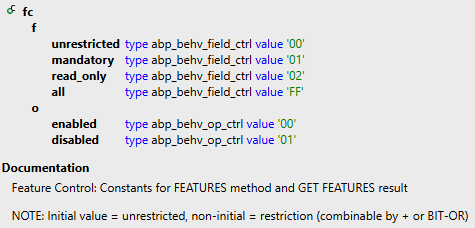
If you receive this warning message, then you have used the wrong data type. There is now a new feature control that you can equip with the different data types. This differs accordingly in terms of the fields or the various operations that you can activate or deactivate. The new data type is intended to prevent problems arising from incorrect flags being set or flags originating from a different type.
Global
In the method, we then obtain two structures and various reporting structures that we should use. The first structure is the "requested_features" structure. This defines whether a request is made to check permissions for a given action. This allows us, for example, to save performance if determining permissions is a resource-intensive action. The second important structure is the "result" structure, because this allows us to define whether the corresponding action exists, is authorized, or is disabled. As you can see from the return values, these are now the new Feature Control Flags. Therefore, warning messages could appear if we use the wrong types.

For implementation, it's sufficient to check the permissions once, since we're working in the global area without the Business Partner. This means we can check first whether the user has Create permission, and then in the next step, check whether the Create feature is currently being requested. If the permissions are present, we activate the Create action; otherwise, we deactivate the action. We then do this for all three existing actions.
DATA(can_create) = NEW zcl_bs_demo_rap_sales_auth( )->has_authorization(
    activity = zcl_bs_demo_rap_sales_auth=>activities-create ).

IF requested_features-%create = if_abap_behv=>mk-on.
  IF can_create = abap_true.
    result-%create = if_abap_behv=>fc-o-enabled.
  ELSE.
    result-%create = if_abap_behv=>fc-o-disabled.
  ENDIF.
ENDIF.
Instance
If we work on the instance-based side, we must first read all affected data records via the EML statement. Here, it is sufficient to additionally read the partner number so that we have the information for our authorization check. We then iterate through all data records and determine the authorization for them. Since we have several checks against several actions in this case, we insert a new data record into the result at the beginning of the loop and use %TKY, which contains the key and draft status. We can then access this data record later.
FINAL(auth) = NEW zcl_bs_demo_rap_sales_auth( ).

READ ENTITIES OF zbs_r_sasale IN LOCAL MODE
     ENTITY SASale
     FIELDS ( PartnerNumber ) WITH CORRESPONDING #( keys )
     RESULT FINAL(check_sales).

LOOP AT check_sales INTO FINAL(check_sale).
  INSERT VALUE #( %tky = check_sale-%tky ) INTO TABLE result REFERENCE INTO DATA(result_auth).

ENDLOOP.
The check then proceeds relatively similarly to the global features: We first check whether this request is intended and whether we want to check the field, then we perform a permissions check. During this check, we also pass the partner, since we are checking at the partner level. If the permissions are granted, we set the corresponding feature for the action in the "result" structure.
IF requested_features-%update = if_abap_behv=>mk-on.
  IF auth->has_authorization( activity   = auth->activities-change
                              parnter_id = check_sale-PartnerNumber ).
    result_auth->%features-%update = if_abap_behv=>fc-o-enabled.
  ELSE.
    result_auth->%features-%update = if_abap_behv=>fc-o-disabled.
  ENDIF.
ENDIF.
Validation
For the actual partner validation, we proceed similarly to the instance-based data records. We first read the affected partner numbers using EML and then perform a validation. In this case, we first check whether we have authorization. If we do not have authorization, we generate an error message by populating the "reported" structure and returning an error to the caller. This prevents the data record from being saved, as the validation fails. In principle, a discard draft is always possible to revert the changes.
IF NOT auth->has_authorization( activity   = auth->activities-change
                                parnter_id = check_sale-PartnerNumber ).
  INSERT VALUE #( %tky = check_sale-%tky
                  %msg = new_message( id       = 'ZBS_DEMO_RAP'
                                      number   = '010'
                                      severity = if_abap_behv_message=>severity-error
                                      v1       = check_sale-PartnerNumber ) )
         INTO TABLE reported-sasale.
ENDIF.
Performance
Performance can also play an important role when it comes to permission checks. If the permission check takes too long or is performance-intensive, the user will be able to see data records in the UI, but may not yet be able to work with them because the permission check is still running in the background. In the past, no indicators were displayed for this; that is, the user simply couldn't click on the data records, which was a typical indicator that not all checks had been completed. Therefore, you should ensure that these checks don't run for too long. A simple workaround is to perform the check only while the action is running, in order to verify the permission again before saving. While this takes longer, it does affect the saving process, but it also means that not all data records need to be checked beforehand, and the initial work will proceed smoothly.
Test
Let's now run a test in the UI and examine the permissions and limitations in detail. We'll look at the various actions and the permissions granted.
Update
Currently, we do not have permission to create, modify, or delete objects. However, when we start the application and view a data record, we see that the edit action is not restricted. Basically, we have disabled updates in the code, and we don't have permission to update.

However, we are currently in a draft scenario. This means that, in addition to the update action, we also have the edit action, which is important for the draft state. This is also displayed here in the UI, and since we haven't restricted it, we still have the necessary permissions. This means we also need to implement the Feature Control in this case and include it in our logic to disable it.

Permission
As we already established in the previous step, we do not have permission to modify or delete a record. In the last article, we actually granted ourselves permissions to view records. This was done via the IAM app. Dynamic maintenance via the actual business role only defines the business partners for whom we have permission. So where do the activities we need come from? In this case, they still come from the IAM app to which we assigned the permission object. In the case that we maintain this via a Restriction Type, we override the Business Partner, but we cannot override the activity granted by this IAM app. This means that in this case, we only have display permission and therefore cannot make changes, create new records, or delete them.

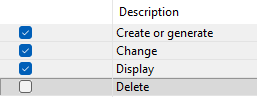
Therefore, we now adapt the IAM app and grant permissions for creating, modifying, and viewing records, without deletion permission. So, in the next step, we can run a test.
Functions
Let's adjust the permissions again and add another business partner with a 5 at the end to the read permission. This gives us write permission for numbers 3 and 4 and allows us to read number 5, which we will then test.
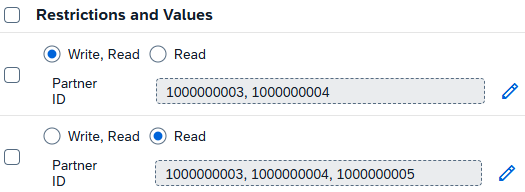
If we only allow one record with a 5 at the end, we should only have read permission. We can see this because the edit and delete buttons are grayed out. Thus, the feature control has been triggered and the corresponding permissions are in effect. Modifying the record is not possible; we can only view it or perform actions that do not require permission checks, such as checking consistency.

If we select a record to which we have permission, we also see that the edit button is active. However, the permission for delete is missing here. We have not assigned this permission via IAM. This means that, apart from an administrator, for example, no one can currently delete data records; we can only create new data records and modify them.

Complete Example
You can find the complete example in GitHub in the corresponding package for the Sales App. The changes from this article can be found in this Commit and you can use it to understand the changes, plus the additional information.
Conclusion
The Feature Control is an important function for enabling or disabling actions and activities, depending on the permissions or the object's state. With the newer releases, there have been some changes to the typing of the corresponding flags. You should pay attention to this and watch out for any warning messages and resolve them. Otherwise, you might not have permission even though you used the On flag, for example, because you used it from the wrong type and it then has a different meaning.