ABAP Tools - IDE Actions (Output)
Let's look at the output options we currently have with IDE Actions and what we can achieve with them. We will look at different implementation examples for each case.

Table of contents
This time we'll implement the output for our action, taking a look at the current output types and what we can use them for.
Introduction
In the last article, we created the IDE action and discussed the various details of its execution. In the end, we received an error because we had not yet defined any output.
Output
The methods Text, HTML, and Code Change are currently available to us as output, which we will look at in more detail in this chapter.
Return
Last time, we created the actual action class ZCL_BS_DEMO_IDE_FIRST_ACTION and did not implement the RUN method correctly. Let's look at the method; we should create an object from the IF_AIA_ACTION_RESULT interface.
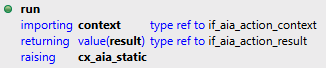
We now have the CL_AIA_RESULT_FACTORY factory at our disposal, which can create the appropriate objects.
Text
To output a string, we have the factory create a text popup. Here, we don't map to the target interface yet in order to access the SET_CONTENT method. We currently have no further settings or options.
DATA(text) = cl_aia_result_factory=>create_text_popup_result( ).
text->set_content( `Here is my text output ...` ).

result = text.
As a result, the text is displayed in a simple popup window. We cannot adjust the size of the window; it is determined by the last actions.

HTML
As the name HTML suggests, we have all the options here for creating and outputting an HTML document. This basically opens up several possibilities for creating attractive lists, enumerations, and other things. In this example, we generate a simple heading and a paragraph for the output. We also set the color of the heading to blue.
DATA(html_document) = `<html><head></head><body><h1 style="color:blue;">Big Heading</h1><p>A text in a paragraph</p><body></html>`.

DATA(html) = cl_aia_result_factory=>create_html_popup_result( ).
html->set_content( html_document ).

result = html.
The output of the HTML popup would now look like this. Basically, you have complete freedom here, but you'll probably have to adjust the size to fit your output.
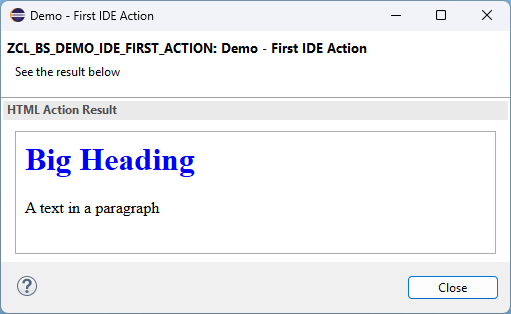
Therefore, we recommend a small framework that takes care of preparing the output to HTML. You can make some adjustments with CSS to make your output look even better.
Code Change
Things get a bit more complex when creating a code change. Here, we usually need the marked source code if we want to use it for analysis. If, however, we simply want to insert some new source code, we don't need any reference code and can simply adopt the new code. The standard offers various options for code changes for this purpose.

- INSERT - Inserts the submitted content into the source code.
- REMOVE - Removes the selected source code at the submitted position.
- REPLACE - Replaces the selected source code.
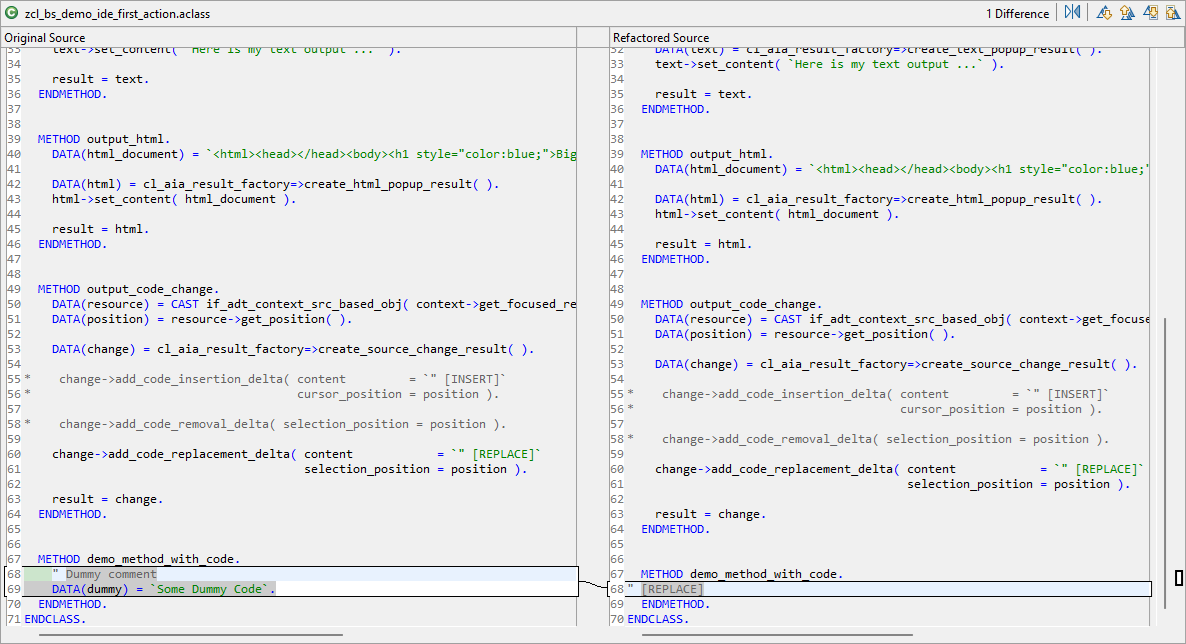
In the following example, we perform a replacement of the source code. To do this, we get the current cursor position from the CONTEXT object. However, we must first cast the object to the IF_ADT_CONTEXT_SRC_BASED_OBJ interface to access the GET_POSITION method. We then use the factory to obtain a new Source Code Change object. Then we add a replacement and pass the new source code.
DATA(resource) = CAST if_adt_context_src_based_obj( context->get_focused_resource( ) ).
DATA(position) = resource->get_position( ).

DATA(change) = cl_aia_result_factory=>create_source_change_result( ).
change->add_code_replacement_delta( content            = `" [REPLACE]`
                                    selection_position = position ).

result = change.
Now we get the change dialog and can review the code change. If we are satisfied with it, we can accept the changes by clicking OK. This gives us a simple way to make direct changes to the source code and communicate the delta to the executor.
Complete example
You can find the complete example in our GitHub repository. All changes from today's article are summarized in this commit and should be understandable.
Conclusion
Whether you just want to display a message, express yourself with HTML, or display a change in the code, this is possible using the current output methods. However, we would also like to see options for object trees and fixable windows.