ABAP Tools - IDE Actions (Side Effects)
How can we automatically update information on the UI when something happens with the IDE action? Let's take a closer look at the side effects.

Table of contents
In this article, we'll look at the behavior of side effects and how we can use them more efficiently for our input.
Introduction
Last time, we looked at value helps in IDE actions and how we can create sequential value helps. In this article, we'll focus more on working with the UI. We want to automatically react to input and update information on the popup (input). Similar to side effects in the ABAP RESTful Programming Model, we can trigger the effect after an action in the UI and thus adjust information.
Preparation
Therefore, as a first step, let's adjust our input and add new fields that we will subsequently use for our new features. These two fields are an input field and an output field for the later side effect. To do this, we extend the INPUT structure in the Input class for the UI.
"! <p class="shorttext">SE: Input</p>
se_input      TYPE string,
"! <p class="shorttext">SE: Output</p>
se_output     TYPE string,
We want to react to two things:
- Changing the output type
- Input of text into the input field
Definition
To implement the side effect, we need to perform several steps.
Configuration
Using the configuration, we then need to activate the side effect on the field. To do this, we have the element returned to us from the configuration in the CREATE_INPUT_CONFIG method and call the SET_SIDEEFFECT method. There, we set the flag to call the effect after the update.
configuration->get_element( `output_format` )->set_sideeffect( after_update = abap_true ).
configuration->get_element( `se_input` )->set_sideeffect( after_update = abap_true ).
Basically, we can activate various effects when, for example, we edit a table. We can also react to creating and deleting entries in a table, for example, when we need to update the data.

Class
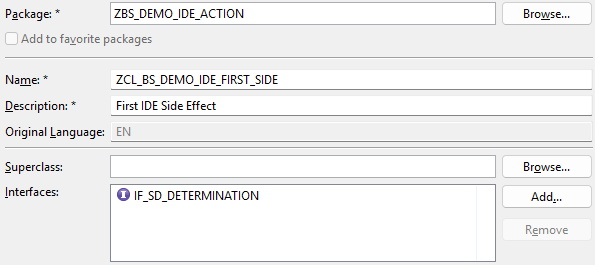
In the next step, we need to implement the actual class for the side effect. This requires the interface IF_SD_DETERMINATION, where we will later implement the actual logic.
Handler
Once we have defined the class, we need to register it in the framework. To do this, we create the method GET_SIDE_EFFECT_PROVIDER in the Input class. If the method is not yet implemented, you can find it in the interface IF_AIA_SD_ACTION_INPUT. We create the instance and pass it to the DETERMINATION parameter of the provider.
METHOD if_aia_sd_action_input~get_side_effect_provider.
  RETURN cl_sd_sideeffect_provider=>create( determination = NEW zcl_bs_demo_ide_first_side( ) ).
ENDMETHOD.
Implementation
In this chapter, we will look at the actual implementation of the logic. Currently, we have two fields with an effect that we want to place in an output field. In the first step, we check whether we are currently using the correct side effect, so that we can control which effect triggers which code.
IF determination_kind <> if_sd_determination=>kind-after_update.
  RETURN.
ENDIF.
As a next step, we read the current input data via the MODEL, as we want to use the current data for the effect to give the developer feedback on their input.
DATA input TYPE zcl_bs_demo_ide_first_input=>input.
model->get_as_structure( IMPORTING result = input ).
As a final step, we execute the actual effect. Here, we take the format and current length of the input field and include it in the output. Finally, we pass the data to the RESULT parameter for updating. Of course, you can now call numerous derivations and further logic. However, it shouldn't take too much time, otherwise the developer will have to wait after every input.
input-se_output = |{ input-output_format }: { strlen( input-se_input ) }|.
result = input.
Result
Now that we have completed the implementation, let's take a look at the side effect in real time. The output field now reacts to changes in the output or input into the input field and adjusts accordingly. As long as the effect is not triggered again, you can also adjust the output field manually.

Complete Example
You can find the complete code from the entire example in the GitHub repository. The following Commit contains the changes from this article, allowing you to review the current state later.
Conclusion
Side effects bring more life to your IDE action and allow you to directly reflect the effects of input on the UI and pre-populate information for the developer. They can be used for many things in dynamic development.