ABAP - Create dump
In ABAP, a dump represents a system termination due to a malfunction or an error that wasn't properly caught and handled. However, the dump also allows for the provision of additional information.

Table of contents
In this article, we'll look at how to create a dump in your code and how it can help you find errors.
Introduction
A dump usually represents a serious problem in the system, because a program or process has crashed, perhaps due to errors in the code or unforeseen system issues. A dump also generates a log, which we can use to perform analysis and find the error. In some situations, it therefore makes sense to proactively generate an error to simplify later analysis or to highlight problems in the system.
Generation
There is a statement we can easily use to generate dumps. Let's look at two different use cases.
Inline
If we want to generate an error inline, we can do so using the RAISE SHORTDUMP statement. We must pass an exception instance to the statement to generate the dump. In this case, we can also generate the exception inline while we want to trigger the dump. Using the keyword NEW and the name of the exception, we create a new instance and pass it directly to the statement. From this point on, the short dump is generated and the program terminates.
RAISE SHORTDUMP NEW cx_sy_zerodivide( ).
Exception
If we have an existing exception, we can use it directly to generate the short dump and include it in the log. This is especially useful when we reach points where we might no longer be able to react or where it simply doesn't make sense to continue running the program. Let's take the simple case where we want to generate a new UUID: In this case, a TRY/CATCH is always necessary to catch an exception. However, if this exception is thrown and no UUID is generated, the entire program should actually be terminated, since saving is no longer possible. In such a case, we can then take the caught exception and directly trigger a short dump with it.
TRY.
    DATA(new_uuid) = cl_system_uuid=>create_uuid_x16_static( ).

  CATCH cx_uuid_error INTO DATA(error).
    RAISE SHORTDUMP error.
ENDTRY.
Besides the UUID, another typical case might be if we want to write an application log, but instantiation isn't possible. In that case, it would be pointless to continue, as we wouldn't be able to write error logs or anything else either. We could theoretically still generate an email, but a dump is obviously very conspicuous in the system.
A second case is the application job. If an exception is thrown in the application job, we often don't receive any further information in the log. Therefore, we don't know exactly why the exception was thrown and what the message contains. Here, for example, we could create a dump in the system and thus view the context of the current application job.
Evaluation
Let's briefly look at the evaluation area and how you can read the dumps in the system to extract further information from them.
Information
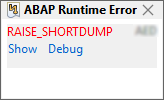
If you are logged into the ABAP Development Tools for Eclipse and have configured your feed readers, you will receive a notification in the form of a pop-up in the lower right area of your IDE. Here you have the option to jump directly to the log or, in some cases, if it has just been generated, even to start the debugger to take a closer look at the error.
Access
You either open the log via the Feed Reader or via the pop-up from which you received the dump information. A new object will now be displayed in the IDE. The default selection shows the compressed dump; important information has already been extracted and prepared for you. Basically, you don't need to read that much. We already get initial information here about the type of exception, which program was terminated, and the context.

In the lower section, you can also switch to the classic dump view. There, you'll find the information presented in the format typical of transaction ST22. You can still view the dumps in the transaction itself, at least as long as you're working on an on-premises or private cloud system. In its raw form, the dump contains much more information if you want to delve deeper into the error and it's not immediately obvious where the dump originated.

Sections
Let's take a quick look at the different sections you'll find within a dump and how they can help you get more information.
- Header Info - Here you get a brief summary of the information: what kind of error occurred (for example, a runtime error), whether it was triggered by an exception, on which system it occurred, at what time, and on which server.
- What happened - In this section, you'll usually find a longer text explaining what actually happened. In our example: that a RAISE SHORTDUMP or THROW SHORTDUMP was triggered to generate a short dump. Error Analysis - The error analysis briefly indicates why the program terminated; In this case, an exception was thrown.
- Information - Within the information section, you will find further details about where the termination occurred: which include, which method, which line.
- Source Code Extract - In this section, you will find a code snippet showing the exact point of termination and also see the surrounding code to understand how it was called.
- Active Calls - In the Active Calls section, you will find the call stack of the various objects up to your object where the termination occurred. This way you can see which standard you came from or which different classes your implementation was called from.
Complete Example
Here you will find the complete class and resources we used in our article. You can reuse the class in your system to check further settings.
CLASS zcl_bs_demo_dump DEFINITION
  PUBLIC FINAL
  CREATE PUBLIC.

  PUBLIC SECTION.
    INTERFACES if_oo_adt_classrun.
ENDCLASS.


CLASS zcl_bs_demo_dump IMPLEMENTATION.
  METHOD if_oo_adt_classrun~main.
    RAISE SHORTDUMP NEW cx_sy_zerodivide( ).

    TRY.
        DATA(new_uuid) = cl_system_uuid=>create_uuid_x16_static( ).
        out->write( |UUID: { new_uuid }| ).

      CATCH cx_uuid_error INTO DATA(error).
        RAISE SHORTDUMP error.
    ENDTRY.
  ENDMETHOD.
ENDCLASS.
Conclusion
System dumps are not only a problem, at least when they occur rarely, but can also be used to provide further information, context, and clues about error situations. In the classic ABAP world, for example, a message of type X could be generated to force programs to terminate and create a dump. In the modern ABAP Cloud world, we would use the RAISE SHORTDUMP statement here.
Further information:
SAP Help - RAISE SHORTDUMP