ABAP - XCO Logging
The XCO classes are part of the ABAP Cloud APIs and offer numerous functions that aren't always easy to understand. In this article, we'll take a detailed look at the logging object.

Table of contents
The XCO classes are helper classes that provide various everyday functions bundled under a public API. You can find more information and an overview of the XCO libraries on the overview page.
Introduction
The XCO classes also include a logging object for messages and other objects. Therefore, it's worthwhile to compare the different classes and how we can use them. Essentially, the framework integrates the BAL_LOG* function blocks into the classes. At the end of the article, you will find a comparison of the classes and frameworks to help you find the best solution.
Preparation
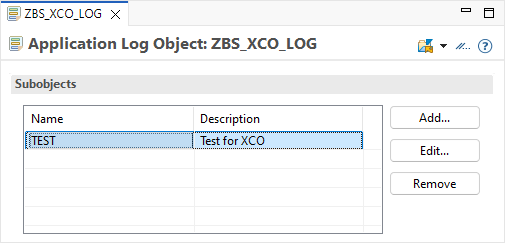
To be able to process our test cases right away, we first create a logging object ZBS_XCO_LOG and a corresponding sub-object. Since we are working with the application log, we need the ID for further processing.
To be able to create corresponding real messages, we need a message class with a few dummy messages for the log.

Finally, you also need permissions for the application log if, for example, you are working in a cloud system. The restrictions here are very strict, and to access and write the logs and messages, we need S_APPL_LOG for our new object. The package includes an IAM app with a business catalog.
Creation
Let's take a look at creating an application log. We create a new log object using the class XCO_CP_BAL and the corresponding factory. Since a header is already generated in the implementation, you also need permissions for the application log object here. We pass the object, a sub-object, and an external ID, which we can use for searching and identification.
DATA(log) = xco_cp_bal=>for->database(
                )->log->create( iv_object      = 'ZBS_XCO_LOG'
                                iv_subobject   = 'TEST'
                                iv_external_id = external_id ).
In the example above, we use DATABASE for persistence. Currently, you have two options to choose from:
- DATABASE - The messages are stored in the database.
- MEMORY - The messages are only held in memory at runtime.
In the next step, we want to pass messages directly to the object. The object offers various methods that we can use for this. However, the focus is on objects from the XCO area.
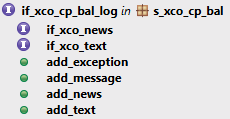
Now we pass a message, an exception, and an object with the interface for News and Text to the Log object. Further details about the helper methods can be found in Git.
log->add_message( get_message( )->value ).
log->add_exception( NEW cx_sy_itab_line_not_found( ) ).
log->add_news( get_strings( ) ).
log->add_text( get_strings( ) ).
That completes the implementation. Since we used the database for persistence, all messages are written directly to the database. This triggers a commit via a second database connection, which does not affect the current process. This allows you to access the messages later even if your actual process has terminated. Therefore, calling a save method is no longer necessary.
Reading
Now let's try reading the various messages again. To do this, we again use the corresponding persistence and load the log using the handle. You can find the handle as an attribute of the log object.
DATA(log) = xco_cp_bal=>for->database( )->log->load( handle ).
Using the Message attribute, we can then retrieve all instances of the messages. Each message contains three pieces of information: the actual message, the level of detail (if you have classified the messages accordingly), and the message's timestamp (if you need further information about when the message occurred).
LOOP AT log->messages->all->get( ) INTO DATA(message).
  out->plain->write( message->value-message->get_text( ) ).
  out->plain->write( message->value-level_of_detail->value ).
  out->plain->write( message->value-timestamp->value ).
ENDLOOP.
As a result, we output the various pieces of information to the Eclipse console.

Search
If we haven't stored a corresponding handle for our process, but only have some information, such as a delimitation by external ID or time, then we have to search the existing logs.
Filter
To do this, we first define a filter criterion by which we want to restrict the entries. You can find the attribute LOG_FILTER on the class XCO_CP_BAL for this purpose. There, we have various attributes available that we can use to restrict the search.
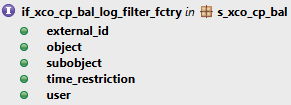
In this example, we filter by the external ID because we previously generated different logs with different references. We pass a constraint to the method for the query.
DATA(filter_external_id) = xco_cp_bal=>log_filter->external_id(
    xco_cp_abap_sql=>constraint->contains_pattern( '*02*' ) ).
Using the class XCO_CP_ABAP_SQL, you can create and populate such a constraint. The same queries are available here as for a range. Therefore, we use the CONTAINS_PATTERN (CP) method to search for a pattern. But be careful, unlike what is described in the documentation, we only got a result with an asterisk (*).
Query
Once our filters are defined, we can call the persistence again. Since we want to read from the database, we use DATABASE and in this case, we use the LOGS attribute. We can now pass all our filters to the WHERE method and finally call the GET method.
DATA(found_logs) = xco_cp_bal=>for->database( )->logs->where( VALUE #( ( filter_external_id ) ) )->get( ).
Processing
Selecting the logs can take some time, depending on the data query. Ultimately, we obtain a table with log instances, which we can then process and analyze accordingly. In this case, we retrieve the handle and the external ID for analysis.
LOOP AT found_logs INTO DATA(log).
  out->write( log->handle ).
  out->write( log->header->get_external_id( ) ).
ENDLOOP.
We searched for all objects with "02" in the name of the external ID, and this is what our corresponding result looks like. Output of the handle and the external ID:

Comparison
In this section, we will directly compare the different classes with each other and look at the general support as well as the specific messages. Basically, all classes are based on the framework of the BAL_LOG* function blocks when it comes to handling messages.
| BAL_LOG_CREATE | CL_BALI_LOG | XCO_CP_BAL | AML | |
|---|---|---|---|---|
| General | ||||
| Language Version | Classic | ABAP Cloud | ABAP Cloud | ABAP Cloud |
| Maintenance | SLG0 | ADT | ADT | ADT |
| ABAP OO | ✔️ | ✔️ | ✔️ | |
| Testable | ✔️ | |||
| Expiration Date | ✔️ | ✔️ | ✔️ | |
| Error case | ✔️ | ✔️ | ||
| Messages (native) | ||||
| T100 | ✔️ | ✔️ | ✔️ | ✔️ |
| System | ✔️ | ✔️ | ✔️ | |
| Exception | ✔️ | ✔️ | ✔️ | ✔️ |
| Text/String | ✔️ | ✔️ | ✔️ | ✔️ |
| BAPI | ✔️ | ✔️ | ||
| XCO_MESSAGE | ✔️ | ✔️ | ||
We have the following criteria Compared:
- Maintenance - Where we create and maintain the Application Log object.
- Testable - Is the class written to be testable, so that it can be mocked at runtime without much effort?
- Expiration Date - Can the deletion date be set so that the log is deleted by the system after x days?
- Error Case - In the event of a termination (dump), the messages are still persisted.
- Messages - This is about the native provision of a method or way to transfer the message to the log. Usually without the overhead of a mapping.
In this article, we discussed the XCO classes; you can find more information about the general ABAP Cloud API in this article. If you'd like to learn more about the open-source project ABAP Message Logger, we also have a dedicated article for it. The logger was written with the intention of covering as many of the points mentioned above as possible, while remaining simple and testable to implement.
Complete Example
You can find the complete example of both classes in our GitHub repository. In this Commit you will find the changes from today's article and can follow the steps in your system.
Conclusion
In addition to the new standard API for ABAP Cloud, there is now a second variant from the XCO library. The logging class primarily focuses on the XCO ecosystem, with its interfaces and behavior. Looking at the scope of the framework, there is certainly room for improvement.
Further information:
SAP Help - Business Application Log