
ABAP - XCO Regular Expressions
Let's take a look at the XCO classes for regular expressions and how you can easily use them to execute REGEX against text and input in ABAP Cloud. We'll also compare them with classic ABAP.

Table of contents
The XCO classes are helper classes that provide various everyday functions bundled together under a public API. Further information and an overview of the XCO libraries can be found on the overview page.
Introduction
During development, we often come across situations where we want to check and validate user input, or only allow certain inputs. Regular expressions, or REGEX for short, are used to perform this validation. These compare texts against specific patterns. The standard here, for example, is comparing an email address, where an @ symbol is expected, and a period for a domain. Further checks can also be performed.
Engine
There are various validation engines for regular expressions. You can generate various methods using the ENGINE factory of the XCO_CP_REGULAR_EXPRESSION class. Also note the constructor here, as you can use it to make additional settings.
Hint: The recommendation is usually to use PCRE; previously, POSIX was mainly used as the standard. However, the DEFAULT attribute for most parameters and the factory is still POSIX.
Extraction
In the first example, we'll look at string extraction and how we can extract components from a string into a table. As an example, we'll take a string from which we want to extract all words that contain "is" as a component. We'll use PCRE as the engine.
CONSTANTS search_string TYPE string VALUE `This is my new string class.`.
Classic
Using the FIND statement and the PCRE addition, we receive a results table with all the locations. Afterward, we simply need to navigate through the table and extract the locations from the string into our results table.
FIND ALL OCCURRENCES OF PCRE `\w*is\w*` IN search_string RESULTS DATA(found_parts).
LOOP AT found_parts INTO DATA(found_part).
  INSERT search_string+found_part-offset(found_part-length) INTO TABLE search_results.
ENDLOOP.
Modern
With the modern approach, we use the new FIND and FIND_END functions instead of the classic statements. However, this also generates much more code and no longer provides a table with the result; instead, we have to loop from place to place and perform the extraction.
DATA(ld_start) = 0.
DO.
  DATA(ld_position) = find( val  = search_string
                            pcre = `\w*is\w*`
                            off  = ld_start ).
  IF ld_position = -1.
    EXIT.
  ENDIF.

  DATA(ld_to) = find_end( val  = search_string
                          pcre = `\w*is\w*`
                          off  = ld_start ).

  INSERT substring( val = search_string
                    off = ld_position
                    len = ld_to - ld_position ) INTO TABLE search_results.
  ld_start = ld_to.
ENDDO.
XCO
With the XCO library, we can access the String object. The GREP method offers the possibility of performing an extraction using a REGEX and obtaining a STRINGS object. However, we then have to adapt the expression slightly and cannot adopt it 1:1 from the previous examples.
search_results = xco_cp=>string( search_string )->grep(
    iv_regular_expression = `\w*is\w*`
    io_engine             = xco_cp_regular_expression=>engine->pcre( )
    )->value.
Result
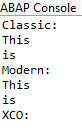
As a result, we receive output in the console; the same two components should always appear here. However, there is currently a discrepancy in the result in the XCO library, which we are currently investigating. The function basically works; see the unit test in the class. However, the "Word Match" doesn't seem to work.
Check
In this example, we perform an input check and use the class XCO_CP=>REGULAR_EXPRESSION to create an object for a REGEX and an engine. Using the MATCHES method, we can then compare whether the string matches the query. In this case, we want to know whether the string contains only uppercase letters, numbers, and underscores.
DATA(regex) = xco_cp=>regular_expression( iv_value  = `^[A-Z0-9_]+$`
                                          io_engine = xco_cp_regular_expression=>engine->pcre( ) ).

IF regex->matches( `MY_CONTENT` ).
ENDIF.
Complete Example
Here you can find the complete class with the entire example. You can also find all the other XCO examples from the series in the GitHub repository.
CLASS zcl_bs_demo_xco_pcre_test DEFINITION
  PUBLIC FINAL
  CREATE PUBLIC.

  PUBLIC SECTION.
    INTERFACES if_oo_adt_classrun.

    CONSTANTS search_string TYPE string VALUE `This is my new string class.`.

  PRIVATE SECTION.
    METHODS extract_string
      IMPORTING !out TYPE REF TO if_oo_adt_classrun_out.

    METHODS validate_string
      IMPORTING !out TYPE REF TO if_oo_adt_classrun_out.
ENDCLASS.


CLASS zcl_bs_demo_xco_pcre_test IMPLEMENTATION.
  METHOD if_oo_adt_classrun~main.
    extract_string( out ).
    validate_string( out ).
  ENDMETHOD.


  METHOD extract_string.
    DATA search_results TYPE string_table.

    " Classic
    FIND ALL OCCURRENCES OF PCRE `\w*is\w*` IN search_string RESULTS DATA(found_parts).
    LOOP AT found_parts INTO DATA(found_part).
      INSERT search_string+found_part-offset(found_part-length) INTO TABLE search_results.
    ENDLOOP.

    out->write( `Classic:` ).
    out->write( search_results ).

    CLEAR search_results.

    " Modern
    DATA(ld_start) = 0.
    DO.
      DATA(ld_position) = find( val  = search_string
                                pcre = `\w*is\w*`
                                off  = ld_start ).
      IF ld_position = -1.
        EXIT.
      ENDIF.

      DATA(ld_to) = find_end( val  = search_string
                              pcre = `\w*is\w*`
                              off  = ld_start ).

      INSERT substring( val = search_string
                        off = ld_position
                        len = ld_to - ld_position ) INTO TABLE search_results.
      ld_start = ld_to.
    ENDDO.

    out->write( `Modern:` ).
    out->write( search_results ).

    " XCO
    search_results = xco_cp=>string( search_string )->grep(
        iv_regular_expression = `\w*is\w*`
        io_engine             = xco_cp_regular_expression=>engine->pcre( )
        )->value.

    out->write( `XCO:` ).
    out->write( search_results ).
  ENDMETHOD.


  METHOD validate_string.
    DATA(regex) = xco_cp=>regular_expression( iv_value  = `^[A-Z0-9_]+$`
                                              io_engine = xco_cp_regular_expression=>engine->pcre( ) ).

    IF regex->matches( `MY_CONTENT` ).
      out->write( 'Match!' ).
    ENDIF.
  ENDMETHOD.
ENDCLASS.
Conclusion
You need regular expressions quite often in development to validate inputs, but also to extract data in XSD, for example. The variant for XCO can save you some of the writing work.
Source:
SAP Help - Regular Expression