ABAP - Polymorphic Structures
What about structures in dynamic ABAP development? Processing has been rather generic up to now. With polymorphic structures, development can now gain more structure.

Table of contents
In this article, we'll take a look at the new polymorphic structures. What can you already do with them, and what can't you do yet? More details in the article.
Introduction
Dynamic or generic development is the most flexible development method you can use, but it also means that you generate a lot of source code to process a small amount of data or provide generic code components. This is mostly due to the fact that more checks, variables, and assignments are often needed because you can't access them directly via the component name. For example, mapping structures and ultimately accessing the various components of those structures is a very common and extensive topic. SAP has provided an initial solution for this using polymorphic structures, which are intended to reduce some of the generic code, thus enabling simpler and shorter ABAP source code. Polymorphic structures were introduced with Release 2608 in the ABAP Environment and in the public cloud and will likely be rolled out to on-premises and private cloud environments with Release 2027.
Preparation
First, we need some structures, tables, and data as preparation. To do this, we will create two data types that will be reused in all structures. Additionally, we create three structures: one for the supplier and the customer, each containing the identifier and name, and one structure omitting both fields to allow for later testing of mapping settings.
TYPES identifier TYPE c LENGTH 12.
TYPES name       TYPE string.

TYPES:
  BEGIN OF none_field,
    some_id  TYPE c LENGTH 10,
    location TYPE string,
    value    TYPE int8,
  END OF none_field.
TYPES none_fields TYPE STANDARD TABLE OF none_field WITH EMPTY KEY.

TYPES:
  BEGIN OF customer,
    customer_id TYPE c LENGTH 10,
    location    TYPE string,
    identifier  TYPE identifier,
    name        TYPE name,
    value       TYPE int8,
  END OF customer.
TYPES customers TYPE STANDARD TABLE OF customer WITH EMPTY KEY.

TYPES:
  BEGIN OF supplier,
    supplier_id    TYPE c LENGTH 10,
    contract_value TYPE p LENGTH 16 DECIMALS 2,
    value          TYPE int8,
    identifier     TYPE identifier,
    name           TYPE name,
  END OF supplier.
TYPES suppliers      TYPE STANDARD TABLE OF supplier WITH EMPTY KEY.

TYPES generic_input  TYPE ANY STRUCTURE CONTAINING identifier TYPE identifier
                                                   name       TYPE name.
TYPES generic_inputs TYPE STANDARD TABLE OF generic_input WITH EMPTY KEY.
To have data right away, we'll create two data sets in tabular form for both the Supplier and the Customer, and also for the missing objects. Finally, we'll read the first row from each table to gain experience working with tables and then with structures.
FINAL(customers) = VALUE customers( ( customer_id = 'C0001'
                                      location    = `Teststreet 1, 51100 Cologne`
                                      identifier  = '10'
                                      name        = 'John Doe'
                                      value       = 98 )
                                    ( customer_id = 'C0002'
                                      location    = `Test Allee 3, 21230 Berlin`
                                      identifier  = '20'
                                      name        = 'Jane Doe'
                                      value       = 13 ) ).

FINAL(suppliers) = VALUE suppliers( ( supplier_id    = 'S0001'
                                      contract_value = '10000.00'
                                      identifier     = '20'
                                      name           = 'Jane Doe'
                                      value          = 17 )
                                    ( supplier_id    = 'S0002'
                                      contract_value = '15000.00'
                                      identifier     = '10'
                                      name           = 'John Doe'
                                      value          = 23 ) ).

FINAL(nones) = VALUE none_fields( ( some_id  = 'N0001'
                                    location = `Teststreet 1, 51100 Cologne`
                                    value    = 40 )
                                  ( some_id  = 'N0002'
                                    location = `Test Allee 3, 21230 Berlin`
                                    value    = 16 ) ).

FINAL(customer) = customers[ 1 ].
FINAL(supplier) = suppliers[ 1 ].
FINAL(none) = nones[ 1 ].
Definition
Let's first look at the definition of the data type and how we can create and use it.
Creation
Basically, we would expect to define a structure. That means we define a new type with a name and give it the type ANY STRUCTURE. With this, we have defined a generic structure. Finally, we define, using the CONTAINING addition, which fields must be present in the structure at a minimum. The fields then have a name and a type that is defined. The compiler then checks at runtime whether a corresponding element with that name exists and whether the type, if it is not a 100% match, can at least be cast to the target type.
TYPES generic_input  TYPE ANY STRUCTURE CONTAINING
    identifier TYPE identifier
    name       TYPE name.
If we can create a structure, we can of course also define a table. Here we use the standard by specifying the name of the type, for example using STANDARD TABLE or SORTED TABLE as the type, and using a key. This defines a table type that then inherits from our generic structure type, which means we can then, for example, pass tables and not just individual data records to a method.
TYPES generic_inputs TYPE STANDARD TABLE OF generic_input WITH EMPTY KEY.
Interfaces
We can then use this data type to define a parameter within a method interface. There are no deviations from the standard here; you work with the type normally.
METHODS extract_name
  IMPORTING !out   TYPE REF TO if_oo_adt_classrun_out
            !input TYPE generic_input.
Variables
However, things look a little different if you want to perform an inline declaration or type assignment of a local element. Basically, we can write the addition and use the type. However, we will then receive an error message directly from the compiler.
DATA local TYPE generic_input.
These data types are not intended for direct declaration, but should primarily be used for interfaces, parameters, and field symbols. This is also shown by the error message we receive, which prevents us from activating our ABAP code.

Assignment
Let's now look at various examples of how we can assign and use data.
Methods
Above, we defined various methods for receiving data and processing it via a generic structure. Therefore, we simply need to call the method here and pass the dynamic type as an input parameter, in this case Customer and Supplier. These different types do not generate any error messages and are accepted one-to-one. This works for structures and tables.
extract_name( out   = out
              input = customer ).
extract_name( out   = out
              input = supplier ).
However, things look a bit different when we use the type NONE: Since this doesn't contain a field defined in the CONTAINING addition, we already get an error message from the compiler. This is because we have a typed data type, and the system recognizes that it doesn't have a corresponding minimum field.

Loops
Let's look at the processing of tables within the methods. For this, we go to the EXTRACT_NAMES method, where we pass an entire table generically. Here, it's not so easy to execute an inline declaration directly in the LOOP. We would get an error message here because we are working with a generic type. If we want to use a reference, we must first define it with REF TO DATA.
DATA input TYPE REF TO data.

LOOP AT inputs REFERENCE INTO input.
  extract_name( out   = out
                input = input->* ).
ENDLOOP.
Field symbols are handled slightly differently: Here, we don't need to define a field symbol with TYPE ANY first, but can work directly with an inline declaration and pass the field symbol to our method.
LOOP AT inputs ASSIGNING FIELD-SYMBOL(<input>).
  extract_name( out   = out
                input = <input> ).
ENDLOOP.
Processing
We've looked at the definition and the passing of data. Now we'll move on to the actual processing and how much code we can save.
Current
So what does it look like if we normally want to access two attributes generically, in this case the identifier and the name, in order to extract or output them during processing? For this, we need to execute an ASSIGN COMPONENT, specify the name of the component, and assign it to a field symbol. At the same time, however, we also need to check whether the assignment was successful or whether this field doesn't even exist in the structure. Finally, we can then generate the output for the two pieces of information.
ASSIGN COMPONENT 'IDENTIFIER' OF STRUCTURE input TO FIELD-SYMBOL(<identifier>).
IF sy-subrc <> 0.
  RETURN.
ENDIF.

ASSIGN COMPONENT 'NAME' OF STRUCTURE input TO FIELD-SYMBOL(<name>).
IF sy-subrc <> 0.
  RETURN.
ENDIF.

out->write( |{ <identifier> } - { <name> }| ).
New
Now let's look at the processing with the new structures. We can see immediately that we no longer need all the overhead of dynamic development. Because we have defined that the identifier and the name must be present in the structure, we can work directly with them in the method and access these two field names. No check for their existence is necessary.
out->write( |{ input-identifier } - { input-name }| ).
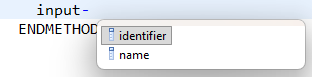
We also receive direct suggestions from the autocomplete function, which makes our work in development easier again, without having to guess existing fields.
Complete Example
In this chapter you will find the complete executable class to recreate the example in your system. However, you will also need the appropriate ABAP release.
CLASS zcl_bs_demo_poly_structures DEFINITION
  PUBLIC FINAL
  CREATE PUBLIC.

  PUBLIC SECTION.
    INTERFACES if_oo_adt_classrun.

  PRIVATE SECTION.
    TYPES identifier TYPE c LENGTH 12.
    TYPES name       TYPE string.

    TYPES:
      BEGIN OF none_field,
        some_id  TYPE c LENGTH 10,
        location TYPE string,
        value    TYPE int8,
      END OF none_field.
    TYPES none_fields TYPE STANDARD TABLE OF none_field WITH EMPTY KEY.

    TYPES:
      BEGIN OF customer,
        customer_id TYPE c LENGTH 10,
        location    TYPE string,
        identifier  TYPE identifier,
        name        TYPE name,
        value       TYPE int8,
      END OF customer.
    TYPES customers TYPE STANDARD TABLE OF customer WITH EMPTY KEY.

    TYPES:
      BEGIN OF supplier,
        supplier_id    TYPE c LENGTH 10,
        contract_value TYPE p LENGTH 16 DECIMALS 2,
        value          TYPE int8,
        identifier     TYPE identifier,
        name           TYPE name,
      END OF supplier.
    TYPES suppliers      TYPE STANDARD TABLE OF supplier WITH EMPTY KEY.

    TYPES generic_input  TYPE ANY STRUCTURE CONTAINING identifier TYPE identifier
                                                       name       TYPE name.
    TYPES generic_inputs TYPE STANDARD TABLE OF generic_input WITH EMPTY KEY.

    METHODS extract_name_generic
      IMPORTING !out   TYPE REF TO if_oo_adt_classrun_out
                !input TYPE any.

    METHODS extract_name
      IMPORTING !out   TYPE REF TO if_oo_adt_classrun_out
                !input TYPE generic_input.

    METHODS extract_names
      IMPORTING !out   TYPE REF TO if_oo_adt_classrun_out
                inputs TYPE generic_inputs.
ENDCLASS.


CLASS zcl_bs_demo_poly_structures IMPLEMENTATION.
  METHOD if_oo_adt_classrun~main.
    FINAL(customers) = VALUE customers( ( customer_id = 'C0001'
                                          location    = `Teststreet 1, 51100 Cologne`
                                          identifier  = '10'
                                          name        = 'John Doe'
                                          value       = 98 )
                                        ( customer_id = 'C0002'
                                          location    = `Test Allee 3, 21230 Berlin`
                                          identifier  = '20'
                                          name        = 'Jane Doe'
                                          value       = 13 ) ).

    FINAL(suppliers) = VALUE suppliers( ( supplier_id    = 'S0001'
                                          contract_value = '10000.00'
                                          identifier     = '20'
                                          name           = 'Jane Doe'
                                          value          = 17 )
                                        ( supplier_id    = 'S0002'
                                          contract_value = '15000.00'
                                          identifier     = '10'
                                          name           = 'John Doe'
                                          value          = 23 ) ).

    FINAL(nones) = VALUE none_fields( ( some_id  = 'N0001'
                                        location = `Teststreet 1, 51100 Cologne`
                                        value    = 40 )
                                      ( some_id  = 'N0002'
                                        location = `Test Allee 3, 21230 Berlin`
                                        value    = 16 ) ).

    FINAL(customer) = customers[ 1 ].
    FINAL(supplier) = suppliers[ 1 ].
    FINAL(none) = nones[ 1 ].

    out->write( `Extract Generic:` ).
    extract_name_generic( out   = out
                          input = customer ).
    extract_name_generic( out   = out
                          input = supplier ).
    extract_name_generic( out   = out
                          input = none ).

    out->write( `Extract Name:` ).
    extract_name( out   = out
                  input = customer ).
    extract_name( out   = out
                  input = supplier ).
*    extract_name( out   = out
*                  input = none ).

    out->write( `Extract Names:` ).
    extract_names( out    = out
                   inputs = customers ).
    extract_names( out    = out
                   inputs = suppliers ).
*    extract_names( out    = out
*                   inputs = nones ).
  ENDMETHOD.


  METHOD extract_name_generic.
    ASSIGN COMPONENT 'IDENTIFIER' OF STRUCTURE input TO FIELD-SYMBOL(<identifier>).
    IF sy-subrc <> 0.
      RETURN.
    ENDIF.

    ASSIGN COMPONENT 'NAME' OF STRUCTURE input TO FIELD-SYMBOL(<name>).
    IF sy-subrc <> 0.
      RETURN.
    ENDIF.

    out->write( |{ <identifier> } - { <name> }| ).
  ENDMETHOD.


  METHOD extract_name.
    out->write( |{ input-identifier } - { input-name }| ).
  ENDMETHOD.


  METHOD extract_names.
    DATA input TYPE REF TO data.

    LOOP AT inputs REFERENCE INTO input.
      extract_name( out   = out
                    input = input->* ).
    ENDLOOP.

    LOOP AT inputs ASSIGNING FIELD-SYMBOL(<input>).
      extract_name( out   = out
                    input = <input> ).
    ENDLOOP.
  ENDMETHOD.
ENDCLASS.
Conclusion
Dynamic programming and accessing fields within structures can be facilitated if we actually use polymorphic structures. However, minor obstacles may still arise with typing or passing data, as well as if we want to work completely dynamically and receive no information from the compiler. However, they generally offer real added value for development.
Further information:
SAP Help - ANY STRUCTURE CONTAINING
SAP Help - Demo Program