ABAP Tools - IDE Actions (Value Help)
Let's take a detailed look at how we can create a value help for our input for our IDE action in ADT. We'll examine several possibilities and dependencies.

Table of contents
In this article, we will discuss value help in the context of IDE actions and implement our own value help in addition to the standard help.
Introduction
Besides the actual input of values for our IDE action, it is also important that we give the developer the option to choose from different values if we provide a limitation. Last time, we looked at dropdowns and the ENUM; here, the values are already fixed, and there are only a handful to choose from. If the values depend on other fields or the selection is too large, then we need a value help.
Preparation
To begin working on the value helps, we define three fields on our input. The goal is to work with dependent data. First, we want to read a class from the system, the second value help should then list all methods, and the third should make the various parameters of the method selectable. To do this, we extend the structure by three fields (VH*):
TYPES:
  "! <p class="shorttext">Out first action</p>
  BEGIN OF input,
    "! <p class="shorttext">Choose an output</p>
    output_format TYPE output_format,
    "! <p class="shorttext">VH: Class</p>
    vh_class      TYPE string,
    "! <p class="shorttext">VH: Method</p>
    vh_method     TYPE string,
    "! <p class="shorttext">VH: Parameter</p>
    vh_parameter  TYPE string,
  END OF input.
If we now call up the IDE action, we initially see three normal fields for input, but no further options for searching for values.

To be able to make the settings in the next step, we need a configuration in the CREATE_INPUT_CONFIG method to adjust the properties of the fields. To do this, we create the configuration for our input and then pass it to the Information Factory at the UI. We will need this object in the following chapters of the article.
DATA input TYPE input.

DATA(configuration) = ui_information_factory->get_configuration_factory( )->create_for_data( input ).

RETURN ui_information_factory->for_abap_type( abap_type     = input
                                              configuration = configuration ).
Standard
First of all, there are already standard search helps for many cases. If you want to search for Core Data Services or classes, we don't need to implement our own logic, but simply activate the search help on the field. To do this, we return an instance of our field via the configuration; case is irrelevant here. Then we call the SET_TYPES method to determine the type of the field. In this case, we define the field as a class.
configuration->get_element( `vh_class` )->set_types( VALUE #( ( `CLAS/OC` ) ) ).
In the example above, we used hardcoded values because the standard currently does not offer constants for this, or at least we haven't found any yet. You can find the available values by pressing F2. Help for the SET_TYPES method:
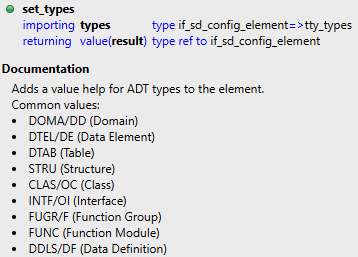
Now, if we call the IDE action, we get the corresponding button behind the field, and the field itself now also responds to the Content Assist in Eclipse.

Hint: If the search help is not displayed on the field, then you need to create a dummy implementation for your own value help. This is a bug that will be fixed in an upcoming release.
Custom
In this chapter, we'll look at how to implement a custom search help with logic and options.
Basics
If we want to implement a custom search help, we first need a class that handles the calls. To do this, we create a new class and use the interface IF_SD_VALUE_HELP_DSNI for the implementation. Once the class is created and activated, we need to register it in our input class. To do this, we implement the GET_VALUE_HELP_PROVIDER method in the class. If you haven't received a suggestion for the method, you'll have to implement it manually. This is due to the default implementation using DEFAULT IGNORE in the interface. We create an instance of our class and pass it to the provider.
METHOD if_aia_sd_action_input~get_value_help_provider.
  result = cl_sd_value_help_provider=>create( NEW zcl_bs_demo_ide_first_value( ) ).
ENDMETHOD.
Now we can define the search help for the two fields so that it is displayed when called. Similar to the standard, we do this via the configuration. Here, we have the element returned to us and activate the input help via the SET_VALUES method. This will later call our Value Help implementation.
configuration->get_element( 'vh_method' )->set_values( if_sd_config_element=>values_kind-domain_specific_named_items ).
configuration->get_element( 'vh_parameter' )->set_values( if_sd_config_element=>values_kind-domain_specific_named_items ).
Implementation
Before implementing the two value helps, we need to lay the foundation in the GET_VALUE_HELP_ITEMS method. To do this, we read the current data from the input, which we will need for the derivation in the next step. We create the structure and populate it using the MODEL.
DATA input TYPE zcl_bs_demo_ide_first_input=>input.

model->get_as_structure( IMPORTING result = input ).
Next, we can then derive the value using the VALUE_HELP_ID to start the correct search help and determine the values. Both methods deliver the same result in the form of a predefined structure. We return the data and the number of rows to the caller. The method also includes a MAX_ITEM_COUNT, which you should also consider when dealing with many data records.
CASE value_help_id.
  WHEN 'VH_METHOD'.
    items = get_methods( input ).
  WHEN 'VH_PARAMETER'.
    items = get_parameters( input ).
ENDCASE.

result = VALUE #( items            = items
                  total_item_count = lines( items ) ).
Methods
First of all, we should check if the class is populated, since we will use it for value help. Otherwise, we will return an empty result.
IF input-vh_class IS INITIAL.
  RETURN.
ENDIF.
Then we use the XCO class to read all public methods. However, only methods defined within the class are read, not those originating from an interface. Then we copy the name and description into the result. The description can be empty if classes are created with Eclipse and the ABAP documentation texts are not synchronized.
DATA(class) = xco_cp_abap=>class( CONV #( input-vh_class ) ).

DATA(public_methods) = class->definition->section-public->components->method->all->get( ).
LOOP AT public_methods INTO DATA(method).
  INSERT VALUE #( ) INTO TABLE result REFERENCE INTO DATA(result_entry).
  result_entry->name        = method->name.
  result_entry->description = method->content( )->get( )-short_description.
ENDLOOP.
Parameters
The procedure for parameters is initially similar; we first check the class and the method before starting the actual logic.
IF input-vh_class IS INITIAL OR input-vh_method IS INITIAL.
  RETURN.
ENDIF.
Then we read the class and only have the one method returned to us. For simplicity, we only return the importing parameters. In principle, with a little more logic, you could collect all parameters.
DATA(class) = xco_cp_abap=>class( CONV #( input-vh_class ) ).

DATA(method) = class->definition->section-public->component->method( CONV #( input-vh_method ) ).
LOOP AT method->importing_parameters->all->get( ) INTO DATA(importing).
  INSERT VALUE #( ) INTO TABLE result REFERENCE INTO DATA(result_entry).
  result_entry->name        = importing->name.
  result_entry->description = importing->content( )->get( )-typing_definition->get_value( ).
ENDLOOP.
Result
Here's another image showing how the value help behaves and which values we get back. We'll use the Content Assist once and the value help directly with all values.

Complete Example
You can find the complete code from the entire example in the GitHub repository. You can find the changes from this article in the following Commit and thus understand the current state later.
Conclusion
For working with our IDE Action, value helps are a central component for good implementation and allow the developer to select the appropriate entries. They can also speed up working with your IDE Actions.