CCM - Determination of Level A Objects
How do we actually access all Level A customer objects and differentiate them from other ABAP Cloud objects? In this article, we'll look at the various objects and processes.

Table of contents
In this article, we'll look at how to determine all ABAP cloud objects in a system, where the information comes from, and what we should consider.
Introduction
To later determine a Cloud-Ready and Upgrade-Stable quota, we also need the number of ABAP cloud objects. This includes Level A and all objects associated with it. It's important to note that this includes not only objects located in a specific Software Component (SWC), but also all objects marked with the language version "ABAP for Cloud Development." These can also be located in Classic ABAP packages. Let's therefore look at the various information sources available to us and how we can derive the appropriate information from them.
Agent
Somewhat naively, we started by querying AI. The initial question sounded quite simple. We wanted to retrieve all objects from a system that have the language version "ABAP for Cloud Development". However, we didn't really know which tables were involved or where exactly the language version was present. Accordingly, AI, or rather the agent in VS Code, started running and attempted to read the entries via the TADIR, for example, but couldn't find the language version there. After a few minutes, we had to abort the run because we ourselves weren't sure where the elements and information came from.
Challenge
The biggest challenge lies in the large number of objects that exist in the system, each with its own language version, and located in completely different tables. This only becomes clear when you consider the scope and sheer number of relevant objects. Normally, you would say: I have a class here, this class has a language version, and I can then count this class as an ABAP Cloud object. But what about, for example, Core Data Services, a Metadata Extension, or the corresponding Service Binding? I won't find these objects among the other code objects; they are stored in separate objects. The next question is: Which objects are actually relevant for ABAP Cloud? Where are these objects located, in which tables, and which ones should I count?
Extraction
In this chapter, let's look at how we went through the various steps to identify the data sources, prepare the extraction, and pull the right objects from the system.
Cloud Objects
First of all, it all starts with a very good tip for getting an overview of the system and its behavior. For example, looking at the XCO classes, which use the language version to classify objects, can be helpful. Looking deeper into the system, you'll find, for example, the class for the language version, in this case, a factory class called CL_ARS_LANG_VRS_OBJTYP_FACTORY. This factory allows us to see what SAP uses as a standard to instantiate and compare the various objects. Internally, the table ARS_LANG_OBJTYPE is used, which contains basic customization for each object type and its corresponding language versions. Here, we also find, for example, the supported key user objects and cloud objects, along with their corresponding classes, tables, and filters. Here it is important to note that the ABAP language field does not always contain the language version, but that fields existing in classic tables have sometimes been reused.

Grouping
If we then go through the data, we will find that, for example, the same table is used for different types. A class, a behavior implementation, and an interface are all located in the same table. To avoid counting these objects twice, we first need to create a group for the configuration. We use the same data source and thus create a configuration table where all types that point to the same table are grouped. When selecting on the table, we restrict the selection directly to objects supported by the ABAP Cloud in order to read only relevant artifacts.
SELECT FROM ars_lang_objtype
  FIELDS *
  WHERE     supports_sap_cloud_platform    = @abap_true
        AND does_not_have_language_version = @abap_false
  INTO TABLE @DATA(ac_objects).

LOOP AT ac_objects INTO DATA(object).
  TRY.
      DATA(config) = REF #( configurations[ table = object-table_name ] ).
      config->types &&= |, { object-object_type }|.
      CONTINUE.

    CATCH cx_sy_itab_line_not_found.
      INSERT VALUE #( table         = object-table_name
                      types         = object-object_type
                      handler_class = object-handler_class_name
                      field         = object-column_name )
             INTO TABLE configurations REFERENCE INTO config.
  ENDTRY.
ENDLOOP.
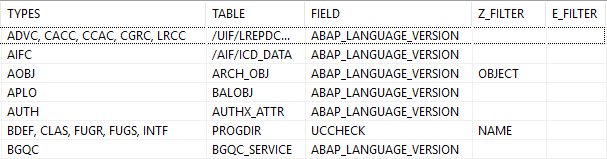
As a result, we obtain a table over which we can later loop, in order to read the actual target table only once and already have the corresponding target field with the language version for the restriction. We then also have the option of specifying further restriction criteria via the configuration to limit the data. More on this in the next section.
Restriction
Now we need to determine the number of ABAP Cloud objects in the actual table. For this, we use a dynamic statement in which we specify the table and calculate a count of the total. However, we need to include a restriction, otherwise we would also count objects delivered by SAP, such as demo objects. Therefore, we have a preconfiguration in which we define the key field for each table, which, for example, contains the object name. This allows us to restrict this field to Z* and Y* to exclude customer-specific objects.
LOOP AT configurations INTO DATA(configuration).
  DATA(condition) = |{ configuration-field } = '{ language_version }'|.
  IF configuration-z_filter IS NOT INITIAL.
    condition &&= | AND ( { configuration-z_filter } LIKE 'Z%' OR { configuration-z_filter } LIKE 'Y%' )|.
  ENDIF.

  SELECT
    FROM (configuration-table)
    FIELDS COUNT( * )
    WHERE (condition)
    INTO @DATA(number_of_entries).

  INSERT VALUE #( types  = configuration-types
                  number = number_of_entries ) INTO TABLE counters.
ENDLOOP.
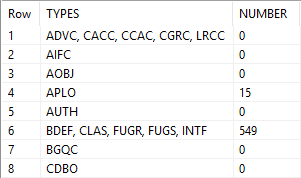
For some tables, there are additional filters for, for example, created users or other types. You can find these in the final example in the preconfiguration for the corresponding tables. As a result, we get a table with the count and object types. We save this as an intermediate table so that we can later trace where the actual values come from. This is more of a verification function than directly determining the count.
S/4HANA 2025
If we are already on a current release, we will also find two additional configuration columns with created core data services in our table. These services are already tailored to the various scenarios, so we also have a separate scenario for classes or interfaces, for example.
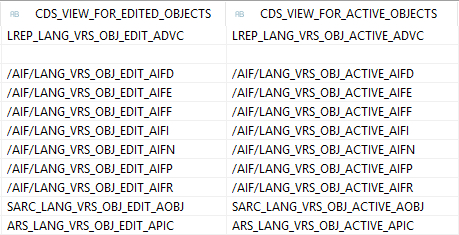
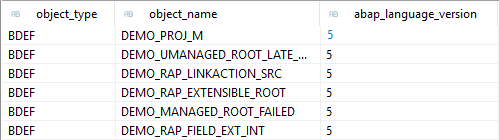
Let's look at an example view. This is for determining the behavior definitions in the system. Basically, the view also accesses the REPOSRC table, but it already has the standard restrictions built in, for example, to read active objects and those of type Behavior. Every view has the typical standard fields: object type, which is usually fixed, the object name to distinguish the actual object, and the ABAP language version, to then be able to differentiate, for example, key user objects or ABAP cloud objects.
define view entity SEDT_LANG_VRS_OBJ_ACTIVE_BDEF
  as select distinct from reposrc
{
  key 'BDEF'                       as object_type,
  key cast((rtrim(left(progname, 30), '=')) as sobj_name) as object_name,
      uccheck                      as abap_language_version
}
where
      subc    = 'B'
  and r3state = 'A'
As a result, we obtain simple views that always have the same structure. This would allow us to delimit objects in a standardized and simpler way in the future, at least if we consider delimitation by name. However, we will still have problems with generated names, for example, if only a GUID is available and we then have to access data such as the creating user. This makes it fundamentally easier, but there are still unresolved challenges.
GitHub
Here you can find the open-source project and further information on GitHub. Further information on installing and using the project can be found in the project and the linked resources. The extraction module is located in its own directory in the current version 1.1.0.
Conclusion
Determining all ABAP Cloud objects can be quite a challenge, as it involves exact numbers and results. We were initially thrown into an unclear task and had to draw our own conclusions about how to extract objects from the tables, how to delimit them, whether they belong to the customer, and ultimately develop a suitable solution that simply returns a number to us. Getting an overview of all objects is not so easy, but thanks to SAP there is a central configuration option.


