CCM - Standard APIs
If we connect to the Central ATC (ABAP Test Cockpit), which APIs do we actually need to retrieve information for the Clean Core Measurement? Here we'll look at the different use cases and APIs.

Table of contents
In this article, we'll look at various standard APIs that we need to implement the Clean Core Measurement (CCM) project.
Introduction
In the last article in this series, we looked at how to access the Level A objects of an on-premise system and count them for our purposes. Now we have the first key performance indicator (KPI) in the system and still need the other KPIs for Levels B through D. We would then derive and calculate these from the findings of the ABAP Test Cockpit. For this, we need some APIs to read the findings, but later also to, for example, make configurations or reuse certain fields in our system.
Configuration
The configuration for the cockpit primarily relates to the object provider used in the ABAP Test Cockpit. Therefore, in this chapter, we will look at reusing the object provider and how to access the configuration information.
Object Provider
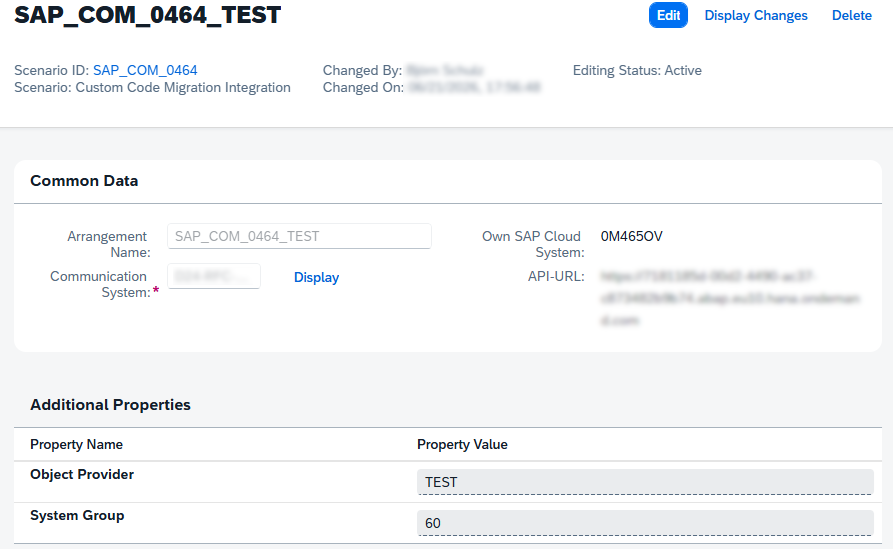
As defined in the on-premise version of the ABAP Test Cockpit, the object provider is used to classify a system and assign it a unique ID, which can be used to retrieve information about objects. This is defined in the Central ATC on the ABAP environment, primarily in the associated Communication Arrangement. The assignment of the ID is therefore very dynamic and can be determined by the customer. In many cases, the system ID is used here to enable system identification.
Basic Configuration
Here, we want to provide a basic configuration in our Business Configuration. This should read all configured object providers from the system at the push of a button and transfer them directly into Customizing, thus eliminating the manual effort of creating and searching for items. To do this, we first define a target structure from which we read the provider ID and the group ID. Additionally, we need a constant that contains the scenario we want to read. In this case, we need the custom code scenario that should be configured in the system to access an on-premises system from the cloud system.
TYPES: BEGIN OF provider,
         provider_id TYPE sca_ds_object_provider_id,
         group_id    TYPE zbc_ccm_group_id,
       END OF provider.
TYPES providers TYPE SORTED TABLE OF provider WITH UNIQUE KEY provider_id.

CONSTANTS custom_code_scenario TYPE string VALUE 'SAP_COM_0464'.
In the next step, we use the shared API for Communication Arrangements to execute a query and read the various objects. To do this, we populate our structure, which we check against the custom code scenario, and pass this to the query method to retrieve all configured systems.
DATA(query) = VALUE if_com_arrangement_factory=>ty_query(
    cscn_id_range = VALUE #( ( sign = 'I' option = 'EQ' low = custom_code_scenario ) ) ).

DATA(arrangement) = cl_com_arrangement_factory=>create_instance( ).
arrangement->query_ca( EXPORTING is_query           = query
                       IMPORTING et_com_arrangement = DATA(systems) ).
Next, we process all systems and read the configured properties for each system. These are the additional criteria where we have defined the object provider and the system group. We can then read the information from the returned table and populate our results table with it. This gives us a list of all defined object providers and their corresponding groups from the system.
LOOP AT systems INTO DATA(system).
  DATA(properties) = system->get_properties( ).

  TRY.
      INSERT VALUE #( provider_id = properties[ name = 'OBJECT_PROVIDER' ]-values[ 1 ]
                      group_id    = properties[ name = 'SYSTEM_GROUP' ]-values[ 1 ] )
             INTO TABLE result.

    CATCH cx_sy_itab_line_not_found.
      CONTINUE.
  ENDTRY.
ENDLOOP.
Value Help
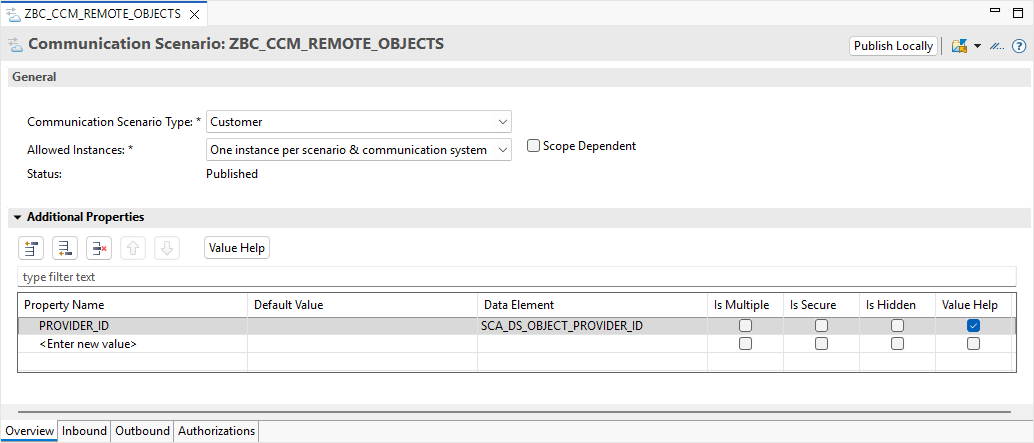
Additionally, we want to create a Communication Scenario in which we read all Level-A objects from the on-premises system. We defined this based on the function module that we also deliver to access the key figures. Since we now also need a configuration for each defined backend system, we also create a parameter that reflects the object provider. To stay as close to the standard as possible, we use the same element (SCA_DS_OBJECT_PROVIDER_ID) as in the standard, which is also used in the standard scenario, and can also activate the Value Help here. This gives us a very simple and flexible way to access defined object providers in the configuration, without having to enter them manually.
ABAP Test Cockpit
Now we need further APIs from the ABAP Test Cockpit environment to read the findings after a run, access the exemptions, and perhaps also schedule a job.
Findings
To access the latest runs from the Custom Code Migration App, the provided view SYCM_APS_PROJECT is available. We can then use this and the associations used to access the last runs. We need the headers present here to check whether the run is current and whether the correct system and variant have been entered. In other words, we want to perform a validation on the data before loading the results into the cockpit.

Once we have determined the project ID, we can read the results from the view below. We receive information about the various findings, error classifications, and messages that we will need later to calculate key figures for each object.

Exemptions
One option that has not yet been implemented is the topic of exemptions. This involves excluding objects from the calculation for which an exemption has already been requested. A distinction should be made between permanent exemptions and temporary exemptions, which may have expired or are only valid for a certain period. However, to do this, we first need to access all the exemptions created for the various objects. These are located in the view SATC_EXEMPTIONS_DDLV_EC1. This view is also available as an API. There is another version that could be used, for example, to check local exemptions. However, we need the central exemptions, as they are used in a central scenario.
Job Scheduling
In the last step, we wanted to automate job scheduling, because we have all the information such as the object provider, the ATC variant, and the objects we want to exclude. However, the appropriate API for creating such central runs is currently missing. Therefore, it is only possible to create the runs manually in the system beforehand and then store them in the configuration. It is also currently not possible to schedule a job to start the project automatically; you have to schedule this manually in the system as well. The problem here is that the job template SYCM_START_PROJECT_RUN has not yet been released and therefore cannot be scheduled via the standard API CL_APJ_RT_API.
GitHub
Here you can find the open-source project and further information on GitHub. Further information on installing and using the project can be found in the project and the linked resources. The examples shown in the article can also be found in the project's source code.
Conclusion
The most important APIs are available for our project to extract the data and partially automate it. There is still room for improvement when it comes to the complete automation and configuration of the applications. Further information about APIs in the ATC context can be found in the blog linked below, which also served as our basis for obtaining all the necessary information.
Further information:
SAP Community - How to extend ABAP Test Cockpit on SAP BTP for custom use cases

