The World of Embedded Analytics: A Practical Overview
This blog shows why embedded analytics in SAP S/4HANA is the modern replacement for legacy reporting tools like SE16N and SQ01. Embedded analytics uses CDS Views on SAP HANA to deliver real-time, secure, and reusable reporting via Fiori apps, Excel, SAP Analytics Cloud, and APIs.

Table of contents
As a programmer, you understand the value of efficient practices like Keep It Simple, Stupid (KISS) and Don't Repeat Yourself (DRY). Imagine applying similar principles to analytics: instead of building custom reporting features from scratch for your functional colleagues, you could share this article to guide them toward better tools.
In analytics, functional users often rely on familiar options such as SE16(N), SQ01, or custom reports to access data from SAP tables. These tools are still available in S/4HANA, but they carry risks related to security and compliance. For specifics, consult your security team or internal auditors. The move to S/4HANA often involves tightening authorizations and roles, which can expose the limitations of older reporting methods.
As reporting needs grow, embedded analytics provides a modern alternative.
This shift is comparable to the adoption of chatbots in operations. If SE16 is like a basic search engine, embedded analytics functions like an advanced language model. Note that SE16 dates back to 1995, and SE16N to 2000 - proven but aging technology.
 The SE16 champions are discussing best practices for visualising SAP data.
What Is Embedded Analytics?
If your system runs on S/4HANA, you can leverage the SAP HANA database for fast operational reporting via Core Data Services (CDS) Views. This allows access to ERP data through Excel, Fiori interfaces, or APIs. For historical or external data, integrate with a business warehouse. For a detailed introduction, refer to SAP's resources: SAP S/4HANA embedded analytics - Overview
This article focuses on practical steps you can apply immediately.
Getting Started
First, ensure authorizations are set up. We assume embedded analytics is enabled in your system with appropriate roles. If not, work with your SAP Basis administrator, authorization experts, and analytics specialists. Perhaps you've heard senior colleagues say: “Back in my days, I managed such setups all by myself!” Well, while technology has become more complex, it also makes things much more efficient once you know how to use it. Take the initiative: accompany your end-users through the first explorations.
View Browser App
Find suitable CDS Views quickly in the View Browser. Filter by "Consumption" view type for reporting-optimized options.

Use the "Settings" to apply additional filters.


For example, searching for "sales" yields views like I_SalesOrder or C_SalesDocumentItem. Review field details and descriptions to verify fit. This method helps with quick orientation.

Query Browser
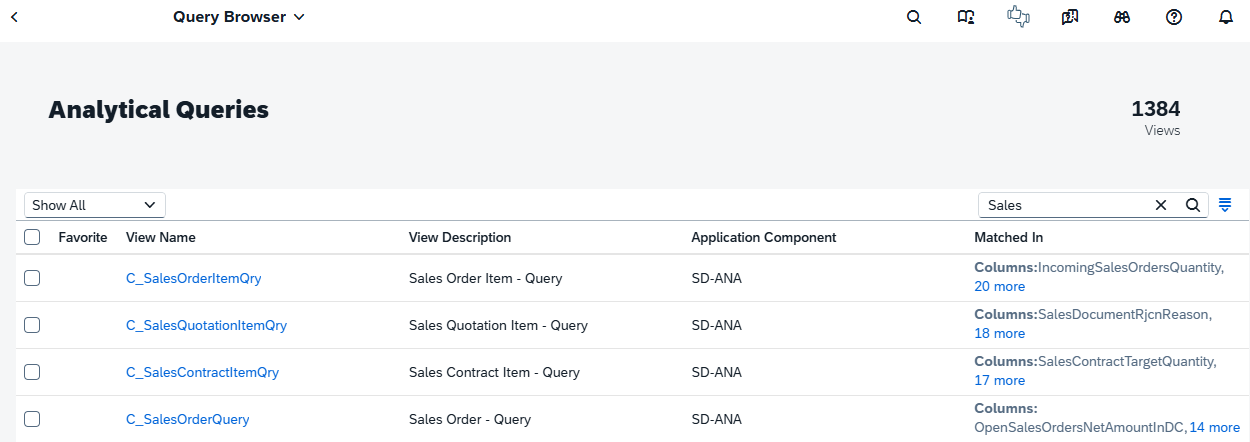
Run queries and review results. If you know the view name, search directly. Prepare examples in advance, such as tracking open invoices or stock levels. Select the CDS View, enter parameters (e.g., date ranges or company codes), and execute. View data in tables, add aggregations if needed, and export for analysis.
SAP Analytic Cloud / Analyse for Office / SAC Excel Add-in
Use data in other tools. Connect to SAC for dynamic dashboards or Analysis for Office for in-depth Excel work. For complex reports, add sources via a business warehouse like SAP Datasphere. One highlight of the SAC and CDS View integrations is: Similarly to Fiori, you can jump into SAC to access associated data models (Association navigations). As explained in this SAP Help text.
Example: In SAC, create a story with charts from live ERP data. Follow naming standards for CDS Views.

Honorable Mentions
The search in SAP’s CDS library on the SAP Business Accelerator Hub could be refined, with improvements expected. Select “S/4HANA”, then “On-Stack Extensibility”, and “CDS Views”. The list is not exhaustive; use Fiori apps in your system for full access.
Direct link: CDS Views | SAP S/4HANA | SAP Business Accelerator Hub
What advantages does embedded analytics offer over SE16N?
This reporting toolbox extends beyond traditional ERP systems and business warehouse extractions. Embedded analytics facilitates reporting in external environments while allowing the reuse of SAP-delivered data models, especially focusing the analytical CDS views. This promotes efficiency by eliminating redundant data modelling efforts and ensuring consistency across platforms.
Key benefits include:
- Integration with third-party tools - Data can be accessed and analyzed in non-SAP applications without complex ETL processes.
- Enhanced scalability - It supports hybrid architectures, combining on-premises SAP systems with cloud-based solutions for broader data utilization.
- Cost and time savings - Reusing pre-built models reduces development overhead and accelerates deployment.
For example, data extraction via OData REST APIs enables connectivity to Microsoft Power Platform (e.g., Power BI for visualizations or Power Automate for workflows) or Databricks lakehouses for advanced analytics, machine learning, and big data processing. Additional integrations could involve tools like Tableau for interactive dashboards, AWS services for cloud storage and AI, or even custom applications built on Azure or Google Cloud, unlocking scenarios such as predictive maintenance, customer sentiment analysis, or supply chain optimization.
SAP S/4HANA allows you to extend standard CDS Views with customer-specific fields and logic using key user extensibility apps - without modifying the SAP core. See also this blog ABAP Cloud - Key User Apps for more information.
Why Can’t Users Just Use CDS Views in SE16N?
If your organization permits end-users to access IT transactions, they could use SE16N for data extraction via CDS Views. However, this approach is limited and overlooks broader potential. Future ERP access will prioritize browser-based front-ends, and a standard SE16N does not align with this direction.
Working with CDS Views opens up various use cases, such as:
- Creating SM30-like maintenance dialogs as Fiori apps (see Business Configuration resources)
- Deploying a full Fiori app in under a day, replacing outdated ALV-grid transactions
Conclusion
For all SAP users the message is clear: reporting in S/4HANA should no longer rely on legacy tools like SE16N or custom extracts. Embedded analytics, built on CDS Views, is SAP’s strategic answer to modern operational reporting. By reusing SAP-delivered data models, you gain real-time insights, consistent semantics, and built-in security—all within a modern, browser-based user experience. Using isolated solutions may work temporarily, but organizations that want to future-proof their SAP landscape must think end-to-end. See also "Why SAP is Pushing S/4HANA Transformations: The Key Reasons Explained". Adopting embedded analytics is not just a technical improvement; it is a governance, efficiency, and strategy decision. It empowers business users, reduces IT overhead, and aligns reporting with SAP’s long-term vision for an integrated, intelligent enterprise.