
API Pull Factors
Modernize SAP with APIs and automation. Reduce custom code, streamline workflows, and prepare for AI-driven integration, across ECC and S/4HANA.

Table of contents
- Why SAP Teams Should Prioritize APIs and Automation
- Why APIs and Automation Belong on Every SAP Roadmap
- From Interfaces to Infrastructure
- Reducing Custom Code with Structured Access
- Supporting Connected Processes
- Reducing Manual Work
- Applicability in ECC
- Tools That Enable SAP Automation
- Controlling Access and Maintaining Compliance
- "Your SaaS Will Have an API, Whether You Build It or Not"
- Building Capability and Confidence
- Preparing for What Comes Next
Why SAP Teams Should Prioritize APIs and Automation
SAP systems benefit from shifting away from user interaction and toward API-led automation. Traditional development using Z-transactions, SAP workflows and batch inputs jobs increases complexity. APIs offer reusable access to core business logic, enabling automated updates to orders, master data, and financial records; without touching the SAP UI.
Tools like SAP Build, Celonis, and n8n make integration faster, more maintainable, and audit-safe. As AI agents and external platforms grow, APIs are essential to avoid becoming bottlenecks. Even in ECC, callable BAPIs support low-impact automation and prepare systems for cloud upgrades.
Adopting APIs now aligns with SAP’s clean core strategy and gives teams a competitive edge by reducing manual effort and accelerating change safely.
Why APIs and Automation Belong on Every SAP Roadmap
While SAP is busy promoting Business AI across S/4HANA and their cloud portfolio, many on-premise customers are still struggling to automate basic processes. Talk of predictive insights and generative copilots miss the real issues, even a blocked invoice or material master update requires manual intervention, or a custom Z-report.
The reality is: AI doesn’t run without automation. And automation doesn’t run without APIs.
APIs are the missing link. They expose the business logic needed to update orders, trigger workflows, and retrieve clean data, whether from S/4HANA or ECC. With callable BAPIs, REST services, and integration layers, teams can build resilient, scalable automations that reduce reliance on manual efforts (even worse: GUI scripting) or batch jobs.
RPA was the first step. Agent-based systems are next. But without a structured API foundation, these tools can’t operate effectively - or at all. If SAP wants customers to benefit from AI, it must start by helping them access and automate their core processes through APIs. This level of control and efficiency is already available. Teams working with S/4HANA have access to a broad set of standard APIs. ECC users can achieve similar results using callable BAPIs. You may also use custom APIs for custom SAP processes.
From Interfaces to Infrastructure
Interfaces such as BAPIs, IDocs, and RFCs have long been part of SAP’s landscape. What has changed is how these interfaces are positioned and used. In S/4HANA and SAP Business Technology Platform (BTP), APIs are treated as first-class components: they are standardized, versioned, and documented for public use [1].
These APIs expose essential business logic and data structures in a way that enables integration with external systems, automation tools, and cloud applications - without modifying the core ERP. While ECC lacks some of the modern API governance features of S/4HANA, it still offers a robust set of callable interfaces that can be used to automate processes and build extensions safely. Even SAP's flagship cloud ERP solution, formerly known as Public Cloud, relies heavily on 'old-school' BAPIs.
Reducing Custom Code with Structured Access
In traditional SAP ECC environments, adapting to new business requirements often meant developing custom transactions (so-called Z-programs) or tailored ABAP workflows. While effective in the short term, these solutions introduce long testing cycles, transport dependencies, and long-term maintenance overhead. Even worse: Each SAP modification tightens the coupling to the SAP GUI and increases the complexity of future upgrades.
An API-based approach shifts this dynamic. Rather than creating new functionality from scratch, teams can invoke SAP’s existing business logic, such as updating a sales order, posting a goods movement, or retrieving master data, through callable functions like BAPIs or modern RESTful APIs. These can be triggered externally by automation platforms, low-code apps, or integration tools without modifying the SAP user interface or core ABAP programs. [2][3]
This decoupling improves change management and system stability. Updates to business processes can often be implemented without altering the SAP backend, making the solution easier to govern and more resilient to upgrades. It also aligns with SAP’s clean core strategy, which encourages using standard APIs and extension points over direct system modifications.
Supporting Connected Processes
Business processes rarely run within a single system. APIs provide the mechanisms to connect SAP with platforms such as Salesforce, SuccessFactors, banking systems, or custom applications. This enables scenarios like:
- Creating orders based on web-based submissions.
- Updating CRM records based on SAP order status.
- Automating financial postings triggered by external systems.
Instead of managing integration through Idocs or file transfers, APIs allow real-time updates that are easier to monitor, test, and control. Low-code platforms such as SAP Build, Power Automate, and n8n make it possible to implement these integrations without writing extensive custom code. [4][5]
Reducing Manual Work
Many recurring SAP tasks are still handled manually or with semi-automated Excel tools. APIs enable these processes to be fully automated. For example:
- Reconciliation routines can retrieve data via APIs and update records directly.
- Mass data corrections can be driven by rules and executed through standard BAPIs.
- Changes to business partner data can be managed in workflows triggered by data quality tools such as Celonis - automation platform make.com. [6]
Because these operations use standard SAP interfaces, they adhere to the same validation logic and authorizations as the SAP GUI. The result is consistent, rule-compliant outcomes with less manual effort.
Applicability in ECC
Many ECC users assume these improvements only apply to S/4HANA. That is not the case. ECC exposes a wide range of BAPIs and function modules. These can be called remotely using existing SAP technologies or through integration tools.
This opens up options for:
- Replacing Z-reports that exist solely to modify records.
- Avoiding LSMW or batch input scripts.
- Preparing for a smoother transition to S/4HANA by externalizing logic.
Automation built around APIs also allows easier refactoring. As business processes evolve, workflows can be adjusted without redeploying core SAP logic.
Tools That Enable SAP Automation
SAP Build Process Automation
SAP Build Process Automation allows workflows to be created within SAP’s ecosystem. It can call APIs, perform screen automation when needed, and manage approvals or routing logic. This is especially useful in finance, procurement, and HR. [2]
Celonis - make.com
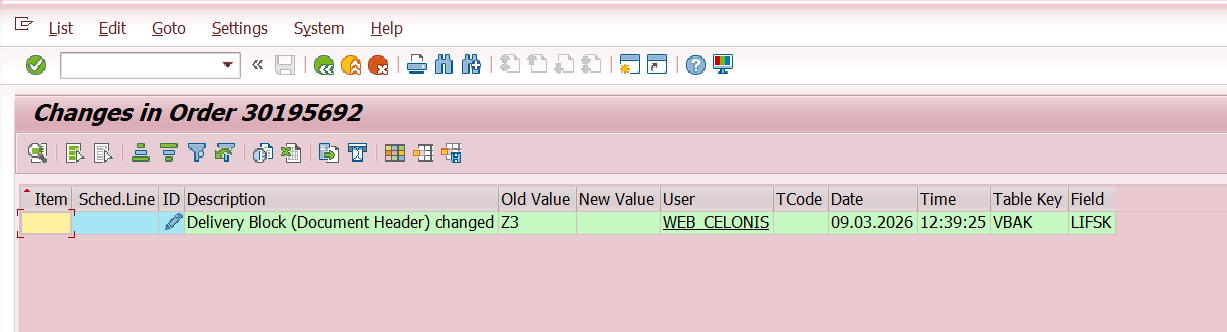
Celonis - make.com, connects process mining to execution. It not only identifies issues, such as delivery blocks or inconsistent payment terms, but can also trigger corrections using SAP BAPIs or the Sales Order API [6]. Here is an example for a make.com automation.
A workflow to access content in SAP, and modify Sales Orders in SAP:

A modified Sales Order in the system - The delivery block was automatically removed here based on specific criteria:
n8n, Power Platform
n8n, Power Platform, and similar tools allow automation across SAP and external systems. Examples include reading an Excel file, updating SAP records, or synchronizing data with cloud services. These platforms include error handling and data mapping features that simplify workflow creation. [7][8]
Controlling Access and Maintaining Compliance
Security remains a key consideration. SAP APIs enforce user-level authorizations. Each API call must authenticate and is subject to the same checks as interactive users.
In addition to SAP’s tools, monitoring and logging can be handled through SAP API Management, reverse proxies, or application logs. Governance policies can define who is allowed to call which APIs, how often, and under what conditions [1]. Well-designed API usage provides visibility, traceability, and control.
"Your SaaS Will Have an API, Whether You Build It or Not"
With the growing adoption of agent-based systems and autonomous workflows, the demand for robust, accessible APIs is no longer optional. In the near future, many users will interact with systems through AI agents like Claude instead of navigating complex UIs. These agents will use whatever interface is available, if a proper API is missing, they will resort to UI automation. In the past, IT-affine end-users used SAP GUI scripting (SAP GuiXT) for such use cases.
For SAP customers, this reinforces the need to expose and consume APIs for key business processes. As this shift unfolds, systems without usable APIs will increasingly be seen as legacy bottlenecks. [9]
Building Capability and Confidence
Introducing API-based workflows doesn’t require large projects. Many teams start with a simple, well-defined use case:
- A blocked sales order process.
- A recurring vendor master update.
- A daily financial report that requires structured data.
By starting small, teams can build internal expertise. The results are reduced manual effort, fewer errors, and better auditability - easy to demonstrate. Once initial success is established, the scope of automation can expand.
Preparing for What Comes Next
As SAP continues to invest in its cloud and integration offerings, APIs will become the default method for process interaction. This affects not just IT architecture but also how business teams interact with systems. Artificial intelligence tools, workflow engines, and analytics platforms will increasingly rely on APIs to extract and act on data. Establishing that capability now prepares SAP teams to respond more quickly in the future. Whether your landscape includes ECC or S/4HANA, APIs offer a structured, supportable way to improve efficiency, reduce manual intervention, and decouple logic from the core system.
Sources:
[1] SAP - What is API integration?
[2] SAP Tutorials - Connect BAPI using Action Group with SAP Build Process Automation
[3] SAP - What is an API? (Application Programming Interface)
[4] Celonis - Change Data in SAP; Create new Sales Order from CSV files
[5] SAP Help - APIs on SAP Business Accelerator Hub
[6] Celonis - Customizations for Analysts - Automations
[7] Microsoft Learn - Connect Microsoft Power Platform and SAP - Power Platform
[8] YouTube - Using Power Automate with Excel to update SAP data
[9] Oliver Eidel - Your SaaS Will Have an API, Whether You Build It Or Not