ABAP - Date and Time
In this article, let's take a closer look at the data types for dates and times in ABAP. Have any changes been made between the various releases, and what should you still use today?

Table of contents
In this article, we'll look at various basic data types and validate various scenarios before examining the results and making a recommendation.
Introduction
In the early days of ABAP and database integration, many things and mechanisms emerged that we still use every day in development. Accordingly, some technical debt has arisen that is obvious to experienced ABAP developers, but may be head-scratching for younger developers. Therefore, in this article, we want to take a look at the basic data types for dates and times.
Preparation
To prepare the test case, we define a table in the system that will provide us with the various types. Using the built-in data types in ABAP, we can define the specific data types in the table. We can then use the table later for typing and validation.
@EndUserText.label : 'Date Time Examples'
@AbapCatalog.enhancement.category : #NOT_EXTENSIBLE
@AbapCatalog.tableCategory : #TRANSPARENT
@AbapCatalog.deliveryClass : #A
@AbapCatalog.dataMaintenance : #RESTRICTED
define table zbs_dmo_datim {
  key client     : abap.clnt not null;
  key identifier : abap.char(20) not null;
  classic_date   : abap.dats;
  hana_date      : abap.datn;
  classic_time   : abap.tims;
  hana_time      : abap.timn;
}
Types
So which types are we actually talking about in this example? We want to take a look at the classic types for dates (DATS) and times (TIMS) and compare them with the new types DATN and TIMN. In this chapter, we will first look at the basic structure of the types.
Classic
The classic data types are stored as characters in the database and are expected by the system in the correct format. When data is inserted, no validation of the data is performed, which in the worst case can lead to errors in subsequent processing.
HANA
The types were introduced with the HANA database and now represent a native type for date and time in the database. However, this also means that the data is always validated before it can be written to the database. This gives you a little more security when working with the types.
Compiler
In this chapter, let's take a look at working with the compiler. Where do we actually receive indications from the system that something is wrong? To do this, we define three different types of examples:
- Empty - In this example, we pass empty character literals to the variables.
- Correct - We pass correct data to the various fields and would not expect any further errors here.
- Incorrect - In this example, the data is incorrect and does not really match the format.
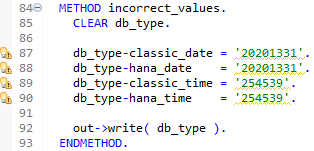
For example, we pass incorrect values to the fields. Here, the 13th month does not exist, and the day unfortunately only has 24 hours.
db_type-classic_date = '20201331'.
db_type-hana_date    = '20201331'.
db_type-classic_time = '254539'.
db_type-hana_time    = '254539'.
This means that for all transfers, we receive a warning from the system that the values are incorrect. For empty data types, the smallest value is suggested, and for incorrect data, the next correct value is suggested. This means that all data types essentially function the same, and for hard-coded values, we receive a warning from the compiler.
Functions
What about SQL functions? SAP has delivered various functions in this area to validate and convert the contents of such fields. These functions are primarily delivered for ABAP SQL, but are therefore also functional in a SELECT. Let's create a local table with different use cases.
DATA locals TYPE STANDARD TABLE OF zbs_dmo_datim.

locals = VALUE #( ( identifier   = 'EMPTY' )
                  ( identifier   = 'INITIAL'
                    classic_date = '00000000'
                    hana_date    = '00000000'
                    classic_time = '000000'
                    hana_time    = '000000' )
                  ( identifier   = 'OK'
                    classic_date = '20201231'
                    hana_date    = '20201231'
                    classic_time = '154539'
                    hana_time    = '154539' )
                  ( identifier = 'HANA_NOK'
                    hana_date  = '20201331'
                    hana_time  = '254539' )
                  ( identifier   = 'CLASSIC_NOK'
                    classic_date = '20201331'
                    classic_time = '254539' )
                  ( identifier   = 'WRONG'
                    classic_date = 'ABC'
                    hana_date    = 'DEF'
                    classic_time = 'GHI'
                    hana_time    = 'JKL' ) ).
Now we can perform a SELECT on the internal table, using the DATS_IS_VALID and TIMS_IS_VALID functions to validate the various columns.
SELECT FROM @locals AS validation
  FIELDS identifier,
         dats_is_valid( classic_date ) AS dats_valid,
         dats_is_valid( hana_date )    AS datn_valid,
         tims_is_valid( classic_time ) AS tims_valid,
         tims_is_valid( hana_time )    AS timn_valid
  INTO TABLE @DATA(validated_content).
We create a new table with the key (IDENTIFIER) and a new field for each validated column. So, what does the new table look like in the debugger?

We can derive a few facts from these observations:
- The two functions do not work for the new data types; they always return OK and are therefore unusable.
- There is no validation function at this level for the new data types, but we can perform a conversion using DATS_FROM_DATN. One disadvantage, however, is that the function requires a correct type. If we pass incorrect data, we have to catch the exception CX_SY_OPEN_SQL_DB, which unfortunately doesn't produce a result for our table.
- We can easily validate the classic data types using the SELECT and the ABAP SQL function.
- An initial date is also incorrect; according to the documentation, at least the value "00010101" must be set here for a valid date to be recognized. Here, you must also use an IS INITIAL check to cover this case.
Database
In the next step, we'll take a look at the database and what actually happens if, despite careful checking, we try to save incorrect data. In our scenario, we try several things using different methods:
- Initial - Inserting empty values into the database.
- Incorrect - The data is correctly structured, but outside the valid and permitted values. For example, December 32, 2020 is an incorrect date.
- Trash - In the third case, we pass completely incorrect data, such as letters for a time.
Classic
Since the classic data type is only a character and no validation is performed on the database, inserting will work in every scenario. Let's assume nonexistent values in the first example.
db_type-identifier   = 'INCO_CLASSIC'.
db_type-classic_date = '20201331'.
db_type-classic_time = '254539'.

INSERT zbs_dmo_datim FROM @db_type.

out->write( sy-subrc ).
out->write( sy-dbcnt ).
In the second example, we try to transfer garbage data into the database.
db_type-identifier   = 'WROG_CLASSIC'.
db_type-classic_date = 'ABC'.
db_type-classic_time = 'DEF'.
HANA
If we try the same examples in the native type space, we expect an abort or error message. In this case, the exception CX_SY_OPEN_SQL_DB is generated, and if we don't catch it, our processing aborts with a dump.
db_type-identifier = 'INCO_HANA'.
db_type-hana_date  = '20201331'.
db_type-hana_time  = '254539'.

TRY.
    INSERT zbs_dmo_datim FROM @db_type.

    out->write( sy-subrc ).
    out->write( sy-dbcnt ).

  CATCH cx_root INTO DATA(error).
    out->write( error->get_text( ) ).
ENDTRY.
Result
Let's take a look at the result in the database. The initial value generally works for all data types. However, the incorrect values for the classic data type are all transferred to the database and can now lead to further problems. You won't find any incorrect values for the new types in the database.

Complete Example
Here you can find the complete example of the class implementation, which you can use to recreate it in your system. You can find the required table above in the "Preparation" step.
CLASS zcl_bs_demo_date_time DEFINITION
  PUBLIC FINAL
  CREATE PUBLIC.

  PUBLIC SECTION.
    INTERFACES if_oo_adt_classrun.

  PRIVATE SECTION.
    DATA db_type TYPE zbs_dmo_datim.

    METHODS empty_types
      IMPORTING !out TYPE REF TO if_oo_adt_classrun_out.

    METHODS correct_values
      IMPORTING !out TYPE REF TO if_oo_adt_classrun_out.

    METHODS incorrect_values
      IMPORTING !out TYPE REF TO if_oo_adt_classrun_out.

    METHODS insert_initial
      IMPORTING !out TYPE REF TO if_oo_adt_classrun_out.

    METHODS insert_incorrect_classic
      IMPORTING !out TYPE REF TO if_oo_adt_classrun_out.

    METHODS insert_incorrect_hana
      IMPORTING !out TYPE REF TO if_oo_adt_classrun_out.

    METHODS insert_wrong_classic
      IMPORTING !out TYPE REF TO if_oo_adt_classrun_out.

    METHODS insert_wrong_hana
      IMPORTING !out TYPE REF TO if_oo_adt_classrun_out.

    METHODS validate_types
      IMPORTING !out TYPE REF TO if_oo_adt_classrun_out.

ENDCLASS.


CLASS zcl_bs_demo_date_time IMPLEMENTATION.
  METHOD if_oo_adt_classrun~main.
    DELETE FROM zbs_dmo_datim.
    COMMIT WORK.

    empty_types( out ).
    correct_values( out ).
    incorrect_values( out ).
    insert_initial( out ).
    insert_incorrect_classic( out ).
    insert_incorrect_hana( out ).
    insert_wrong_classic( out ).
    insert_wrong_hana( out ).
    validate_types( out ).

    COMMIT WORK.
  ENDMETHOD.


  METHOD empty_types.
    CLEAR db_type.

    db_type-classic_date = ''.
    db_type-hana_date    = ''.
    db_type-classic_time = ''.
    db_type-hana_time    = ''.

    out->write( db_type ).
  ENDMETHOD.


  METHOD correct_values.
    CLEAR db_type.

    db_type-classic_date = '20201231'.
    db_type-hana_date    = '20201231'.
    db_type-classic_time = '154539'.
    db_type-hana_time    = '154539'.

    out->write( db_type ).
  ENDMETHOD.


  METHOD incorrect_values.
    CLEAR db_type.

    db_type-classic_date = '20201331'.
    db_type-hana_date    = '20201331'.
    db_type-classic_time = '254539'.
    db_type-hana_time    = '254539'.

    out->write( db_type ).
  ENDMETHOD.


  METHOD insert_initial.
    CLEAR db_type.

    db_type-identifier = 'INTIAL'.

    TRY.
        INSERT zbs_dmo_datim FROM @db_type.

        out->write( sy-subrc ).
        out->write( sy-dbcnt ).

      CATCH cx_root INTO DATA(error).
        out->write( error->get_text( ) ).
    ENDTRY.
  ENDMETHOD.


  METHOD insert_incorrect_classic.
    CLEAR db_type.

    db_type-identifier   = 'INCO_CLASSIC'.
    db_type-classic_date = '20201331'.
    db_type-classic_time = '254539'.

    TRY.
        INSERT zbs_dmo_datim FROM @db_type.

        out->write( sy-subrc ).
        out->write( sy-dbcnt ).

      CATCH cx_root INTO DATA(error).
        out->write( error->get_text( ) ).
    ENDTRY.
  ENDMETHOD.


  METHOD insert_incorrect_hana.
    CLEAR db_type.

    db_type-identifier = 'INCO_HANA'.
    db_type-hana_date  = '20201331'.
    db_type-hana_time  = '254539'.

    TRY.
        INSERT zbs_dmo_datim FROM @db_type.

        out->write( sy-subrc ).
        out->write( sy-dbcnt ).

      CATCH cx_root INTO DATA(error).
        out->write( error->get_text( ) ).
    ENDTRY.
  ENDMETHOD.


  METHOD insert_wrong_classic.
    CLEAR db_type.

    db_type-identifier   = 'WROG_CLASSIC'.
    db_type-classic_date = 'ABC'.
    db_type-classic_time = 'DEF'.

    TRY.
        INSERT zbs_dmo_datim FROM @db_type.

        out->write( sy-subrc ).
        out->write( sy-dbcnt ).

      CATCH cx_root INTO DATA(error).
        out->write( error->get_text( ) ).
    ENDTRY.
  ENDMETHOD.


  METHOD insert_wrong_hana.
    CLEAR db_type.

    db_type-identifier = 'WROG_HANA'.
    db_type-hana_date  = 'ABC'.
    db_type-hana_time  = 'DEF'.

    TRY.
        INSERT zbs_dmo_datim FROM @db_type.

        out->write( sy-subrc ).
        out->write( sy-dbcnt ).

      CATCH cx_root INTO DATA(error).
        out->write( error->get_text( ) ).
    ENDTRY.
  ENDMETHOD.


  METHOD validate_types.
    DATA locals TYPE STANDARD TABLE OF zbs_dmo_datim.

    locals = VALUE #( ( identifier   = 'EMPTY' )
                      ( identifier   = 'INITIAL'
                        classic_date = '00000000'
                        hana_date    = '00000000'
                        classic_time = '000000'
                        hana_time    = '000000' )
                      ( identifier   = 'OK'
                        classic_date = '20201231'
                        hana_date    = '20201231'
                        classic_time = '154539'
                        hana_time    = '154539' )
                      ( identifier = 'HANA_NOK'
                        hana_date  = '20201331'
                        hana_time  = '254539' )
                      ( identifier   = 'CLASSIC_NOK'
                        classic_date = '20201331'
                        classic_time = '254539' )
                      ( identifier   = 'WRONG'
                        classic_date = 'ABC'
                        hana_date    = 'DEF'
                        classic_time = 'GHI'
                        hana_time    = 'JKL' ) ).

    SELECT FROM @locals AS validation
      FIELDS identifier,
             dats_is_valid( classic_date ) AS dats_valid,
             dats_is_valid( hana_date )    AS datn_valid,
*             dats_is_valid( dats_from_datn( hana_date ) ) AS datn_valid_converted,
             tims_is_valid( classic_time ) AS tims_valid,
             tims_is_valid( hana_time )    AS timn_valid
*             tims_is_valid( tims_from_timn( hana_time ) ) AS timn_valid_converted
      INTO TABLE @DATA(validated_content).

    out->write( validated_content ).
  ENDMETHOD.
ENDCLASS.
Conclusion
In most cases, the types initially behave the same, and this doesn't prevent us from generating incorrect values and entries during processing. However, you'll get a warning when saving that something isn't quite right, or even an abort if you forgot to handle errors. You should definitely use the new data type, as it gives you more security in the system and with the data.